

Map JA3/JA4 to Endpoints: CAPTCHA vs Device Fingerprinting for Teams

Last updated on September 29, 2026 · 13 min read
Device fingerprinting and CAPTCHA solve different problems. Fingerprinting provides continuous, passive identification for scoring risk on every visit, while CAPTCHA is an interactive challenge best reserved for moments of elevated risk. The recommended pattern, supported by OWASP's bot management guidance and AWS's client identification controls, is to run fingerprinting as the baseline and invoke CAPTCHA only as a risk-based step-up. This same layered logic is applied in some scoring approaches.
TL;DR:
- Device fingerprinting provides continuous, passive visitor identification based on network, browser, and behavioral signals, which are harder to spoof than challenge-based CAPTCHAs.
- CAPTCHA challenges tend to disrupt user flow and are most effective at high-risk points like login and checkout, while fingerprinting supports ongoing risk scoring across all pages.
- Modern fingerprinting signals include network fingerprints, browser attributes, and behavioral telemetry, with network signals generally carrying more weight due to their difficulty to fake convincingly.
- Combining passive fingerprinting with risk-based CAPTCHA triggers and short data retention improves security while respecting user privacy and accessibility requirements.
- The best approach orders signals from hardest to fake to easiest, reserving disruptive controls like CAPTCHA for elevated risk situations rather than using them as default, universal barriers.
Table of Contents
- Comparing CAPTCHA and device fingerprinting
- How each detection method actually reads a visitor
- Where each control earns its keep, and where it breaks
- Privacy, retention, and accessibility obligations
- Building a layered detection architecture
- How ShieldLabs supplies the underlying signals
- The practical takeaway
- What the industry gets wrong about this trade-off
- Where ShieldLabs fits into this approach
- Sources
- FAQ
Comparing CAPTCHA and device fingerprinting
The two controls differ in nearly every operational dimension a fraud or security team cares about.
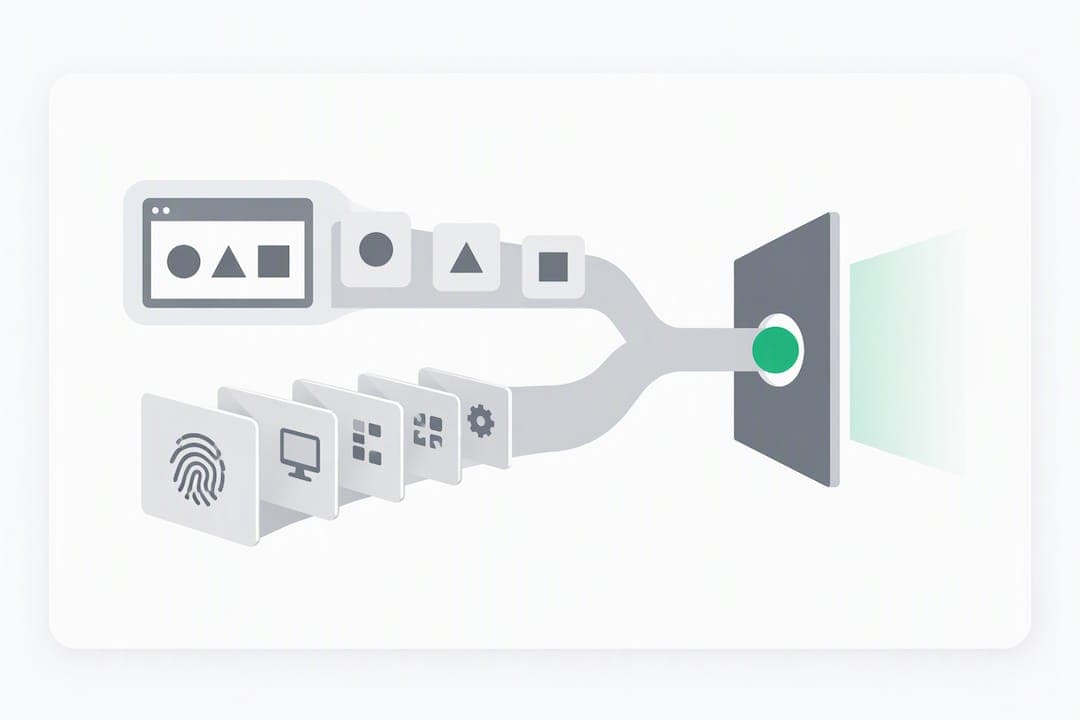
CAPTCHA works by presenting an explicit challenge and waiting for a response, whether that response is solving a puzzle, ticking a box, or passing an invisible behavioral check. Device fingerprinting works in the background, building a profile from network, browser, and execution-environment attributes without asking the visitor to do anything. That difference in detection model drives everything else: friction, accuracy, and how each gets defeated.
- Friction and accessibility: CAPTCHA interrupts the user flow and can be a genuine barrier for people using screen readers or on constrained connections, while fingerprinting adds no visible step at all.
- Spoofability: challenge-based CAPTCHAs face solver services that pass challenges on behalf of automated traffic, according to USENIX's empirical study of CAPTCHA usability, while fingerprinting signals can be spoofed individually but are harder to fake in combination across dozens of attributes at once.
- Attacker workarounds: proxy rotation defeats IP-only rules but not device-based rate limits, per AWS's guidance on client identification, whereas CAPTCHA solver farms specifically target the challenge step itself.
- Typical placement: CAPTCHA tends to sit at login, account creation, checkout, and search, the same targeted resources AWS names in its guidance, while fingerprinting runs continuously across every page and API call.
Teams that treat these as interchangeable end up either over-challenging legitimate users or under-protecting sensitive endpoints. The more durable approach separates "who is this, continuously" from "prove you're not an automated agent, right now."
How each detection method actually reads a visitor
CAPTCHA and fingerprinting pull from different signal sources, and understanding those sources matters for anyone deciding what to collect and where.
Visible CAPTCHA challenges ask a person to identify images, solve a puzzle, or complete a task assumed to be hard for automated systems. Invisible and non-interactive variants score behavioral signals in the background and only escalate to a visible challenge when the score is ambiguous. A further category, cryptographic attestation, includes mechanisms like Privacy Pass, Apple's Private Access Tokens, and WebAuthn, which let a device prove it is a real, un-instrumented client without a human ever solving anything. OWASP lists these attestation paths as legitimate complements to visible challenges.
Device fingerprinting layers signals from three different levels:
- Network and TLS signals, including JA3/JA4 fingerprints and HTTP/2 frame ordering, which are hard for a client to fake without controlling the network stack itself.
- Client hints and browser attributes, such as Sec-CH-* headers, WebGL renderer strings, canvas output, and installed fonts, which vary by browser and device but can be altered by a sufficiently motivated client.
- Behavioral telemetry, covering mouse movement, typing cadence, and navigation timing, which is the hardest layer to fake convincingly over an extended session.
A 2026 evaluation of bypass techniques against bot management systems found that non-interactive defenses depend heavily on execution environment authenticity, meaning automated agents running inside a real, unmodified browser profile bypass these defenses far more reliably than agents running in visibly instrumented environments. (arXiv, 2026) That single finding explains why network and TLS signals, which are harder to fake convincingly, tend to carry more weight in a risk score than client-reported attributes alone. Server-verifiable signals like JA3/JA4 belong earlier in the decision chain than self-reported browser attributes, which is also the order ShieldLabs' guide to device fingerprinting walks through in more technical detail.
Where each control earns its keep, and where it breaks
Both controls have clear use cases and equally clear failure modes, and the difference between a well-tuned system and a frustrating one usually comes down to knowing which is which.
CAPTCHA adds real value at account creation, login, checkout, and public-facing API endpoints where a single bad actor can cause outsized damage. Fingerprinting adds value everywhere else: recognizing a returning device across sessions, flagging proxy rotation, and feeding a risk score that decides whether a CAPTCHA is even necessary. AWS specifically recommends fingerprint-based rate limiting over IP-only rules for traffic that rotates across VPNs and proxies, since IP-only controls have little to offer once an attacker starts cycling addresses.
Failure modes differ too:
- Legitimate multi-device users can look risky to a fingerprinting system that has never seen their new phone or browser before.
- Privacy-respecting browsers that block canvas or WebGL access will produce thinner, less reliable fingerprints.
- Solver services undermine CAPTCHA's core assumption that only humans can pass the challenge, a pattern documented across the USENIX CAPTCHA usability study.
- Fingerprint churn, where the same device produces a slightly different signal after a browser update, can trigger false positives if a system treats every change as a new identity.
Pro Tip: Track CAPTCHA solve rates and fingerprint churn as ongoing metrics, not one-time tuning exercises. Both drift as browsers update and solver services adapt.
Privacy, retention, and accessibility obligations
Both controls collect data about real people, and that carries legal and ethical weight beyond the fraud math.
OWASP's guidance is direct on this point: prefer network and TLS-level signals over deeply invasive browser attributes where possible, since they carry less privacy exposure for a similar amount of signal. When fingerprints are collected, hash or truncate them, keep retention windows short, and avoid holding raw signal data longer than the fraud use case requires. Document the practice in the privacy notice and check whether local law requires an opt-out or disclosure mechanism, since requirements vary significantly by jurisdiction and are best confirmed against a current legal source for the market in question.
- Data minimization: hash or truncate device fingerprints rather than storing raw attribute strings.
- Retention limits: set short retention windows for anti-bot and anti-fraud signals rather than indefinite storage.
- Accessibility: offer an audio, invisible, or attestation-based alternative to any visible CAPTCHA that requires visual puzzle-solving.
- Proportionality: avoid fingerprinting low-risk, already-authenticated traffic where a session token already answers the identity question.
Building a layered detection architecture
A practical deployment follows the same order the signals themselves suggest: start with what's hardest to fake, and reserve the most disruptive control for when it's actually needed.
- Collect network and TLS signals first. JA3/JA4 fingerprints and HTTP/2 ordering require little client cooperation and are harder to spoof than anything reported by the browser itself.
- Layer in passive device fingerprinting. Client hints, WebGL, canvas, and font enumeration add resolution once the network layer has narrowed the field.
- Add behavioral telemetry for ongoing sessions. Typing cadence and navigation timing help distinguish a real user from an automated script over time, not just at a single point.
- Reserve step-up controls for elevated risk. CAPTCHA, attestation tokens, or multifactor authentication should trigger only when the accumulated score crosses a defined threshold, consistent with the risk-based approach OWASP's multifactor authentication guidance recommends.
Map endpoints to protection levels rather than applying one policy everywhere: a product listing page might only need passive monitoring, a login form might warrant a soft step-up like an invisible challenge, and a password reset or high-value checkout might justify a hard step-up every time risk is ambiguous. ShieldLabs' guide to adaptive authentication walks through this kind of threshold-setting in more depth.
Test the plan before trusting it. Run an A/B comparison of CAPTCHA on versus off at a single endpoint, measure conversion and abandonment alongside solve rates, and log signal drift over weeks rather than days so seasonal or browser-update effects don't get mistaken for attacker behavior.
Pro Tip: Pilot step-up thresholds on one endpoint before rolling them out account-wide. A threshold tuned for checkout is rarely right for login.
How ShieldLabs supplies the underlying signals
Some risk scoring systems build their score from over 100 signals collected on each visit, spanning network, client, and behavioral layers, and combine deterministic rules with AI to interpret them. Persistent identification seeks to recognize a returning visitor with up to 99% accuracy even after cleared cookies, incognito mode, IP rotation, or months between visits.
- Each risk score may arrive with underlying signals attached, so teams can see why a visit was flagged rather than relying on an opaque number.
- Detection can span VPNs, proxies, Tor, Apple Private Relay, datacenter IP ranges, anti-detect browser detection, and automation traffic, categories feeding into network and client layers.
- Integration can be implemented with a JavaScript snippet and server-side SDKs for popular programming languages.
- Some platforms offer published pricing rather than quote-based, facilitating straightforward trials against real risk-scoring workflows.
The signals a team's own code acts on, whether that means a soft step-up or a hard block, stay entirely in that team's control.
The practical takeaway
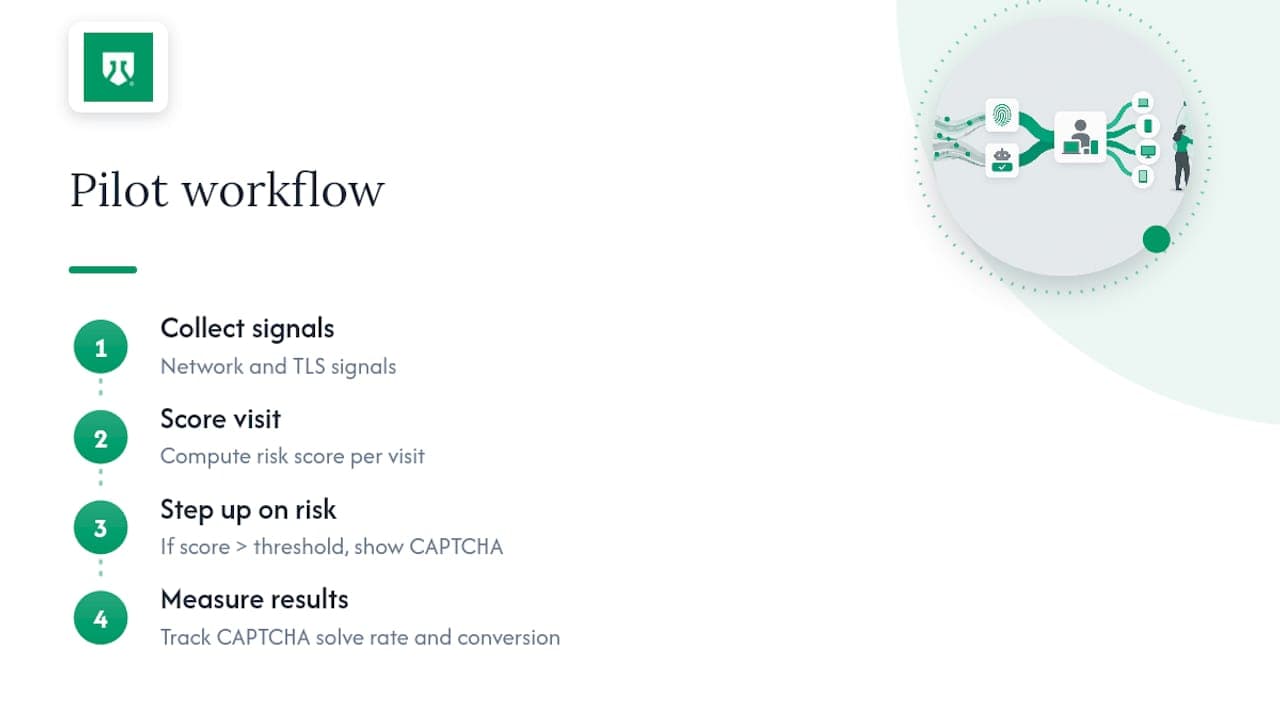
Fingerprinting should carry the everyday load: continuous, low-friction recognition across sessions. CAPTCHA earns its place only at a small number of sensitive checkpoints, triggered by risk score rather than applied by default. A useful pilot is a single login or checkout endpoint: collect network and TLS signals, score them, then step up to CAPTCHA only above a defined risk threshold, and measure both solve rate and conversion.
What the industry gets wrong about this trade-off
Most teams treat CAPTCHA and fingerprinting as a binary choice, picking one and hoping it covers every scenario. That instinct is backward. CAPTCHA's reputation as the default anti-bot tool has outlived its effectiveness against solver services, and fingerprinting's reputation as invasive or fragile has outlived the privacy-aware, hashed, short-retention version OWASP actually recommends.
The bigger mistake is treating any single client-side signal as authoritative. The 2026 arXiv evaluation on bypass techniques makes a point worth sitting with: execution environment authenticity, not any one clever attribute, is what separates a real visitor from an automated one running in a well-disguised browser. Teams that chase ever more exotic fingerprinting attributes while ignoring network-level signals are optimizing the wrong layer.
What should come first is not more signals but better ordering: network and TLS before browser attributes, passive scoring before interactive challenges, and a step-up path that only activates when the score genuinely warrants friction. That is a tuning discipline, not a shopping list of tools.
— Jeff
Where ShieldLabs fits into this approach
Building the layered architecture described above from scratch means standing up TLS fingerprint collection, a client-side signal pipeline, and a risk-scoring engine before a single step-up decision can be made. ShieldLabs packages that groundwork into a five-minute integration: a JavaScript snippet on the front end, server-side SDKs where needed, and a risk score attached to every visit with the signals behind it visible from day one.
The platform suits teams in fintech, e-commerce, SaaS, and iGaming that need the fingerprinting layer of this architecture without building it internally, whether the goal is catching account takeover attempts or spotting the anonymity signals that precede promo and referral abuse. The free tier covers up to 5,000 identifications with no card required, and paid plans start at $79 per month on the published pricing page, scaling to $319 and $799 per month as identification volume grows.
For a team ready to test the risk-scoring half of the architecture this article describes, ShieldLabs' identification product is the starting point, and setup takes about five minutes to the first signal.
Sources
- Client identification controls — AWS Prescriptive Guidance
- Bot Management and Anti-Automation — OWASP Cheat Sheet Series
- An empirical study & evaluation of modern CAPTCHAs — USENIX
- Systematic evaluation of bypass capabilities against bot management systems — arXiv
FAQ
Can you give me an example of device fingerprinting?
A common example is recognizing a returning visitor by combining their browser's TLS handshake fingerprint, screen resolution, installed fonts, and time zone into a single device profile. That profile persists even if the visitor clears cookies or switches networks, letting a system flag the same device across multiple signup attempts.
What does device fingerprinting mean?
Device fingerprinting means building an identifier for a visitor from technical attributes of their network connection, browser, and behavior rather than from a login credential or cookie. AWS describes it as one of several distinct client identification techniques alongside CAPTCHA and TLS fingerprinting.
How can I limit device fingerprinting exposure?
Privacy-respecting browsers and extensions that block canvas or WebGL access reduce the resolution of a fingerprint, though they rarely eliminate it, since network-level signals like TLS fingerprints are harder to mask. Anyone concerned about exposure should check their browser's privacy settings and consider a browser designed to resist fingerprinting.
What are the different types of CAPTCHAs?
CAPTCHA types range from visible image or text puzzles to invisible behavioral scoring that runs without user interaction, plus newer cryptographic attestation methods like Privacy Pass and WebAuthn that avoid puzzles entirely. Each trades off differently between user friction and resistance to solver services, as USENIX's usability research documents.
Is CAPTCHA still effective against automated traffic?
CAPTCHA remains useful at specific checkpoints like login and checkout, but its effectiveness against solver services and sophisticated automation has declined, which is why most current guidance frames it as one layer in a broader system rather than a standalone defense. Pairing it with continuous fingerprinting and risk-based triggers, as OWASP recommends, keeps it useful without over-relying on it.
Recommended
Related articles

Calculate Fraud Detection Pricing With ShieldLabs' 5,000 Free Tier
Estimate fraud detection costs with a buyer-focused pricing workbook and worked examples. Validate your projection using ShieldLabs' 5,000 free...

Stop Sybil Attacks Without KYC: Evidence-First Prevention for Marketplaces
Build an evidence-first defense for marketplace Sybil attacks: payment-weighted reputation, graph-based detection, device and anonymity signals, plus...
98%+ Ecommerce Bot Detection: Research Backed, OWASP Aligned
A practical ecommerce bot detection playbook: research-backed behavioral models, OWASP-aligned layered defenses, shadow-mode rollout, and explainable risk...