

Traffic Analytics

Anonymous Website Visitor Tracking

Measure traffic quality and see how much of your traffic is really anonymous.
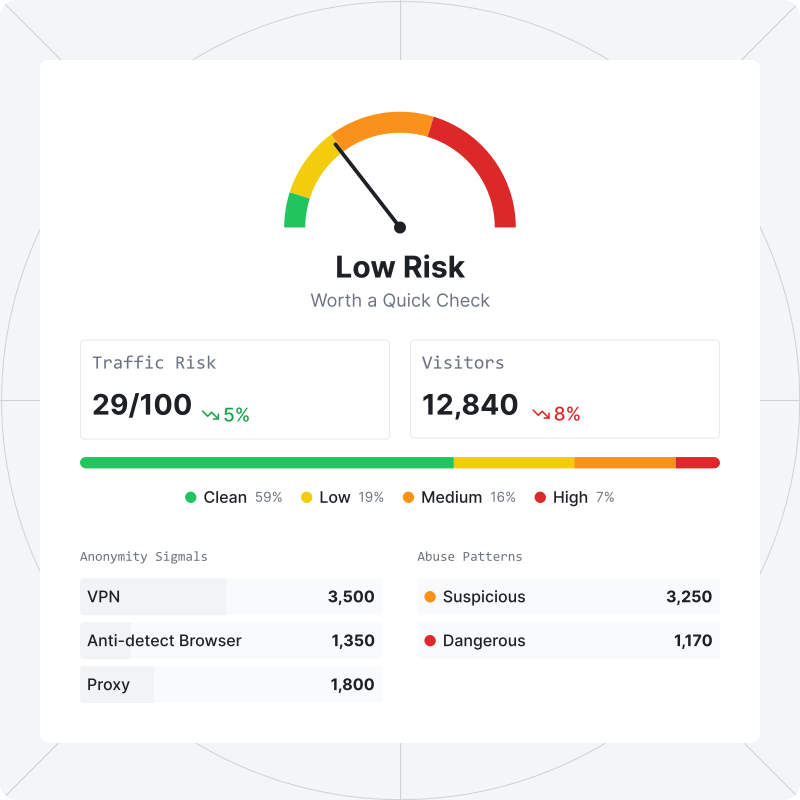
ShieldLabs analytics dashboard showing traffic risk score, anonymous traffic share, VPN traffic, returning visitors, and high-risk channels
  • Identify anonymous visitors

    Turn anonymous traffic into recognized visitors you can act on

  • Score risk on every visit

    Act on a clear risk score before a bad visit costs you

  • Spot abuse in the traffic

    Surface the multi-accounting and farms quietly draining your budget

  • Spot anonymous traffic by UTM

    Cut ad spend wasted on invalid traffic, channel by channel

Everything you need to track anonymous traffic

Visitor analytics for anonymous traffic that turns raw visitor data into clear insights about the anonymity behind every visit.
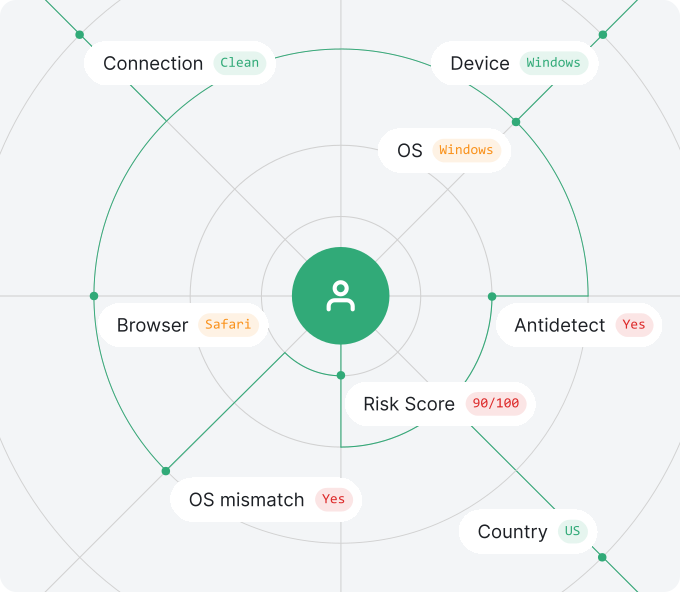
ShieldLabs Overview dashboard with Traffic Risk score, Request Signals, Visitor Insights, Top Countries, Browsers, OS, Device Type, and Connection Types
Overview

See your anonymous traffic in one view

Assess traffic quality at a glance

A single traffic score showing what share of your traffic is anonymous

Understand how visitors hide

Track risk signals across the whole traffic and per visit to know exactly what masking tools visitors use

Your real audience, finally visible

See returning visitors, countries, devices, and browsers without the noise from cookie resets and fragmented sessions

Traffic Source

Spot anonymous traffic by channel, UTM, or domain

See the source behind every visit

View traffic by Channel, Referrer, or UTM Parameter with a per-source Traffic Risk score on every row.

Catch the source of the bad traffic

Identify which partner, creative, or affiliate is delivering invalid traffic and bot traffic instead of real visitors

Cost per real visitor, not per click

Ad spend is paired with anonymous-traffic share per source, so CAC reflects real people, not just clicks

Decisions you can defend

Scale and reallocate budget based on per-channel and per-UTM risk data no standard analytics gives you
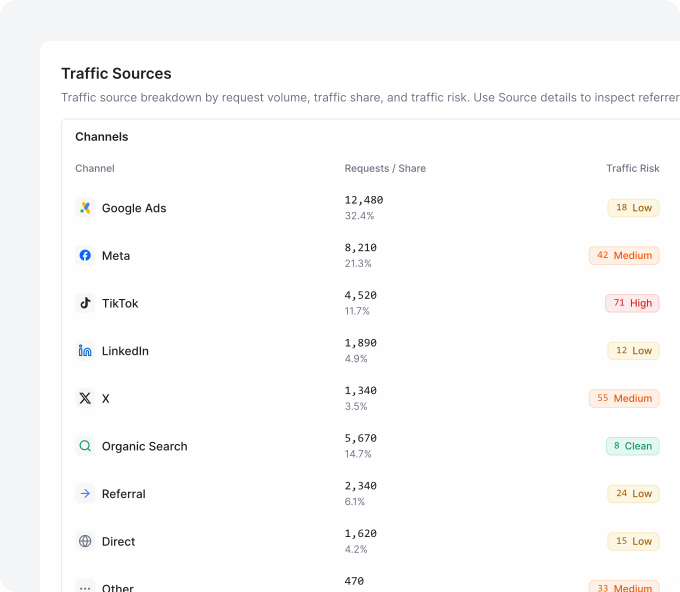
ShieldLabs TrafficSource view with Channels list and Source details with Referrers and UTM Parameters
ShieldLabs High-Risk Events view with a Multi-accounting event
High-Risk Events & Data

Follow anonymous traffic down to the single request

Catch multi-accounting and account sharing

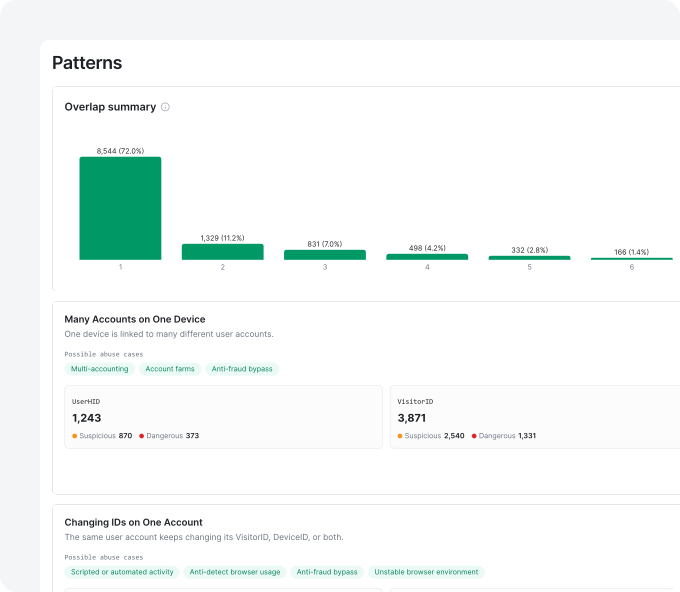
Detect Multi-accounting, Account sharing, Impossible travel, and Account takeover as High-Risk Events to stop abuse before it scales

Investigate every suspicious visit

Search full request data filtered by risk score to find and review the riskiest sessions fast

Measure how deep the abuse runs

Review each High-Risk Event with Medium or High confidence to focus on the clearest cases first

Share the evidence

Export filtered data as reports for partners, internal teams, or external review

Integrations

Connect the data to where your team already works

Install in five minutes

Drop one JavaScript snippet on the site to start tracking anonymous visits with zero backend setup

Query any visit via API

Pull visitor history, risk scores, and risk signals through the API to power sign-up flows, fraud checks, or business logic

Push data in real time via Webhooks

Stream every visit into webhooks to trigger fraud checks, automate workflows, or feed existing systems

Bring your own stack

Pipe anonymous-traffic data into internal tools to build custom analytics on top

api.shieldlabs.ai/v1/visits/latest
{
  "request_id": "0c284695-cf0b-4755-8beb-0a2e9536595e",
  "visitor_id": "aa8c616a-8a25-4a5e-bee2-a9a08e5128a4",
  "device_id": "6a45967d-1371-9652-ba99-b01ea3992208",
  "public_ip": { "ip": "62.197.149.124", "country": "United States" },
  "local_ip": { "ip": "45.83.91.7", "country": "United States" },
  "connection_type": "vpn",
  "traffic_source": {
    "channel": "paid",
    "utm_source": "google",
    "utm_medium": "cpc",
    "utm_campaign": "brand"
  },
  "risk_score": 70,
  "signals": [
    { "name": "antidetect_browser", "weight": 60 },
    { "name": "proxy", "weight": 10 }
  ]
}

Built for every team working with traffic.

A single view of anonymous traffic for every team that touches it.

For Growth & Marketing

Spot invalid traffic, ad fraud, and bot traffic per channel, UTM, and landing page before it drains ad spend

For Product & Analytics

Measure real returning users on clean data that survives cookie resets and fragmented sessions

For Fraud & Risk

Detect High-Risk Events and masked traffic in real time, ready out of the box with no rule setup

See who is visiting, anonymously or not.

Free 5,000 one-time identifications, with transparent pricing that scales with your needs

Frequently asked questions

ShieldLabs identifies and tracks anonymous website visitors by building a persistent identifier from 300+ device, OS, browser, IP, and network signals collected on the first page load, so the same visitor stays recognized even without cookies. It works in four layers: Snippet: drop one JavaScript snippet on the site to start collecting signals on every page load; Persistent identifier: each visitor gets a precise identifier that stays stable across cleared cookies, rotated IPs, and incognito sessions; Risk score: every visit gets a risk score on the first visit, with anonymity flags for VPN, proxy, anti-detect browser, or other masking tools; Delivery: results arrive in the analytics dashboard, through the API, and via webhooks. ShieldLabs returns a stable identifier and a risk score on the first visit, so anonymous traffic stays trackable across sessions and channels with 99.9% identification accuracy.

ShieldLabs tracks visitors without cookies and scores every visit for risk, while cookie-based analytics only counts volume and loses visitors the moment cookies clear. The differences: Identity: a persistent identifier survives cleared cookies, rotated IPs, and incognito mode; cookie analytics fragments the same person into many sessions; Anonymity: ShieldLabs flags VPN traffic, anti-detect browsers, and coordinated abuse; cookie analytics cannot see them at all; Traffic quality: ShieldLabs breaks traffic down by source so clean traffic can be told apart from invalid traffic per channel and per UTM. ShieldLabs adds the layer cookie-based tools miss: who the anonymous visitor really is, and how risky each visit is, on every source and every session.

ShieldLabs runs alongside those tools rather than replacing them, adding the traffic-quality and visitor-anonymity layer most of them miss. How teams stack it: With web analytics: keep Google Analytics for volume, add ShieldLabs for anonymity share and per-source traffic quality; With click-fraud tools: keep them for PPC blocking, add ShieldLabs to see invalid traffic and anonymous visitors per channel and UTM; With internal fraud systems: feed ShieldLabs signals, scores, and High-Risk Events into your backend after login. ShieldLabs fills the gap the others leave open: a persistent identifier, a risk score, and High-Risk Events such as Multi-accounting and Account takeover across every source and every session.