

Developer Playbook: Selenium Detection as a Five Signal Classification

Last updated on September 23, 2026 · 19 min read
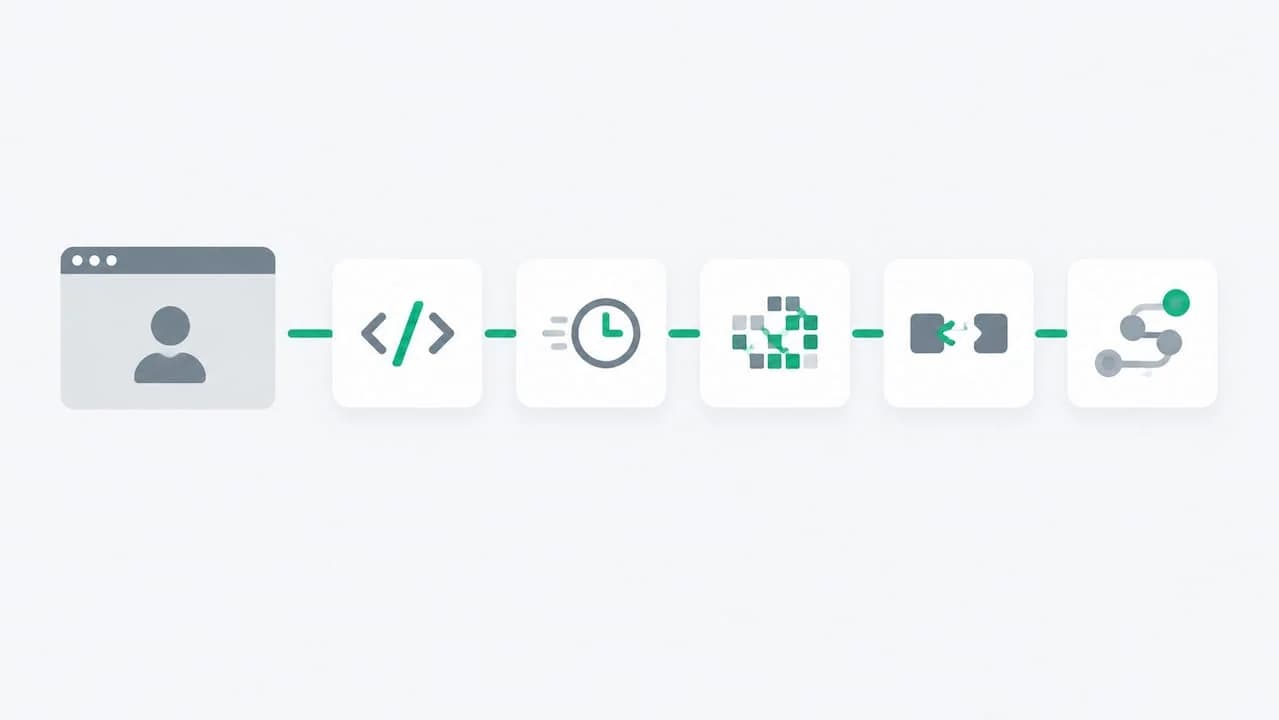
Yes, websites can detect Selenium-driven browsers, and they do it more reliably than most developers assume. Detection relies on five signal groups: JavaScript globals like navigator.webdriver, Chrome DevTools Protocol (CDP) artifacts, rendering and feature gaps, network and TLS fingerprints, and behavioral patterns. Every mitigation trades one tell for another, so nothing works without testing it against a real detector first.
TL;DR:
- Detection techniques leverage multiple signals, including JavaScript globals, CDP artifacts, rendering discrepancies, network fingerprints, and behavioral patterns.
- Simple patches to
navigator.webdriveror property descriptors are often insufficient, as detailed fingerprinting methods can reveal tampering.- Network-level signals like TLS ClientHello fingerprints and HTTP/2 header order provide server-side detection that client-side patches cannot easily obfuscate.
- Behavioral analysis of mouse movements, scrolling, and interaction timing offers strong clues since automated sessions lack genuine micro-behaviors.
- A layered detection approach combining signals from client, network, and behavior yields the most reliable identification of Selenium-driven browsers.
What Is Selenium Detection and Why Do Sites Use It?
Selenium detection is the practice of identifying browser sessions controlled by WebDriver based automation rather than a human at a keyboard. Retailers use it to stop scalper bots. Ticketing platforms use it to slow inventory hoarding. Fintech and iGaming platforms use it to catch account farms and bonus abuse running through scripted browsers. The technique matters because Selenium remains the most widely used browser automation library for functional testing, which means its fingerprints are the best documented and the easiest for detection scripts to target first.
The irony is that Selenium was never built to be invisible. It was built to drive a browser predictably for test suites, and predictability is exactly what a detector looks for. Understanding selenium detection techniques starts with accepting that the tool's own design creates most of the tells covered below.
For a managed implementation, the bot detection tools comparison maps browser and account evidence to edge controls and additional verification steps.
Client-Side JavaScript Detection: navigator.webdriver and Patched Descriptors
The single most checked signal in any selenium identification process is navigator.webdriver. The WebDriver specification requires compliant browsers to expose this flag so that automated sessions can be identified programmatically, which means a driver-controlled Chrome instance returns true by default, and a detection script only needs one line to check it.
That flag is the easy part. The harder part is what surrounds it.
Driver-injected global variables. Older versions of ChromeDriver and similar drivers attach identifiers directly to the document or window object, commonly prefixed $cdc_ or $wdc_. These strings exist because the driver needs a way to communicate with the page context, but they also give detectors a reliable signature. A script that iterates over document properties looking for anything matching cdc_ or wdc_ catches unpatched sessions instantly.
Property descriptor and toString() checks. This is where naive fixes backfire. A common fix is running Object.defineProperty(navigator, 'webdriver', {get: () => false}) to spoof the flag. That works against a script that only reads the value. It fails against a script that calls Object.getOwnPropertyDescriptor(navigator, 'webdriver') and checks whether the descriptor looks native, or calls .toString() on the getter function and checks whether it returns native code syntax or a visibly overridden function body. A patched property that doesn't replicate the original descriptor shape is often a stronger signal than the flag it was meant to hide, because now the detector knows something was tampered with rather than just suspecting automation.
Detection research on headless browsers backs this up directly: patches that don't fully replicate native behavior tend to create a more distinctive fingerprint than leaving the property alone.
Practical checks worth running before shipping any fix:
- Open DevTools console on a driver-controlled session and run
navigator.webdriverto confirm the baseline value. - Enumerate
Object.getOwnPropertyNames(window)and diff it against a clean browser session to spot injected globals. - Call
Object.getOwnPropertyDescriptor(navigator, 'webdriver').get.toString()and compare the output against a real Chrome instance. - Search Stack Overflow threads on
navigator.webdriveroverrides before copying a snippet. Many popular answers are years old and target Chrome versions that no longer behave the same way.
The advice that holds up across browser fingerprinting research is to change the minimum needed, verify it against an actual detection script, and never mutate a global just because a GitHub gist says to.
CDP and Driver-Level Artifacts: How the Control Channel Leaks Evidence
JavaScript patches only cover what runs in the page context. Selenium and most stealth wrappers still talk to the browser through the Chrome DevTools Protocol, and that control channel leaves its own trail.
CDP sessions inject specific runtime bindings and generate distinctive event timing patterns. A page loaded through Runtime.evaluate calls behaves slightly differently than one where a human clicked a link, and sites that log CDP-specific events (like certain Page.frameNavigated sequences firing before paint events a real browser would fire first) can flag the session without ever touching navigator.webdriver.
The --enable-automation flag is the clearest example of a driver-level leak. ChromeDriver sets this flag when it launches Chrome, and its effects are documented in the Chromium issue tracker, including how it influences infobar text, certain navigator properties, and automation-specific behavior that persists even after JavaScript-level overrides run. Because the flag is set at process launch, no in-page script can fully retract its downstream effects. The browser was told it's automated before your page code ever executes.
A few artifacts worth knowing about specifically:
- The automation infobar ("Chrome is being controlled by automated test software") that some driver configurations still surface depending on flags and version.
- CDP-specific properties left on
windowin certain driver/browser version combinations. - Timing gaps between
DOMContentLoadedand the first CDP command, which tend to be far more regular in scripted sessions than in human browsing.
One useful comparison: detection frameworks that combine even a handful of these process-level signals with page-level checks report meaningfully higher catch rates than JavaScript-only detection, because the combination of weak signals is what makes classification reliable even when any single signal is noisy on its own.
This is the layer where the honest answer is that full erasure isn't realistic through patching alone. If a project genuinely requires indistinguishability from a human session, that usually means running real, non-headless browser environments with careful driver configuration rather than trying to scrub CDP fingerprints after the fact.
Rendering and Feature Tells: WebGL, Plugins, Codecs, and Permissions
Detection scripts that go past the obvious flags start probing how the browser renders and negotiates media, because these checks are harder to fake convincingly.
WebGL renderer strings. Calling gl.getParameter(gl.RENDERER) on a headless or virtualized Chrome instance frequently returns a software rasterizer name like SwiftShader instead of a real GPU vendor string. Detection guides flag this as one of the most reliable rendering-level tells, because spoofing a GPU string is trivial but making the entire rendering pipeline behave consistently with that spoofed string is not.
Plugin lists and codec negotiation. navigator.plugins returning empty, or canPlayType() reporting inconsistent codec support relative to the claimed browser and OS, are contradictions detection scripts specifically look for. A user agent claiming desktop Chrome on Windows that can't play H.264 the way real desktop Chrome does is a mismatch reliable enough to serve as a standalone signal.
Permissions API inconsistencies. Querying navigator.permissions.query() for camera, microphone, or notifications and comparing the result against what a real browser in that state would report catches sessions where permission state was set programmatically rather than through normal browser interaction.
Steps that actually close these gaps rather than paper over them:
- Provision a real GPU or a properly configured virtual GPU rather than relying on default software rendering.
- Confirm codec support matches the claimed browser and platform combination before running any test.
- Set permission states through the same APIs a real user flow would trigger, not through direct property injection.
- Cross-check the full anti-detect browser fingerprint profile rather than fixing one property in isolation.
Network and TLS Signals That Live Outside JavaScript
None of the checks above touch the network layer, and that's exactly where a growing share of selenium detection techniques now operate, because they're invisible to anything running inside the page.
TLS ClientHello fingerprinting looks at the cipher suite order, extensions, and negotiation parameters a client sends during the TLS handshake. Real browsers have consistent, well-documented ClientHello signatures. Many HTTP libraries used underneath automation tooling, or automation stacks that don't route through the actual browser's network stack, produce a ClientHello that doesn't match any real browser release. That mismatch happens before a single line of page JavaScript runs.
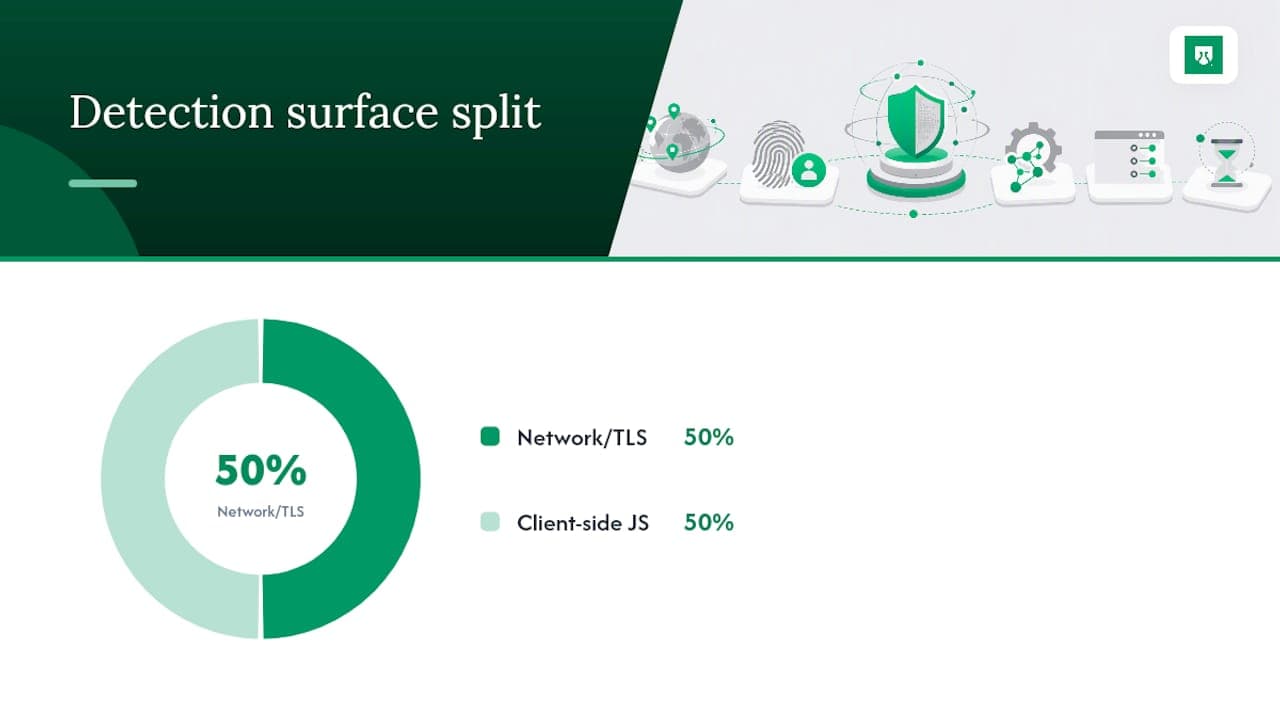
HTTP/2 adds a second layer. Frame ordering, header ordering, and settings frame values differ across browser engines in ways that are stable enough to fingerprint. A request that claims to be Chrome in its user agent string but sends headers in an order Chrome's network stack never produces is a strong, purely server-side tell.
What this means practically:
- ClientHello and HTTP/2 ordering checks happen entirely server-side, before any response is sent, so no client-side patch can affect them.
- These signals are most useful to detectors when correlated with client-side flags rather than used alone, since a mismatched ClientHello with a clean JavaScript profile still reads as suspicious.
- Debugging this requires logging raw request fingerprints server-side (or using a tool that surfaces them) and comparing against known browser baselines, because standard browser DevTools won't show you your own TLS handshake.
The practical implication for engineers is that fixing JavaScript tells while ignoring network-level fingerprints leaves half the detection surface untouched. A session with a flawless navigator.webdriver override and a mismatched TLS signature is still an easy catch.
Behavioral Signals and Session Telemetry
Detectors that survive the JavaScript, CDP, rendering, and network layers usually move to behavior, because scripted sessions still tend to move and type differently than people do.
The features most commonly tracked:
- Mouse movement paths. Real cursor movement has micro-jitter, acceleration curves, and occasional overshoot-and-correct patterns. Programmatic clicks that jump directly to coordinates with no path data are an obvious tell.
- Scroll behavior. Human scrolling comes in irregular bursts with variable velocity. Automated scripts that scroll in perfectly even increments stand out immediately.
- Typing cadence. Keystroke timing that's either impossibly fast or unnaturally uniform (the same number of milliseconds between every keystroke) reads as scripted input.
- Idle and dwell patterns. Sessions that navigate from page load to form submission in under a second, with no pauses to read content, don't match how people actually browse.
- Interaction sequence. The order of events (focus, then mouse move, then click, versus a direct click with no preceding focus event) can reveal whether interactions were dispatched programmatically.
The absence of these micro-behaviors is often more telling than any single wrong value, because it's a pattern across the entire session rather than one flag a developer forgot to patch.
Pro Tip: If you're building test suites that need to validate detection resistance, randomize timing within a realistic human range and inject small mouse path variance, but do this strictly in a test or QA environment against your own detection scripts. Simulating behavior to defeat a production site's fraud controls raises the same ethical and legal questions covered later in this article, and it's a different problem than validating your own test tooling.
Practical Mitigation Steps for Engineers
The engineering priority list, in order of what actually reduces detection risk versus what just moves the tell somewhere else:
Start with the environment, not the patches. A full, real browser profile (with genuine history, cookies, and extensions state rather than a blank profile) run in non-headless mode closes more gaps at once than any collection of JavaScript overrides. Headless mode remains one of the most detectable configurations by default, because so many rendering and feature checks assume a full compositor pipeline that headless doesn't always replicate faithfully.
Align codecs and GPU before touching any property. Real GPU provisioning (or a correctly configured virtual GPU) and accurate codec support resolve the WebGL and canPlayType() mismatches covered earlier without a single line of spoofing code.
Normalize permissions through real API flows. Set permission states the way a browsing session naturally would, rather than injecting values directly.
Remove obvious globals carefully, not blindly. If a driver version injects $cdc_ style variables, confirm with a diff against a clean session before deleting anything, and verify the deletion doesn't leave a detectable gap where a native property should exist.
Randomize micro-timings only in test contexts. Adding jitter to click and scroll timing is useful for validating your own detection resistance in a controlled test suite. It is not a general-purpose evasion technique for production traffic, and treating it as one blurs into the legal and ethical territory covered further down.
What to avoid:
- Blanket property overrides copied from a Stack Overflow answer without checking the descriptor shape against a real browser.
- Assuming a single patched flag (usually
navigator.webdriver) is sufficient, when detectors increasingly correlate five or six signal groups at once. - Ignoring browser and driver version drift. A stealth patch tuned for one Chrome and ChromeDriver release pairing can break, or worse, become a fresher tell, the moment either updates.
Pro Tip: Treat every mitigation as a hypothesis, not a fix. Change one signal, rerun your detection test, and record whether the score moved. This isolates cause and effect instead of stacking five changes and hoping the result is cleaner.
Extension and profile hygiene matters here too. Teams running larger automation fleets benefit from the same extension hardening guidance IT teams use for managed browsers, since leftover automation extensions or misconfigured profile settings often reintroduce the exact tells a stealth patch was meant to remove.
Testing and Debugging Checklist: Is Your Automation Detected?
Run this loop in order, and don't skip to step four because a fix "should" work:
- Baseline the target site's detection surface. Load the page in a real, unmodified browser and in your automated session side by side. Note every DevTools console difference, especially around
navigator,window, and rendering-related objects. - Run client-side diagnostics. Check
navigator.webdriver, enumerate global properties for injected identifiers, and inspect property descriptors on anything you've patched. - Log server-side signals in parallel. Capture TLS ClientHello fingerprints, header ordering, and IP reputation patterns for the same session, since these won't show up in any browser console.
- Change exactly one variable. Patch a single property, adjust one timing parameter, or swap one environment setting. Never batch changes.
- Retest and record the result. Compare the detection outcome against the baseline and log whether that specific change moved the needle, isolating which change actually reduced the score rather than introducing a new tell elsewhere.
- Repeat until signals stop correlating. A session is meaningfully harder to detect only once client-side, network-level, and behavioral signals all point the same direction as a real browsing session.
The ShieldLabs Perspective on Multi-Signal Detection
Every technique in this article, taken alone, is a coin flip. navigator.webdriver alone catches unpatched sessions and nothing else. A single mismatched WebGL renderer string catches some automation and misses the rest. The pattern that actually holds up across fraud and abuse detection at scale is combining dozens of weak signals into one auditable score rather than betting on any single check.
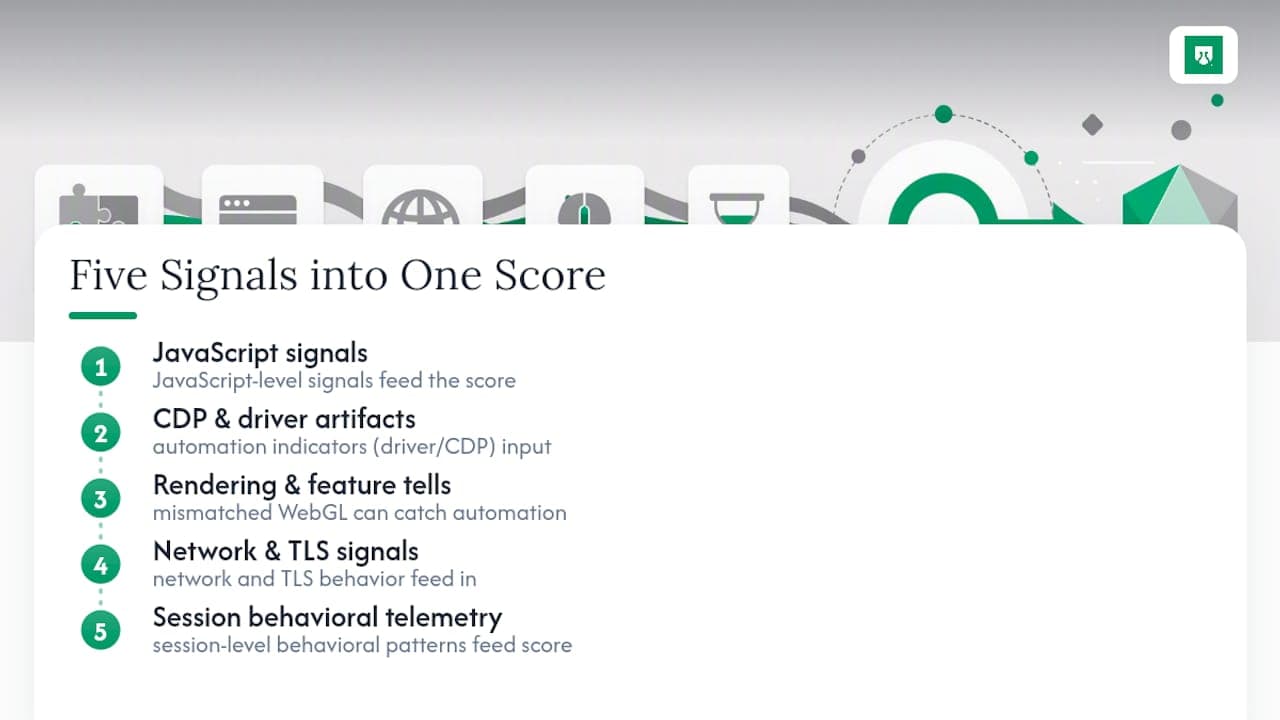
ShieldLabs applies this approach to fraud detection: JavaScript-level signals, network and TLS behavior, and session-level behavioral patterns feed into a single risk score, and every score ships with the specific signals that produced it rather than an opaque number. That transparency matters for engineering teams, because a score with no visible reasoning behind it can't be debugged, tuned, or defended when a false positive blocks a legitimate visitor.
The practical recommendation for teams working with any detection signal, whether it's homegrown or from a platform: insist on a score that shows the signals behind it, not a black-box verdict. Then choose the action for each case: block, hold, or step up. For teams evaluating how risk signals fit into a broader anti-fraud stack, the anonymous visitor detection documentation covers how anti-detect browser detection, proxy and VPN signals, and automation indicators combine into one risk view.
Overview of Common Selenium Detection Techniques Used by Websites
Pulling the layers together, most production detection systems run a tiered check rather than a single test. The first tier is cheap and catches unsophisticated sessions: navigator.webdriver, obvious driver-injected globals, and user agent strings that don't match observed behavior. The second tier is feature-level: WebGL renderer checks, plugin and codec cross-checks, and permission state validation.
The third tier is where sites investing in serious anti-fraud tooling operate: network fingerprinting (TLS and HTTP/2), CDP artifact detection, and behavioral telemetry analyzed across a full session rather than a single request. Sites rarely rely on just one tier. E-commerce platforms fighting scalper bots typically stack all three, since scalpers have strong financial incentive to defeat any single check.
The trend worth watching heading into 2026 is that behavioral and network-level checks are becoming standard even on mid-sized sites, not just enterprise platforms, largely because managed detection services and open frameworks have made layered detection accessible without a dedicated security team. The days of navigator.webdriver being the only obstacle are largely over for any site that has been targeted by automated abuse before.
Impact of Browser and Driver Versions on Detection Likelihood
Version drift is one of the most underestimated variables in selenium performance analysis. A stealth configuration that passes detection on Chrome 118 with a matching ChromeDriver build can fail entirely on Chrome 122, not because the detection script changed, but because the browser's native behavior shifted underneath the patch.
This cuts both ways. Older, unpatched Chrome and ChromeDriver pairings tend to carry more obvious automation flags (the automation infobar, more prominent CDP artifacts) that newer releases have quietly reduced or changed. Newer driver versions have also closed some previously exploitable gaps, while occasionally introducing new ones, which is part of why the Chromium issue tracker stays active with automation-flag reports year over year.
The practical takeaway: version pinning without revalidation is a liability. Any mitigation strategy needs to be retested against current browser and driver release combinations, not just validated once and assumed stable. A patch built and tested six months ago against a specific version pairing may already be stale, and stale patches are exactly the kind of mismatch detectors are tuned to catch.
Ethical Considerations and Legal Implications of Evading Selenium Detection
The technical playbook in this article applies just as directly to legitimate QA engineering as it does to abuse. That distinction is what actually matters here, not the techniques themselves.
Testing your own site's detection resistance, validating that your fraud controls correctly flag automation, or running internal QA against staging environments you own is standard, expected engineering work. Selenium itself is designed and documented as a testing tool, and using detection-evasion knowledge to stress-test your own detection stack is exactly the kind of use case that documentation anticipates.
Using the same techniques to defeat a third party's rate limits, bypass paywalls, automate ticket or inventory scalping, or run fake account creation at scale is a different matter entirely, and one that increasingly runs into both platform terms of service and, depending on jurisdiction and intent, laws governing unauthorized computer access. The line isn't the technique. It's whether you have the right to be running automation against that target in the first place, and whether the site's terms of service explicitly restrict automated access. When in doubt, that's a question for the platform's terms of service and, for anything ambiguous, legal counsel, not a technical workaround.
What Actually Matters in Selenium Detection Work
Most advice on this topic treats detection as a single switch to flip: patch navigator.webdriver, ship it, done. That framing is backwards, and it's why so many "stealth" scripts stop working within a browser release or two. Detection is a classification problem built on dozens of weak signals, and the sites doing this well are scoring the intersection, not any one flag.
The conventional advice oversells JavaScript patches and undersells everything happening at the network and process level, where no amount of client-side cleverness reaches. If you fix navigator.webdriver and ignore your TLS fingerprint, you've fixed the signal that mattered least.
Prioritize the environment first. Real profiles, real GPUs, correct codecs, and non-headless execution close more gaps than a stack of overrides ever will. Test every change in isolation, and assume any patch you didn't personally verify against a live detector is more likely to add a tell than remove one.
Yahor Papou, CMO at ShieldLabs
Try ShieldLabs for Multi-Signal Fraud Detection
Everything covered above, JavaScript flags, CDP artifacts, rendering mismatches, network fingerprints, behavioral patterns, is exactly the signal set fraud and product teams need scored automatically rather than rebuilt from scratch in-house. ShieldLabs gives growth-stage and enterprise teams that scoring out of the box: anti-detect browser detection, automation and bot signals, VPN and proxy detection, and behavioral risk all combine into one risk score, shown with the specific signals behind it so your team can audit every decision instead of trusting a black box. The platform starts with 5,000 free identifications (one time) and no card required, with a single JavaScript snippet getting you to your first signal in about five minutes. If your traffic includes bot activity, anti-detect browsers, or scripted account creation, start with the anonymous visitor detection product and see the signal breakdown on your own traffic before choosing the action for each case.
Sources
For engineers who want to go deeper than this article covers:
Recommended
Related articles
One Snippet, Five Minutes: Early Bot Detection for WordPress Sites
Cut bot damage on WordPress by detecting early, logging first, and tuning rules safely. Install one JS snippet in about five minutes.

SSR Safe Angular Bot Detection: OWASP Layering and Server Validation
Angular-focused, actionable steps to run SSR safe client checks, validate tokens server side, apply OWASP layering, and use ShieldLabs signals for...
7 CAPTCHA alternatives for 2026: stop abuse without blocking real users
The 7 best CAPTCHA alternatives for 2026, from silent device intelligence to invisible challenges, and how to stop abuse without blocking real users.
