

The 7 best anti-detect browser detection tools in 2026

Last updated on October 12, 2026 · 9 min read
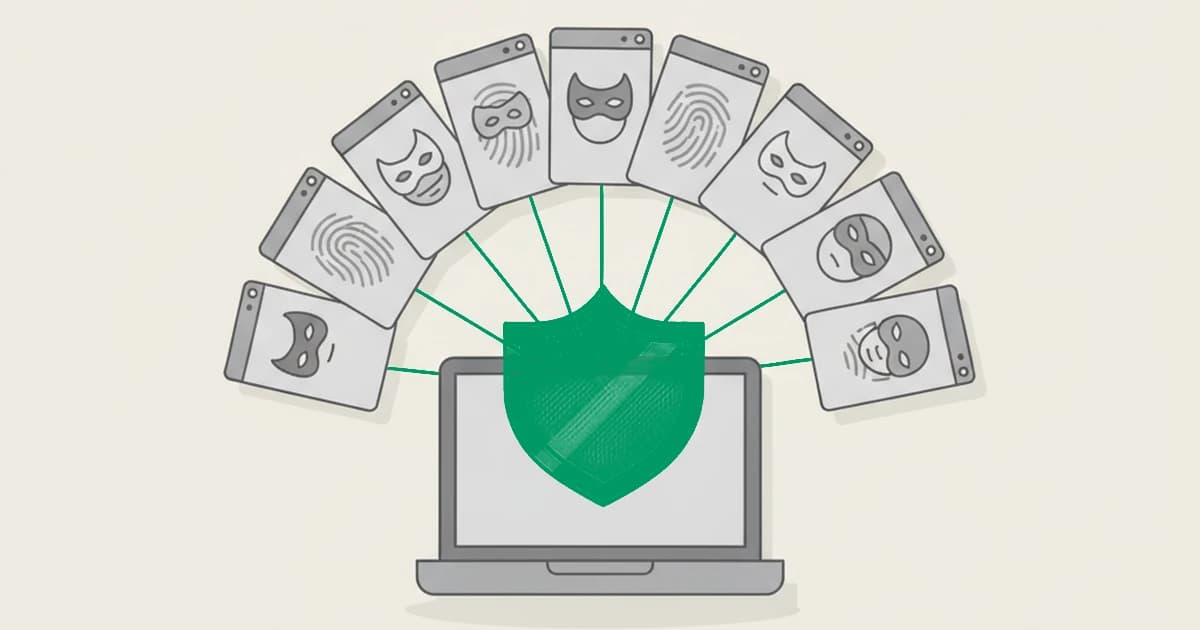
Anti-detect browser detection is how fraud and abuse teams catch one operator hiding behind many spoofed browser sessions.
Browser fingerprinting works because browsers are surprisingly unique: when the Electronic Frontier Foundation ran its Panopticlick study, it found that about 84 percent of browsers carried a fingerprint distinctive enough to identify them on their own, and that figure climbed higher for browsers with common plugins installed. Anti-detect browsers exist to break exactly that link.
They let one operator rewrite what a browser reports about itself, so a single machine can present each session as a fresh, unrelated device. Catching those spoofed and tampered sessions, before they turn into dozens of fake accounts, is the defender-side job this guide is about.
This guide is written for the team on the receiving end, not the operator running the evasion tool. It explains what anti-detect browser detection is, how it works at the signal level, and covers the tools across the segments below.
Key takeaways
- An anti-detect browser lets one person spoof many device fingerprints, and it is the engine behind multi-accounting, bonus abuse, and coordinated fake-account fraud.
- Detection does not rely on a blocklist of tool names. It reads the fingerprint for internal contradictions, tampered attributes, and mismatches between what the browser claims and what the environment actually is.
- Tools that hold up pair those tamper signals with persistent identification and named risk signals, so a spoofed session still links back to the device underneath.
- The market splits into platforms you can evaluate on your own traffic today and sales-led suites that bundle case management, compliance, or edge bot mitigation, usually with a bot-first or verification-first focus.
What is anti-detect browser detection?
Anti-detect browser detection is the practice of identifying when a visitor is using a browser built to spoof or hide its real fingerprint. An anti-detect browser gives one operator a fresh, believable set of device attributes for every session: a different canvas signature, a different set of fonts, a rewritten user agent, a spoofed time zone and screen size.
The goal is to defeat browser fingerprinting so that ten accounts opened from one machine each look like ten separate people.
Detection flips that around. Instead of trusting the attributes a browser presents, a detection tool looks for the tells that the attributes were manufactured: values that do not fit together, signals that a real browser would never emit, and a claimed environment that contradicts the real one.
The output is a signal a fraud team can act on, usually as one input into a wider risk score. It is the same defender discipline covered in the companion explainers on how to detect anti-detect browsers and how to detect anti-fingerprint browsers.
How anti-detect browser detection works
No single check catches a well-configured anti-detect browser. Good detection reads several layers and looks for where they disagree:
- Fingerprint inconsistencies. A spoofed browser has to rewrite many attributes at once, and they rarely stay consistent. A user agent that claims one operating system while the rendered graphics, fonts, and audio stack point to another is a contradiction a genuine browser does not produce.
- Tampered and spoofed attributes. Anti-detect tools patch the browser to override what it reports. Detection watches for the traces of that patching: overridden JavaScript APIs, injected properties, and values that sit outside the range a real device would return.
- Known artifacts and automation flags. Anti-detect setups often run inside a virtual machine, on a privacy-hardened or headless build, or alongside automation frameworks. Each leaves a residue that detection can name.
- Claimed versus real environment. The browser says it is a phone in one country while the network, rendering, and hardware signals describe a desktop somewhere else. That mismatch is one of the clearest tells.
- Anonymity and network signals. Anti-detect browsers are almost always paired with a VPN, proxy, or datacenter connection to complete the disguise. A tool that names those risk signals can flag the evasion instead of being fooled by it.
The most durable approach adds one more layer: persistent identification that survives the spoofing. When the fingerprint is rewritten but the machine underneath stays recognizable, the many fake identities still collapse back to one device, which is the pattern that matters for anti-detect browser detection in practice.
How to evaluate an anti-detect browser detection tool
Five criteria separate the tools below:
- Detection depth. Does it read tampered attributes, environment mismatches, and risk signals, or only one of those layers?
- Named signal or inference. Is anti-detect use surfaced as a named signal, or do you infer it from tamper, headless, and proxy flags?
- Ready-made detection versus rules you build. Does it link many spoofed sessions back to one device and flag account-level abuse for you, or hand you raw signals to model yourself?
- Explainability. Can your team see which signals moved the score, or is the output a verdict you have to trust?
- Integration and pricing transparency. Can you start from a snippet with published pricing, or only through a sales call?
The tools below are grouped by approach, listed alphabetically within each group, and described against the same criteria.
Tools at a glance
This table summarizes the intended fit of each tool. The sections below explain its coverage and limits.
| Tool | Best fit |
|---|---|
| ShieldLabs | Fraud and growth teams that want anti-detect browser use surfaced as a named signal feeding an explainable score they can act on |
| Castle | Teams already on Cloudflare that want edge-plus-app coverage and are comfortable composing their own rules |
| Fingerprint | Developer teams that want a durable device identifier plus tamper and VM signals to anchor their own anti-detect logic |
| IPQualityScore (IPQS) | Teams that mainly want IP, VPN, and proxy reputation at signup and treat device-side anti-detect analysis as secondary |
| SEON | IGaming and fintech teams that want enrichment, case management, and AML workflows alongside device data and can absorb a sales cycle |
| Verisoul | Teams that want fake-account prevention with an optional biometric verification step and are comfortable starting through a sales conversation |
| DataDome | Large teams that need edge bot and DDoS mitigation across CDNs and treat anti-detect browsers as one part of a broader automated-traffic problem |
Device and browser-signal tools
These tools read the device and browser fingerprint directly, looking for tampered attributes, risk signals, and identifiers that survive a rewritten fingerprint.
ShieldLabs
ShieldLabs is a fraud detection and prevention platform with traffic quality scoring, bringing enterprise-level functionality without enterprise pricing. You add one JavaScript snippet, and each visit returns persistent identification with 99.9% identification accuracy that survives cleared cookies and a rotated IP, so a rewritten fingerprint still traces back to the device underneath.
Anti-detect and spoofed browser use is surfaced as a named risk signal, sitting alongside VPN, proxy, Tor, and datacenter with 99.9% risk signal detection accuracy, and it feeds an explainable risk score from 0 to 100 with the contributing signals shown in Details.
Bot and automation detection is covered too. ShieldLabs automatically detects multi-accounting, account sharing, impossible travel, and account takeover from linked activity. Pricing includes 5,000 free identifications, then plans from 99 USD a month, with no credit card for the free tier.
ShieldLabs covers web traffic through one JavaScript snippet, with an API and webhooks on every plan.
Best for: fraud and growth teams that want anti-detect browser use surfaced as a named signal feeding an explainable score they can act on.
Castle
Castle is a self-serve account-security platform with a dual-layer architecture: it runs at the Cloudflare edge and inside your app through an SDK, so signals from one sharpen the other. Its device fingerprinting claims up to 99.5 percent accuracy with a collision rate as low as 0.001 percent, and it is pitched to uncover headless browsers, tampering, and carrier data.
It returns three separate scores from 0 to 100 for bot, abuse, and account takeover, plus a customer-owned rules engine, and its developer blog runs teardowns of public fingerprinting test sites. Castle also ranks organically for the term undetectable browser.
A free tier covers 1,000 calls a month, and the Pro plan is 200 USD a month before a large jump to a custom enterprise plan.
The tradeoff is that anti-detect coverage lives inside Tamper Detection and a headless-browser flag rather than a single named anti-detect signal, and Castle leans on self-learning models rather than an explainable per-signal breakdown. Its public review base is also thin.
Best for: teams already on Cloudflare that want edge-plus-app coverage and are comfortable composing their own rules.
Fingerprint
Fingerprint is a self-serve device intelligence API built on the open-source FingerprintJS project, which has 27,000-plus GitHub stars.
Its persistent visitor identifier recognizes the same device across sessions even when cookies are cleared and the IP rotates, and its homepage pitch is explicit about the use case: get details on suspicious visitors even when a VPN, incognito mode, or a tampered browser or device is in play.
On top of the identifier it layers 20-plus Smart Signals, including Browser Tamper Detection, Incognito Detection, Virtual Machine Detection, and a Privacy-Focused Browser flag, folded into a single weighted Suspect Score. It also carries SOC 2 and ISO 27001 certification, and paid plans start at 99 USD a month.
The tradeoff is that Fingerprint reads anti-detect behavior through proxy signals rather than a single named anti-detect signal, and it hands you raw signals rather than a verdict. As one G2 reviewer puts it, Fingerprint is not a full-feature fraud provider, so you build the interpretation layer yourself, and cost is the most common complaint as volume grows.
Best for: developer teams that want a durable device identifier plus tamper and VM signals to anchor their own anti-detect logic.
IPQualityScore (IPQS)
IPQualityScore pairs IP reputation with email and phone validation and a device-fingerprinting layer, backed by a proprietary honeypot network across more than 150 countries.
Its anonymizer detection for VPN, proxy, Tor, residential proxy, and datacenter connections covers the network side, and those signals are a real part of unmasking an anti-detect setup, since spoofed browsers almost always ride an anonymized connection.
Free interactive lookup tools make it easy to test before committing, a permanent free tier covers 1,000 lookups a month, and self-serve plans start at 99 USD a month.
The tradeoff sits in the packaging. IPQS leads with IP, email, and phone reputation, and its device-fingerprinting layer plus mobile SDK are gated to a custom Enterprise plan, so the self-serve tiers give you the network side of an anti-detect signal but not the device-side fingerprint analysis.
There is no named anti-detect browser feature, and reviewers flag a dated dashboard, so you assemble the pattern yourself.
Best for: teams that mainly want IP, VPN, and proxy reputation at signup and treat device-side anti-detect analysis as secondary.
SEON
SEON is a fraud platform that pairs device intelligence with data enrichment, resolving an email or phone number into a wider digital footprint and layering device, network, and behavioral signals on top. Its device intelligence covers fingerprinting, proxy, and Tor detection, and reviewers on TrustRadius specifically credit its device fingerprinting and proxy and Tor detection as strengths.
SEON markets 900-plus signals with transparent, explainable scoring, a custom rules engine, and case management, and it is widely used in iGaming and fintech. The published Starter tier is 699 USD a month for 2,500 fraud checks, with everything above that quoted by sales.
The tradeoff is that SEON does not publicly name anti-detect browser detection as a discrete capability, and it markets a signal count rather than an enumerated list, so a technical reviewer comparing anti-detect coverage has to take the breadth on faith. One Capterra reviewer explicitly asked for better tracking of virtual machines and device-replacement tooling.
Access is the other friction: every path routes through a sales call rather than an instant signup.
Best for: iGaming and fintech teams that want enrichment, case management, and AML workflows alongside device data and can absorb a sales cycle.
Verisoul
Verisoul is a fake-account-prevention platform that combines device and network signals with optional selfie and document verification. Its Device Risk product names anti-detect browser, virtual machine, and emulator detection in its copy, and its Proxy and VPN checks run more than 10 real-time network tests, feeding an Account Linking graph that visualizes which accounts share a device.
It also offers a no-code rules builder and an automated investigation agent, and it carries SOC 2 from its Professional tier. Paid plans start around 249 USD a month, with a free Starter tier that is dashboard-only.
The tradeoff is access and output. Every call-to-action, including the free tier, routes to a demo booking, so there is no instant self-serve path, and the free Starter tier has no API access.
Verisoul also returns match probabilities rather than a stable device identifier you can join in your own warehouse, and while anti-detect detection is named in the product copy, it does not have a dedicated product surface.
Best for: teams that want fake-account prevention with an optional biometric verification step and are comfortable starting through a sales conversation.
Bot mitigation platforms
These platforms enforce at the network edge, built to classify and filter automated traffic at scale, with anti-detect browsers treated as one part of a broader bot problem.
DataDome
DataDome is an enterprise bot and online-fraud platform that enforces at the edge, classifying traffic in under 2 milliseconds across 35-plus points of presence.
It has invested more visibly in the anti-detect topic than most, publishing per-tool teardown pages and threat research that compares anti-detect browsers and bots-as-a-service, and its own research notes that advanced bots evade generic defenses the large majority of the time. Detection runs through thousands of AI models rather than a public catalog of named signals.
There is no free tier or self-serve signup, and pricing starts at 3,830 USD a month.
The tradeoff is framing and fit. DataDome is bot-mitigation-first, built to block automated requests at the edge, but anti-detect browsers are driven by human operators running multi-accounting, so a bot-first product can miss the human-operated abuse that these tools are actually built for.
It also surfaces no persistent visitor identifier for downstream analytics and names no discrete anti-detect signal in its public pricing, so you rely on the engine's verdict rather than reading a signal breakdown.
Best for: large teams that need edge bot and DDoS mitigation across CDNs and treat anti-detect browsers as one part of a broader automated-traffic problem.
How to choose
No single tool on this list is the universal answer, and many teams layer two: a device-intelligence signal for the everyday case and a broader platform for organized rings. Start from your own threat model and how much you want done for you.
Three questions decide most of it. First, do you want anti-detect browser use surfaced as a named, explainable signal, or are you comfortable inferring it from proxy signals like tamper and headless flags? A tool that names the signal and shows its weight is faster to defend to a risk committee than a black-box score.
Second, is the abuse human-operated or automated? Anti-detect browsers are run by people farming accounts, so a fraud and visitor-identification layer fits better than a bot-mitigation product built to block machines at the edge. Third, do you need a stable identifier that survives the spoofing?
Persistent identification is what collapses many fake identities back to one device once the fingerprint is rewritten.
Match those answers to the entries above. If your problem is everyday multi-accounting and bonus abuse on the web, a device-intelligence platform you can evaluate on your own traffic today covers most of it quickly. If you face automated scraping and bot traffic at enterprise scale, an edge platform earns its cost.
If proving one real human per account matters as much as spotting a spoofed browser, a verification-first vendor may fit.
Sources
- Electronic Frontier Foundation: How Unique Is Your Web Browser? (Panopticlick study)
- Wikipedia: Device fingerprint
- Group-IB Knowledge Hub: Anti-detect browser
- Wikipedia: Sybil attack
Recommended
Frequently asked questions
- What is an anti-detect browser?
- An anti-detect browser is a modified browser that lets one operator spoof or rewrite the fingerprint their browser reports, giving each session a fresh set of device attributes such as canvas signature, fonts, user agent, time zone, and screen size. The purpose is to defeat browser fingerprinting so that many accounts opened from one machine each look like a separate person. It is the tooling behind multi-accounting, bonus and trial abuse, ban evasion, and coordinated fake-account fraud.
- How do you detect an anti-detect browser?
- By reading the fingerprint for contradictions rather than trusting what it claims. Detection looks for attributes that do not fit together, such as a user agent claiming one operating system while the graphics and font stack point to another, plus traces of tampering like overridden browser APIs, virtual-machine and headless artifacts, and a mismatch between the claimed and the real environment.
- Is it legal to detect anti-detect browsers?
- Detecting anti-detect browsers is a standard part of fraud and abuse prevention, and analyzing the fingerprint your own site receives is widely practiced by security and risk teams. As with any collection of device and network data, the responsible approach is to disclose it in your privacy policy, collect only what you need, and follow the privacy regulations that apply to your users and region. This article is general information, not legal advice, so confirm your specific obligations with your own counsel.
- What is the best anti-detect browser detection tool for a small team?
- A device-intelligence platform you can evaluate on your own traffic, with a free tier, is usually the right starting point, because it can be integrated and tested without a sales process and surfaces the anti-detect signal directly.
- Does ShieldLabs detect anti-detect browsers?
- Yes. ShieldLabs surfaces anti-detect and spoofed browser use as a named risk signal, alongside VPN, proxy, Tor, and datacenter, and feeds it into an explainable risk score from 0 to 100 with the contributing signals shown in Details. Persistent identification, with 99.9% identification accuracy, links the session back to the device even after the fingerprint is rewritten and the IP rotates, and bot and automation detection is covered in the same read.
Related articles
5 Low Latency Checks to Detect Anti Detect Browsers for Fraud Teams
Research backed playbook for fraud teams: five low latency checks to spot anti detect browsers, signal to score mapping, and a ShieldLabs setup path.

Browser spoofing: what it is and how spoofed browsers give themselves away
What browser spoofing is, what attackers fake (user agent, OS, screen, timezone), and how a spoofed browser betrays itself through signals that disagree.

Device Spoofing Detection for Web Fraud Teams
How browser, device and TLS signals reveal spoofing on the web, plus where mobile attestation belongs in a separate defense layer.