

What is browser fingerprinting? Detection methods + countermeasures

Last updated on July 2, 2026 · 11 min read
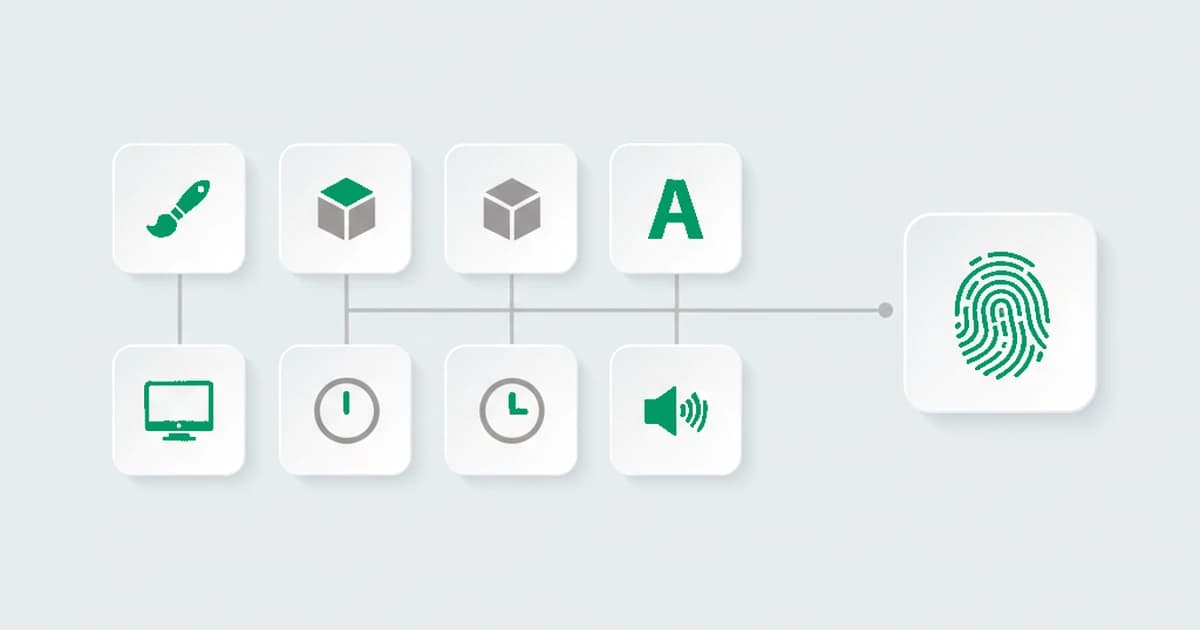
Browser fingerprinting recognizes a browser and the visitor behind it by combining the technical attributes a browser already exposes, things like canvas rendering, installed fonts, screen size, and time zone, into a distinctive signature, without setting a cookie. It is the foundation of broader device intelligence: the browser layer is the part of device fingerprinting that supplies the most distinctive detail. The technique remains in wide use: a 2025 study tracking real browsing sessions found fingerprinting scripts active across thousands of top-ranked sites. Two laptops bought the same day render the same canvas test image with measurable pixel-level differences, because their GPUs and fonts diverge. The technique is neutral plumbing: the same signals can power invasive ad tracking or legitimate fraud prevention, and the difference is in what you collect and why.
Key takeaways
- A browser fingerprint is derived fresh on each visit from properties the browser and device reveal, so it works without a cookie and survives clearing because the identifier is derived from the browser and device, not stored. Durable recognition is strongest at the device level, where the signature is computed from the machine rather than from anything the browser keeps.
- Distinctiveness comes from stacking signals: no single attribute identifies anyone, but combine enough moderately distinctive attributes and the joined signature becomes effectively unique.
- Canvas, WebGL, audio, and font enumeration are the most distinctive active methods; user agent, time zone, IP, and TLS are the lower-detail passive ones, each covered in this breakdown of browser fingerprinting techniques.
- Fingerprinting is dual-use. The same signals serve cross-site ad tracking, which faces strict legal scrutiny, and first-party fraud prevention, which sits on firmer ground.
What is browser fingerprinting?
Browser fingerprinting is the practice of collecting a set of technical attributes exposed by a browser and device, then combining them into a signature distinctive enough to recognize that browser and the visitor behind it on a later visit. Unlike a cookie, the signature is not stored on the user's machine. It is derived fresh each time from properties the browser already reveals: rendering behavior, hardware characteristics, network details, and configuration. The browser layer is the foundation of broader device fingerprinting, supplying the most distinctive detail.
The technique rests on a single idea: each attribute a browser reveals carries enough distinguishing detail to narrow the field of possible devices. A common screen resolution narrows it very little. A rare combination of installed fonts, an unusual GPU, and a non-default time zone together narrow it a lot. Stack enough of these moderately distinctive attributes and the combined signature becomes effectively unique, even though no single attribute identifies anyone on its own.
That dual-use nature matters. Fingerprinting is neutral plumbing: the same technique can power invasive ad tracking or legitimate fraud prevention. The difference is in what you collect and why. Cross-site behavioral tracking assembles a profile of a person across the web. First-party fraud prevention reads device and network signals on one site to recognize returning visitors and flag the risk signals behind which abuse hides, without collecting names, email addresses, or payment data.
Browser fingerprinting vs device fingerprinting
Browser fingerprinting and device fingerprinting overlap but are not the same. Browser fingerprinting reads signals the browser exposes (canvas, fonts, user agent, WebGL), so it recognizes a browser instance and can shift when someone switches or updates browsers. Device fingerprinting aims at the machine underneath, combining those browser signals with more stable hardware and network traits to recognize the same physical device even across different browsers or after a reset. In practice the two run together: browser fingerprinting is the foundation that supplies the most distinctive detail, and the device layer supplies persistence.
How does browser fingerprinting work?
Browser fingerprinting works by assembling many small signals into one identifier. A script reads a browser's technical attributes in milliseconds through standard web APIs the browser already exposes to every site, then combines the most distinctive ones into a signature precise enough to recognize the same browser and device on a later visit. The most informative categories:
Canvas fingerprinting. The browser draws hidden text and shapes to an HTML5 canvas; tiny GPU, driver, and font-rasterization differences make the output stable for one device but distinct across machines.
WebGL fingerprinting. WebGL exposes the GPU more directly through its renderer string and a rendered 3D scene, so different graphics stacks return measurably different output.
Audio context fingerprinting. The Web Audio API reads how the device's audio stack processes a generated waveform, a stable signal that needs no permission prompt.
Installed fonts. Measuring rendered text across many typefaces reveals the installed font set, a highly distinctive signal because fonts vary by OS, locale, and software.
Media-device enumeration. The browser can list the connected audio and video hardware, the speakers, microphones, and cameras present, and their set and labels vary machine to machine. Full enumeration usually needs the user to grant camera or microphone permission, so it works as a supporting signal rather than a primary one.
Screen and hardware. Resolution, color depth, pixel ratio, device memory, and CPU cores: individually common, collectively narrowing.
User-agent, time zone, language, and JS APIs. The declared browser and OS, time-zone offset, languages, and supported JavaScript APIs round out the picture with lower-detail passive reads.
Server-side, the request itself carries signal too: the IP address, the order of HTTP headers, and TLS characteristics. A robust fingerprint fuses these client and server categories into one identifier rather than treating any single attribute as definitive.
| Surface | What it reads |
|---|---|
| Canvas | Hidden text and shapes drawn to an HTML5 canvas, where tiny GPU, driver, and font-rasterization differences make the output distinct across machines |
| WebGL | The GPU more directly, through its renderer string and a rendered 3D scene |
| Audio context | How the device's audio stack processes a generated waveform, with no permission prompt |
| Installed fonts | The installed font set, measured across many typefaces, highly distinctive because fonts vary by OS, locale, and software |
| Screen and hardware | Resolution, color depth, pixel ratio, device memory, and CPU cores, individually common but collectively narrowing |
Active vs passive fingerprinting
Browser fingerprinting splits into two families. Passive fingerprinting reads only what the device sends without being asked, like the user agent, header ordering, IP address, and TLS handshake details. Active fingerprinting runs code in the browser to probe deeper, like the canvas, WebGL, and audio tests, font enumeration, and API checks. The two differ in trace, distinguishing detail, and how easily each is faked.
- Passive: requires no JavaScript and leaves almost no trace, but it carries less distinguishing detail and is easier to spoof, since the device only has to claim a configuration.
- Active: far more distinctive, because it measures how the actual hardware and software behave rather than what they claim to be, which is much harder to fake convincingly.
The gap between the two is where evasion lives, and where detection earns its keep. A device can declare one configuration in its passive signals while behaving like another under active probing. Those contradictions are the strongest tell that something has been tampered with.
How unique is a browser fingerprint?
Unique enough to be a real identifier for a large share of devices, though how unique depends on the population. The EFF's 2010 Panopticlick study, published in that year's Privacy Enhancing Technologies Symposium proceedings, found 83.6 percent of tested browsers unique within the sample, the result that first put fingerprinting on the map. Later large-scale work adds nuance: on big, mobile-inclusive samples many phones look alike, so overall uniqueness is lower, while desktop browsers stay highly distinctive. The AmIUnique project reached comparable conclusions on a modern dataset, finding canvas and WebGL among the most distinctive attributes, and a 2024 study at The Web Conference re-measured how much distinguishing detail fingerprints carry across tens of millions of real Chrome browsers.
The number that matters is how much identifying information a fingerprint carries, measured in bits. The EFF's Panopticlick data showed at least 18.1 bits of identifying information in a typical fingerprint, enough, in principle, to single out one browser among hundreds of thousands. No single attribute reaches that on its own; the distinctiveness comes from the combination. That is also why removing one signal rarely helps a user hide: the remaining attributes still combine into something rare.
A fingerprint also has to be stable, not just unique, and the two goals pull against each other. The more attributes you fold in, the more distinctive the signature, but also the more likely one of them shifts: a browser update rewrites the user agent, a new font changes the set, so a naive exact-match fingerprint breaks and the returning device looks new. Reliable recognition leans on the most stable, most distinctive signals and tolerates small drifts, which is what separates an identifier that persists across updates from a brittle one that resets every week.
How do websites detect and recognize a fingerprint?
Websites recognize a returning fingerprint by reducing the collected attributes to a compact signature, then matching that signature against ones they have seen before. Because a real device changes slowly, the match has to tolerate small drifts rather than demand an identical hit. The steps that turn raw signals into recognition:
- Hashing into a signature: the most distinctive attributes are combined and hashed into a compact identifier that stands in for the full attribute set.
- Matching with tolerance: an exact-match hash breaks the moment one attribute changes, so robust recognition uses fuzzy or weighted matching that still links a fingerprint when a font is added or the browser updates.
- Weighting by distinctiveness and stability: distinctive, stable attributes like canvas, WebGL, and fonts count for more than common or volatile ones, so the match leans on the signals least likely to change.
- Linking across sessions: a matched signature ties a "new" visit back to a device seen before, even after cookies are cleared or the IP rotates.
- Confidence, not certainty: recognition is probabilistic, so the output is a match confidence, and a weak match is treated as a new device rather than forced onto an existing one.
The throughline: recognition is matching under drift, not a single exact lookup. The work is staying locked onto the same device as its fingerprint shifts from week to week, without merging two different devices that happen to look alike.
How does a browser fingerprint become a decision?
A fingerprint becomes useful only when detection turns the raw signals into something a team can act on. Collecting attributes is the easy half; deciding what they mean is the half that prevents abuse. Detection typically derives three things from the signals above:
- A stable device identifier: many datapoints are fused into an identifier that persists across sessions, cleared cookies, and rotated IPs, and holds even when a visitor signs up under a fresh email.
- Tamper and anti-detect signals: when the active fingerprint contradicts the passive signals, like a browser claiming one OS but rendering like another, that mismatch is the tell, with no need to recognize the specific evasion tool.
- A risk score with named reasons: each visit gets a score from 0-100 alongside the list of signals that fired, so the team sees the reasoning behind the result and chooses the action for each case.
That explainability is what teams miss in black-box tools: a score with no named reasons behind it is hard to act on or defend, and it often pushes teams to rebuild detection logic in-house just to understand a verdict.
The throughline: the value is not the fingerprint itself but the named, explainable signals attached to it, so teams see the reasoning, not just a number. A device-level identifier ties a visit to the machine behind the browser, holding through a cleared cookie or a rotated IP; it deliberately does not claim to follow a person from a phone to a separate laptop.
Countermeasures, and how detection survives them
Countermeasures against browser fingerprinting fall into three buckets: privacy browsers that standardize or randomize the fingerprint, anti-detect browsers that spoof a fresh fingerprint per profile, and network masking that hides the IP. Each reduces tracking, yet each also introduces a new inconsistency that consistency-based detection reads as its own signal. What each one does to detection:
Privacy browsers and randomization. Tor Browser standardizes its fingerprint so users look alike; Brave and Firefox randomize canvas and audio readings per session. These genuinely raise the cost of tracking individuals. But uniform or randomized fingerprints are themselves a signal: a browser that returns a different canvas hash on every page load is exhibiting behavior real Chrome does not. When we tested browsers running randomized canvas and audio readings, this was exactly the pattern that surfaced: a genuine device returned the same canvas hash on every read, while a randomizing browser returned a fresh value each time. Brave shipped this kind of per-session canvas randomization in 2020, and a session whose canvas never repeats stands out against the stable output real Chrome produces.
Anti-detect browsers. These tools let one user run dozens of isolated profiles, each spoofing a different fingerprint, to make many accounts look like many people. They are the heavy artillery of Multi-accounting, and the mismatches they leave behind are what ShieldLabs detects directly. The catch: spoofing every layer consistently is hard. The declared OS, the rendered fonts, the network origin, and the time zone have to agree, and they frequently don't, which is exactly what anti-detect browser detection looks for.
Network masking. VPNs, proxies, Tor exit nodes, and Privacy Relay hide the real IP. A detection layer can flag each as a named risk signal and cross-check IP geolocation against the device's declared time zone and language, surfacing geolocation spoofing when they conflict.
The throughline: every countermeasure that hides one signal tends to introduce another inconsistency. Detection that scores the coherence of the whole profile, rather than trusting any single attribute, survives evasion that defeats naive fingerprint matching.
Is browser fingerprinting legal? Privacy considerations
Fingerprinting sits inside data-protection law because a sufficiently distinctive fingerprint can, in some contexts, function as an online identifier. The EU's ePrivacy guidance from the European Data Protection Board treats device fingerprinting much like cookies for consent purposes when it is used to single out or track individuals, and the EFF maintains an overview of how fingerprinting undermines privacy controls. The legal picture turns on purpose and data: invasive cross-site ad tracking faces strict scrutiny; narrowly scoped fraud prevention on a first-party basis sits on firmer ground. Under the GDPR, that fraud-prevention use is usually grounded in legitimate interest rather than consent, and the CCPA likewise treats security and fraud prevention differently from the sale of personal information.
The firmer-ground version collects technical signals only, device, browser, OS, IP, and network attributes, and pairs them with a risk score. It recognizes a device at the device level rather than a named person, and the user stores the data in its own backend and controls retention. That posture is a design choice, and it sits alongside KYC or AML, which verify identity documents for a separate purpose.
Recognizing returning visitors with ShieldLabs
ShieldLabs recognizes returning visitors from one JavaScript snippet that fingerprints every visitor in about five minutes, and owns the matching logic that keeps recognition accurate as browsers update, privacy tools randomize, and a fingerprint drifts from week to week, so your team gets the result without building and maintaining that logic.
From those signals it derives a persistent, device-anchored visitor identifier, built on device intelligence: because the recognition is read from the device rather than stored in a cookie, it holds steady when a visitor clears cookies, switches networks, or returns days later, so a session that looks new is tied back to the device you already know rather than counted twice. It also resolves the browser, device type, and operating system behind each visit, so you see what a returning visitor is running, not just that they came back.
Each visit also returns a risk score that weighs how consistently the fingerprint describes one real device, and surfaces the risk signals a visitor uses to hide, so a spoofed or masked profile stands apart from a genuine returning one.
The identifier, score, and signals reach your stack through an API and webhooks, so your team acts on the result in its own flow and chooses the action for each returning or suspicious visitor.
Sources
- EFF: Cover Your Tracks (formerly Panopticlick)
- AmIUnique research project
- W3C: Mitigating Browser Fingerprinting in Web Specifications
- MDN: Canvas API
- Wikipedia: Device fingerprint
Frequently asked questions
- Can JavaScript alone build a reliable browser fingerprint?
- JavaScript reads the most distinctive attributes, canvas, WebGL, audio, fonts, and screen, but the strongest evidence about whether a device is lying sits at the network and transport layer that page scripts cannot reach. A fingerprint built from browser-side reads alone is distinctive yet easier to spoof, so reliable detection pairs it with server-side signals and scores how well the whole picture agrees. The honest answer is partly, but not on its own.
- Is browser fingerprinting the same as bot detection?
- Browser fingerprinting and bot detection overlap but are not the same. Bot detection flags automation, like headless browsers or scripted input. Fingerprinting recognizes a specific device across visits, and the detection built on top of it flags when that device's signals can contradict each other. A session can pass a bot check and still be a returning device wearing a fresh fingerprint, so the two work best together, each covering what the other misses.
- Does a tampered or randomized fingerprint always mean fraud?
- A tampered or randomized fingerprint does not always mean fraud. Privacy browsers, QA environments, and privacy-conscious users all produce fingerprints that look unusual without any abuse behind them, so an inconsistency is one risk input to weigh with the rest. The value is context: telling a one-off unusual session apart from a coordinated pattern across accounts, then choosing the action for each case.
- How reliable is fingerprint-based recognition against residential proxies and rotated IPs?
- More reliable than IP-based methods, because the device signals do not move when the IP does. A residential proxy or a rotated IP changes the network origin, but the canvas, WebGL, audio, and font reads still describe the same underlying hardware, so a returning device is recognizable even from a fresh IP. The proxy itself becomes its own signal: a residential or datacenter classification that detection cross-checks against the device, rather than a way to disappear.
- Is there a browser fingerprinting API?
- ShieldLabs exposes a JavaScript snippet that runs in the browser and an API plus webhooks that return a device identifier, a risk score, and the signals that fired for each visit. Integration takes about five minutes: drop in the snippet, and signals appear on live traffic. The developer documentation covers the response shape.
- Does ShieldLabs collect personal data when fingerprinting?
- ShieldLabs reads technical device, browser, OS, IP, and network signals only, no names, emails, phone numbers, or payment data. The result recognizes a device and assigns a risk score at the device level. ShieldLabs focuses on device recognition and risk scoring, while identity-document checks like KYC or AML stay with dedicated identity-verification providers.
Related articles
Fingerprinting vs Cookies: Key Differences for Fraud Teams
How cookies differ from server-side fingerprinting, why many cookieless claims mislead, and practical steps for developers and fraud teams.

What was Google's Privacy Sandbox, and why did it end in 2025?
Google retired the Privacy Sandbox in October 2025 and third-party cookies are staying in Chrome. What it was, why it ended, and what it means for fraud.

How to detect anti-fingerprint browsers (2026)
Anti-fingerprint browsers spoof canvas, WebGL, fonts, and TLS to break recognition. How to detect them in 2026, and the tells they leave behind.