

Headless Browser Detection Before JS Runs: JA4 for Dev & Security


Last updated on September 23, 2026 · 18 min read
Headless browsers are detectable with high confidence when independent signals line up. A mismatched TLS/JA4 fingerprint, a SwiftShader-rendered canvas hash, and a lingering CDP artifact rarely occur together in a genuine session. No single check is reliable on its own, which is why the right approach treats detection as evidence, aggregated into a risk score, rather than a pass/fail gate on any one property.
TL;DR:
- Combining network fingerprints, JavaScript checks, and CDP artifacts offers the most reliable detection of headless browsers with minimal false positives.
- WebGL renderer strings, especially those indicating software rendering like SwiftShader, are among the strongest signals for headless sessions.
- Behavioral patterns such as uniform request animation frame intervals and unnatural mouse movements help distinguish bots from human users over time.
- Network fingerprints like JA4 TLS and HTTP/2 frame ordering detect automation before scripts load, making them high-confidence early signals.
- Using a risk score that aggregates multiple signals helps prevent false positives, allowing proportionate responses based on the overall confidence level.
What Layers Produce the Strongest Headless Browser Detection Signals?
Every automated session leaks evidence at several distinct layers, and knowing where each signal originates changes how much you should trust it. Network fingerprints arrive before a single line of page JavaScript executes. Runtime properties and rendering artifacts show up only once the page loads. Behavioral signals accumulate over the course of a session.
Grouping checks this way matters because some are passive and server-side, while others require active in-page instrumentation:
- Pre-render network layer: TLS client hello structure, HTTP/2 frame ordering, and connection metadata, all collectible before rendering starts.
- JavaScript runtime layer: navigator properties, permissions, plugin lists, and client hints.
- Rendering and GPU layer: WebGL renderer strings and canvas output.
- Control-channel layer: residue left by the Chrome DevTools Protocol and similar automation interfaces.
- Behavioral layer: timing cadence, mouse and scroll entropy, and interaction patterns over time.
A session that fails one check in isolation might just be a privacy-hardened browser or an unusual configuration. A session that fails checks across three or four layers simultaneously is a much stronger case. Layering checks this way is also what keeps false positives down, since no individual signal has to carry the full weight of a decision.
Why Do JavaScript-Level Checks and Navigator Properties Still Matter?
navigator.webdriver is the oldest and most obvious tell in automated browsing sessions. WebDriver-controlled sessions set this flag to true by default, and while stealth plugins routinely patch it to false or delete it, the patch itself often becomes the giveaway. A genuine Chrome property has a native getter defined on Navigator.prototype. A patched one frequently shows up as an own property on the instance, or a getter whose toString() output doesn't match V8's native function signature.
That distinction is checkable directly:
- Compare
Object.getOwnPropertyDescriptor(Navigator.prototype, 'webdriver')against what you'd expect from a stock browser build. - Call
navigator.webdriver.toString.toString()and check whether it returns"function toString() { [native code] }"or something a patch script generated. - Walk the prototype chain with
Object.getPrototypeOf()to confirm the property lives where it should, not injected further down the chain.
Beyond the webdriver flag, plugin and MIME-type lists are worth checking for internal consistency. A real Chrome installation reports a specific, small set of built-in plugins (PDF viewer entries, primarily) with matching MIME types. Headless configurations frequently report an empty plugin array, or a mismatched one that doesn't correspond to the reported Chrome version.
Client hints add another contradiction surface. Compare the legacy navigator.userAgent string against navigator.userAgentData (where available) and against feature detection results. A user agent claiming Chrome 120 on Windows that lacks expected Windows-specific font rendering or codec support is inconsistent in a way that's cheap to catch and expensive to fully patch. Language and locale mismatches between navigator.languages, the Accept-Language header, and Intl.DateTimeFormat().resolvedOptions().timeZone round out the picture.
How Do CDP Artifacts Reveal Automation After JS Patches?
The Chrome DevTools Protocol is what tools like Puppeteer and Playwright use to drive a browser, and it leaves marks that survive most JavaScript-level stealth patching. This matters because a growing share of anti-detection tooling focuses entirely on faking navigator properties while leaving the control channel untouched.
Common CDP residue includes:
- Injected global variables left behind by automation frameworks, sometimes named predictably (
__playwright,__puppeteer, or similar patterns depending on the tool version). - Stack traces that reference CDP-internal frames rather than a clean native call path when errors are thrown deliberately inside a probe function.
- Event-listener counts or ordering that differ from a human-driven session, since CDP commands often attach or manipulate listeners as a side effect.
The most resilient of these signals is timing jitter. Every CDP command is a round trip between the controlling process and the browser, and that round trip introduces latency that doesn't exist in native user interaction. CDP roundtrips and their control-channel residue are difficult to eliminate entirely, even in sessions where every obvious JS flag has been scrubbed.
Pro Tip: Measure the delay between dispatching a synthetic requestAnimationFrame callback and its execution across several hundred frames. A CDP-driven session shows a measurably different jitter distribution than a native render loop, even when every navigator property looks clean.
Do WebGL Renderer Strings Really Expose Headless Sessions?
Yes, and it's one of the highest-confidence checks available. Headless environments frequently lack access to real GPU hardware, so they fall back to software rendering, most commonly Google's SwiftShader implementation. That fallback is visible directly through the WebGL API.
Here's how to read it:
- Get a WebGL context and call
getExtension('WEBGL_debug_renderer_info'). - Query
gl.getParameter(debugInfo.UNMASKED_RENDERER_WEBGL)and inspect the returned string. - Flag strings containing "SwiftShader," "llvmpipe," or other known software-rendering identifiers, since real consumer hardware almost never reports these.
WebGL rendering anomalies tied to software renderers are among the most reliable headless indicators available, largely because faking a convincing GPU renderer string while actually running on software rendering requires spoofing the entire rendering pipeline, not just one string value.
Canvas fingerprinting adds a second layer of confidence on top of the renderer string. When you draw the same shapes, text, and gradients to a canvas element and hash the pixel output, software renderers tend to produce hashes that cluster tightly together across different machines, because they're all running the same rendering math instead of real, varied GPU hardware. A deeper look at how WebGL fingerprinting works covers the hashing approach in more detail. Pairing the canvas hash with frame-timing measurements, since software rendering tends to produce more uniform frame times than hardware acceleration, cuts down on false positives from legitimate low-end devices.
What Timing and Behavioral Signals Separate Bots From People?
Rendering and network checks catch a lot, but timing and interaction patterns catch what's left. The core idea is that human interaction with a page has irregularities that scripted interaction doesn't bother to fake, because faking them convincingly is expensive.
Useful signals in this category:
- requestAnimationFrame cadence: capture a sequence of
performance.now()timestamps across consecutive rAF callbacks; native rendering loops show natural variance tied to display refresh rate, while some automation frameworks show suspiciously uniform intervals. - Mouse movement entropy: real cursor paths have acceleration curves and micro-corrections; synthetic mouse events dispatched via CDP or
dispatchEventtend to move in straight lines or teleport between coordinates. - Scroll behavior: genuine scrolling has variable velocity and momentum; programmatic scrolling often jumps to exact pixel offsets instantly.
- Interaction timing relative to page load: a click registering within milliseconds of DOM ready is far more common in scripts than in people.
The key design decision is window length. Short-window checks (a few seconds) catch obvious automation fast but produce more false positives from legitimate power users or accessibility tooling. Longer-window checks, aggregated over a full session, are more accurate but slower to act on. Most production setups run both: a fast heuristic for early flagging, and a longer behavioral profile that adjusts the risk score as more data accumulates.
How Do TLS and HTTP/2 Fingerprints Catch Bots Before JS Runs?
Network-level fingerprinting catches automation before a single page script executes, which makes it one of the most valuable early-warning signals available. The two most useful techniques here are JA3/JA4 TLS fingerprinting and HTTP/2 frame-level analysis.
- JA3/JA4 fingerprints are derived from the TLS ClientHello message: the cipher suites offered, extensions included, and their ordering. TLS and HTTP/2 settings are critical pre-rendering signals that expose mismatches between a claimed User-Agent and the actual network stack. A request claiming to be Chrome 120 but presenting a ClientHello structure that matches Python's
requestslibrary or a headless Chromium build with a stripped-down cipher list is lying somewhere, and JA4 makes that mismatch easier to catch than its predecessor. A closer look at JA4 fingerprinting and how it improves on JA3 explains the underlying structure. - HTTP/2 frame ordering and SETTINGS values offer a second, independent check. Real browsers send SETTINGS frames in a specific, engine-determined order with particular initial values for window size and header table size. Many scripting libraries and headless configurations use HTTP/2 implementations with different defaults, and that difference is visible at the frame level without touching application content.
Both techniques share a critical advantage: they operate underneath naive user-agent spoofing entirely. Changing the User-Agent header is trivial. Reproducing an authentic browser's exact TLS handshake and HTTP/2 settings profile requires either running that actual browser engine or a purpose-built TLS stack that mimics it precisely, which is a meaningfully higher bar. Background on how TLS fingerprinting and JA3/JA4 work covers the collection method in more depth.
Pro Tip: Log JA4 fingerprints server-side alongside the User-Agent header for every request during a testing window, then flag any User-Agent that maps to more than one distinct JA4 value across your traffic. Legitimate browser versions produce a narrow, predictable set of fingerprints; scripted traffic often doesn't.
Where Do Codec, Permission, and Font Checks Catch Impersonation?
Capability mismatches are cheap contradiction checks that catch impersonation attempts that got the obvious properties right but missed the details underneath.
HTMLMediaElement.canPlayType()returns different codec support depending on the actual browser build and OS. A session claiming to be Chrome on Windows that reports unusual codec support (or none) for formats Chrome handles natively is inconsistent with its own claimed identity.- The Permissions API (
navigator.permissions.query()) should behave logically: querying camera or microphone permission on a headless session with no media devices attached often returns states that don't match what a real device with those peripherals would report. - Font enumeration and glyph rendering differ subtly across operating systems and browser builds. A page that measures text rendering width for a specific font list can catch a session claiming macOS while rendering fonts consistent with a Linux container, which is exactly the kind of environment many headless deployments run in.
None of these checks are decisive alone, but each adds one more contradiction to a growing case.
How Should You Test and Validate Detection Signals?
Building detection logic without a repeatable test harness is a good way to ship checks that either miss real automation or flag legitimate users. A structured validation process avoids both failure modes.
- Build a local comparison harness. Run the same page against a real headed browser and its headless counterpart (Puppeteer, Playwright, Selenium) on identical hardware, and log every signal side by side: canvas hash,
UNMASKED_RENDERER_WEBGLvalue, navigator descriptors, and TLS fingerprint. - Correlate network and JS-layer signals server-side. Since JA4 fingerprints arrive before any page script runs, tag each session server-side at connection time, then join that tag against the JS-layer signals captured later in the request lifecycle to build a labeled dataset.
- Maintain a regression suite. Testing both headed and headless runs while capturing canvas hashes, renderer strings, and TLS fingerprints gives you a baseline to re-run whenever a browser engine or automation library updates, since minor version bumps regularly shift these values.
- Keep dataset hygiene tight. Separate true positives, false positives, and ambiguous cases explicitly, and re-evaluate thresholds against fresh traffic on a fixed schedule rather than assuming static thresholds age well.
How Do You Turn Signals Into a Risk Score and a Response?
Blocking on any single failed check is a fast way to lock out legitimate users running privacy tools, unusual hardware, or accessibility software. A risk score built from multiple independent signals reduces false positives compared with treating any one check as a binary gate.
Practical patterns worth building into your rules:
- Weight network-layer and rendering-layer signals more heavily than any single JS property, since they're harder to spoof convincingly.
- Use graduated responses tied to score bands: passive monitoring at low risk, silent friction (extra verification steps, slower response times) at medium risk, and hard challenges or manual review only at high risk.
- Log which specific checks fired and their raw values, not just a final score, so the rule can be audited and re-tuned later.
- Revisit thresholds regularly against fresh traffic, since automation tooling and stealth patches evolve continuously.
Pro Tip: Never let a single high-weight signal override the aggregate score in isolation. A legitimate user on a locked-down corporate browser can trip one or two checks; a real automated session trips several at once. The pattern across signals is what should drive the response, not any one flag.
How Does a Fraud Detection Platform Turn Raw Signals Into a Score?
A detection layer built specifically for this problem consolidates the checks above into a single, explainable output instead of leaving every team to build and maintain its own signal collection pipeline from scratch. ShieldLabs collects 300+ device and network signals per visit and returns them alongside a risk score rather than a black-box verdict.
The relevant signal categories map directly onto what's covered here:
- Network-layer signals, including TLS/JA4 fingerprints and connection metadata, surfaced through network intelligence.
- Device and runtime signals, covering rendering artifacts, navigator inconsistencies, and automation residue, surfaced through device intelligence.
- Persistent identification logic that recognizes a returning device across sessions even when cookies are cleared or IPs rotate.
Integration follows a two-part model: a JavaScript snippet collects client-side signals, and a server-side SDK (available for Node.js, Python, Go, and PHP) returns the risk score and signals to your backend. You choose the action for each case: review a session in the Suspicious band (30–59), or require stronger proof of identity in the Dangerous band (60–100), with the score and its underlying signals always visible rather than hidden inside an opaque decision.
That auditability matters for tuning over time. Every score arrives with the specific signals that produced it, so a team can trace a false positive back to the exact check that fired and adjust from there instead of guessing at what changed.
What Are the Ethical Limits of Headless Browser Detection?
Detection logic touches the same signals used for legitimate accessibility tooling, automated testing, and privacy-conscious browsing, which makes proportionality a real design constraint, not an afterthought.
Automated testing frameworks, uptime monitors, and accessibility tools running headless browsers are not fraud. A detection system that treats every headless signal as hostile will flag QA pipelines, monitoring services, and screen-reader-adjacent tooling right alongside scraping bots and account takeover attempts. Building in an allowlist path for known-good automated traffic, verified through means other than the browser signals themselves, avoids that collateral damage.
Privacy is the second constraint. Canvas fingerprinting, WebGL renderer queries, and behavioral tracking are the same techniques used for cross-site tracking, and running them without any disclosure invites both regulatory scrutiny and reasonable user objection. Collecting these signals for fraud and abuse prevention is a different purpose than ad tracking, and that distinction should show up in how the data is retained, who can access it, and how long it's kept, not just in a privacy policy nobody reads.
Proportional response matters as much as accurate detection. A medium-confidence signal should trigger a step-up in friction, not an automatic ban. Reserving hard blocks for high-confidence, multi-signal cases keeps the false-positive cost low, and keeps the system defensible if a legitimate user ever asks why they were flagged.
Where Does Headless Browser Detection Actually Get Used?
The theory matters, but the operational value shows up in specific, recurring scenarios across industries.
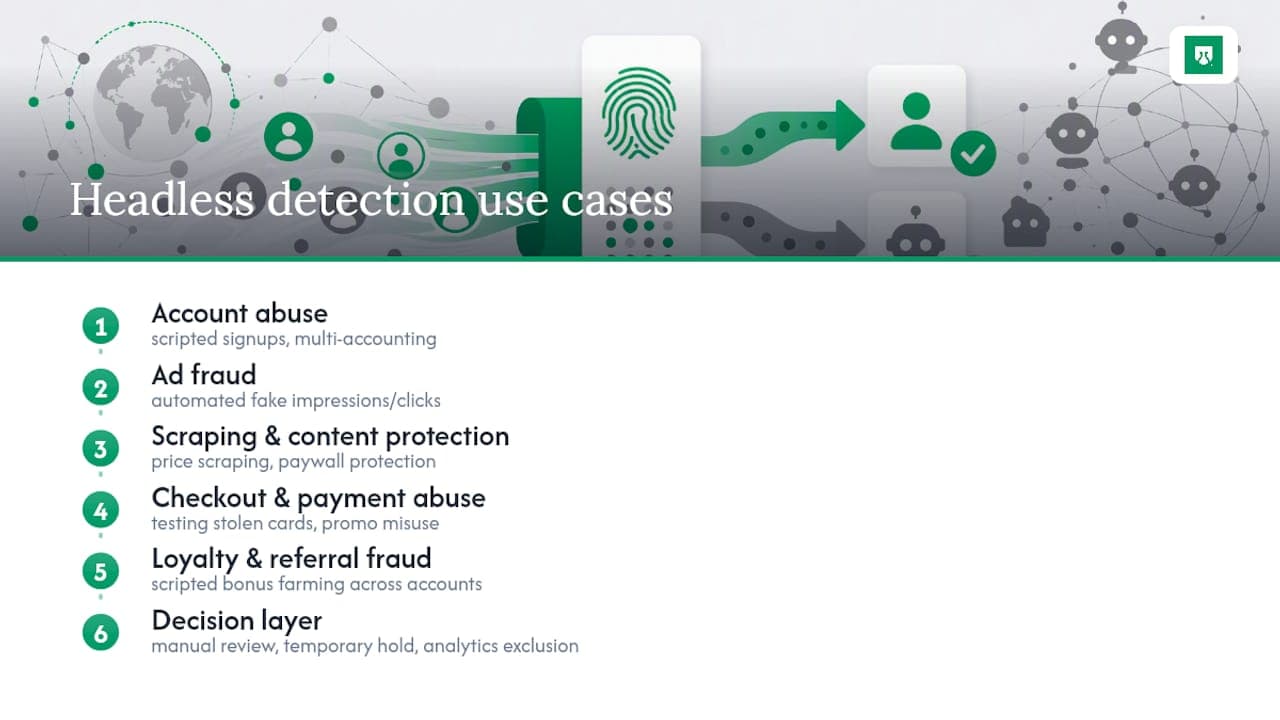
Account abuse prevention. Free-trial abuse and multi-accounting schemes frequently rely on scripted signups run through headless browsers to create dozens or hundreds of accounts quickly. Network and rendering signals catch the automation layer even when each account uses a different email and IP.
Ad fraud detection. Automated traffic generating fake ad impressions or clicks is a persistent problem for publishers and ad networks, and headless browsers are a common tool for generating that traffic at scale because they're cheap to run in bulk on cloud infrastructure.
Scraping and content protection. E-commerce sites monitoring for competitor price scraping, and media sites protecting paywalled content, both rely on the same layered signals to distinguish scripted scraping tools from real visitors browsing normally.
Checkout and payment flows. Fintech and e-commerce platforms watch for headless sessions attempting to test stolen card numbers or exploit promo codes at volume, since manual testing at that speed isn't feasible for a person.
Loyalty and referral programs. Gaming and iGaming platforms in particular see scripted sessions farming referral bonuses or loyalty points across large numbers of fabricated accounts, often behind the same connection.
In every one of these cases, the detection layer flags the risky session, and you choose the action for each case, whether that's a manual review queue, a temporary hold, or simply excluding that traffic from analytics.
Which Automation Frameworks Are Easiest to Detect?
Not all automation tools leave the same footprint, and the differences matter when you're deciding where to focus detection effort.
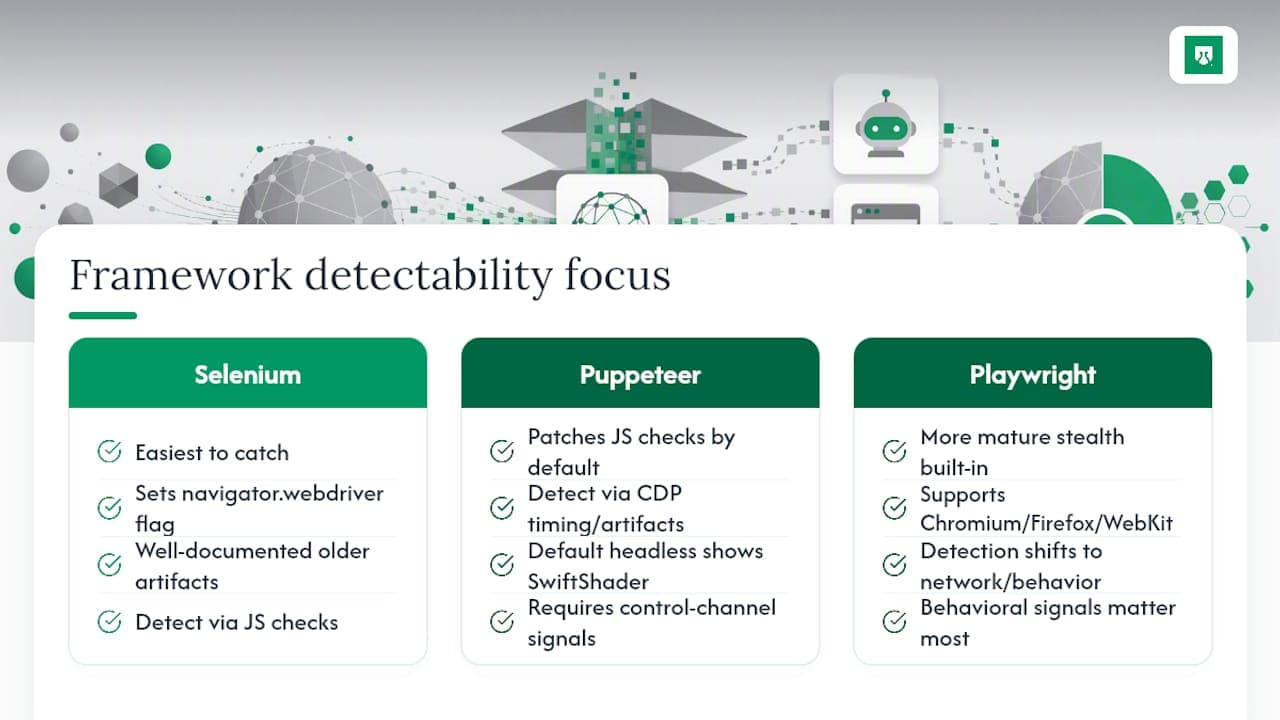
Selenium tends to be the easiest to catch. Its WebDriver protocol implementation sets navigator.webdriver reliably, and older Selenium versions in particular leave characteristic artifacts that detection scripts have targeted for years, making it a well-documented baseline case.
Puppeteer, which drives Chromium directly through CDP, patches many JS-level checks more thoroughly out of the box, but that's precisely why CDP-layer timing and control-channel artifacts matter more for catching it. Its default headless mode also tends to surface SwiftShader rendering unless specifically configured otherwise.
Playwright supports multiple browser engines (Chromium, Firefox, WebKit) and has more mature built-in stealth behavior than either of the other two by default, which pushes detection further toward network fingerprints and behavioral signals rather than obvious JS properties.
None of these frameworks is inherently more or less "detectable" in some fixed sense; detectability depends heavily on configuration, the stealth plugins layered on top, and which signal categories a given detection setup actually checks. A team relying solely on navigator.webdriver will catch unmodified Selenium easily and miss a well-configured Playwright session entirely. A team combining network fingerprints, rendering checks, and CDP timing analysis closes most of that gap regardless of which framework is driving the browser underneath.
Framework-specific evidence deserves its own validation. The Selenium detection playbook groups automation signals so a legitimate test runner is not judged by one patched browser property.
Practical trade-offs when treating headless signals as evidence
Every detection rule trades sensitivity against user impact, and there's no threshold that eliminates that trade-off entirely. Push too aggressively on any single signal and you'll catch privacy-conscious users, QA pipelines, and accessibility tooling alongside real abuse. Tune too conservatively and scripted traffic slips through untouched.
The practical answer is iteration, not a perfect starting configuration. Run new checks in a monitoring-only mode before they ever affect a live decision, watch what they flag, and adjust weights against real traffic before tightening enforcement. Detection signals age, too, as browser engines and automation libraries update, so a rule set that worked well six months ago deserves a second look now.
Yahor Papou, CMO at ShieldLabs
Get the Signals and Risk Score Without Building the Detection Stack
Building and maintaining every check covered here, TLS fingerprinting, WebGL analysis, CDP timing, behavioral profiling, is a real engineering investment most teams don't have the bandwidth to sustain long term. A detection platform can collect 300+ device and network signals per visit, including anti-detect browser detection and automated browser traffic, and return them alongside a risk score, so you choose the action for each case. Scores split traffic into three bands, Trusted (0–29), Suspicious (30–59) and Dangerous (60–100), with the specific signals behind each score fully visible rather than hidden in a black box.
Setup can run through a JavaScript snippet on the frontend and server-side SDKs for Node.js, Python, Go, and PHP, typically reaching a first signal within about five minutes. ShieldLabs offers a one-time free tier of 5,000 identifications with no card required, which can be enough room to test detection accuracy against your own traffic before committing to a paid plan. Start by exploring the identification product and running it against a real traffic sample.
Sources
Recommended
Related articles
7 Bot Detection Tools for Web Signup and Login
Compare seven bot detection tools across browser/device evidence, account behavior, edge mitigation and challenges, with current integration and plan checks.

7 CAPTCHA alternatives for 2026: stop abuse without blocking real users
The 7 best CAPTCHA alternatives for 2026, from silent device intelligence to invisible challenges, and how to stop abuse without blocking real users.

One Snippet, Five Minutes: Early Bot Detection for WordPress Sites
Cut bot damage on WordPress by detecting early, logging first, and tuning rules safely. Install one JS snippet in about five minutes.