

One Snippet, Five Minutes: Early Bot Detection for WordPress Sites

Last updated on September 14, 2026 · 18 min read
The fastest way to cut bot damage on WordPress is layered detection that identifies malicious automation through network, request, browser, and behavioral signals, then rejects it before WordPress fully initializes. Forward-confirmed reverse DNS (FCrDNS) verification protects legitimate crawlers while logs preserve evidence for every decision. A detection layer like Shieldlabs can supply the signals your team uses to block fraud, but the actual rejection happens in your own code, as early in the request as possible.
TL;DR:
- Layered detection combining network reputation, request anomalies, browser fingerprinting, and behavioral patterns is essential for accurately identifying bots on WordPress sites.
- Confirmed FCrDNS verification effectively distinguishes spoofed crawlers from legitimate search engine bots, preventing false positives.
- Implementing detection at the edge or server early-init reduces resource usage and blocks most malicious requests before WordPress loads, improving efficiency.
- Log-only monitoring during initial rollout helps avoid false positives and allows tuning detection thresholds based on real traffic data.
- Combining passive signals with active challenges, such as proof-of-work or CAPTCHA, enhances bot defense while minimizing friction for genuine visitors.
Table of Contents
- Why WordPress Attracts So Much Bot Traffic
- What Signals Actually Separate Bots From Humans?
- Where Should Bot Detection Run in Your Stack?
- A Practical Checklist for Detecting and Filtering Bots
- How to Tune Rules Without Blocking Real Visitors
- How a Detection Layer Extends WordPress Defenses
- What I'd Do First if I Were Triaging a Bot Problem Today
- Get Started With Shieldlabs for WordPress Traffic
- Sources
- FAQ
Why WordPress Attracts So Much Bot Traffic
WordPress runs a large share of the web, which makes its login screens, REST endpoints, and plugin ecosystem a predictable, well-documented target. Automated traffic does not need to guess how a WordPress site is built. The structure is public, the common weak points are cataloged, and the payoff for a successful script is often immediate: a foothold, a scraped catalog, or a stolen session.
Three endpoints draw a disproportionate share of abuse. wp-login.php gets hammered by credential-stuffing scripts that cycle through leaked password lists. xmlrpc.php, still enabled by default on many installs, lets attackers test hundreds of password combinations in a single HTTP request instead of one at a time, which makes it a favorite for brute-force amplification. The REST API, meanwhile, exposes user enumeration and content data that scrapers harvest for competitive intelligence or content theft.
The abuse that follows tends to fall into recognizable categories:
- Credential stuffing and brute-force login attempts against
wp-login.phpandxmlrpc.php, often run from botnets spread across thousands of residential IPs. - Content and price scraping, where automated clients pull product pages, blog posts, or pricing tables at a rate no human browsing could match.
- Vulnerability probing, systematic requests checking for outdated plugin versions, exposed config files, or known exploit paths.
- Comment and form spam, submitted at volume to plant backlinks or phishing content.
- Card testing, where fraud rings run stolen card numbers through checkout forms in small increments to find working cards before committing to a larger purchase.
The operational cost is easy to underestimate. Every one of these activities consumes server resources whether or not it succeeds, which means a shared or modestly provisioned host can slow down for legitimate visitors during an active scraping run. Analytics get distorted too. A traffic spike that looks like a marketing win can turn out to be a scraper loop, and spam submissions can bury a real lead in a flood of junk form entries. Keeping WordPress core, themes, and plugins updated, combined with unique credentials, remains the baseline defense that every other layer builds on.
What Signals Actually Separate Bots From Humans?
No single signal reliably separates a scraper from a shopper. The sites that get bot detection right combine several signal families into one risk score, rather than betting everything on a User-Agent string or an IP blocklist.
Network-level signals
IP reputation and Autonomous System Number (ASN) lookups are the first filter. Traffic originating from known datacenter ranges (AWS, DigitalOcean, OVH) is far more likely to be automated than traffic from residential or mobile ASNs, simply because most human visitors are not browsing from cloud infrastructure. Proxy, VPN, and Tor exit node detection adds another layer: none of these are inherently malicious, but an unusual concentration of checkout attempts from Tor exit nodes is a pattern worth scoring higher.
FCrDNS is the specific technique that keeps this from becoming a blunt instrument. The method works by taking the IP's reverse DNS (PTR) record, resolving that hostname forward, and confirming it matches the original IP. Search engines like Googlebot publish this relationship deliberately so site owners can verify a crawler's identity instead of trusting whatever the User-Agent header claims. A request claiming to be Googlebot that fails FCrDNS is almost certainly spoofed, and that distinction matters because blocking a real search crawler by mistake costs you organic visibility.
Header and request anomalies
User-Agent strings are trivial to fake, which is why relying on them alone leaves an obvious gap. Better signals come from the surrounding request context: missing or malformed Accept-Language headers, an absent Referer on a request that should have one, HTTP/1.0 requests from a client claiming to be a modern browser, or a TLS handshake fingerprint that does not match the claimed browser version. Combining UA with these secondary markers, rather than trusting UA in isolation, is the difference between catching spoofed crawlers and waving them through.
Browser-side signals
For traffic that executes JavaScript, fingerprinting adds a layer that server-side signals cannot reach. WebDriver detection flags automation frameworks like Selenium or Puppeteer, which expose telltale properties in the browser's JavaScript environment. Canvas and WebGL fingerprint mismatches (a screen resolution that does not match the reported device, or a font list inconsistent with the claimed operating system) point to spoofed or automated environments. Anti-detect browser detection has become a more specific need as automation tools have gotten better at mimicking real browser fingerprints, which is a topic worth understanding in more depth if your site handles logins or checkout.
Behavioral signals
Timing gives away more than most bot operators realize. A contact form filled out in 0.4 seconds was not typed by a person. A sequence of requests hitting every product page in numerical URL order, at a fixed interval, is a scraper on a schedule, not a browsing customer. Burst rate (dozens of requests per second from one session) and sequential probing across endpoints (/wp-admin, then /xmlrpc.php, then a plugin's known vulnerable path) both indicate reconnaissance rather than organic use.
Bot traffic can account for a significant share of total requests on unprotected WordPress sites, according to plugin data on automated login attempts and scraping patterns tracked across installs using honeypot and trap-URL detection.
Pro Tip: Don't score any single signal as a hard pass/fail. Weight network reputation, header anomalies, fingerprint mismatches, and behavioral patterns into one composite score, and only trigger a challenge or block once that combined score crosses a threshold you have validated against real traffic.
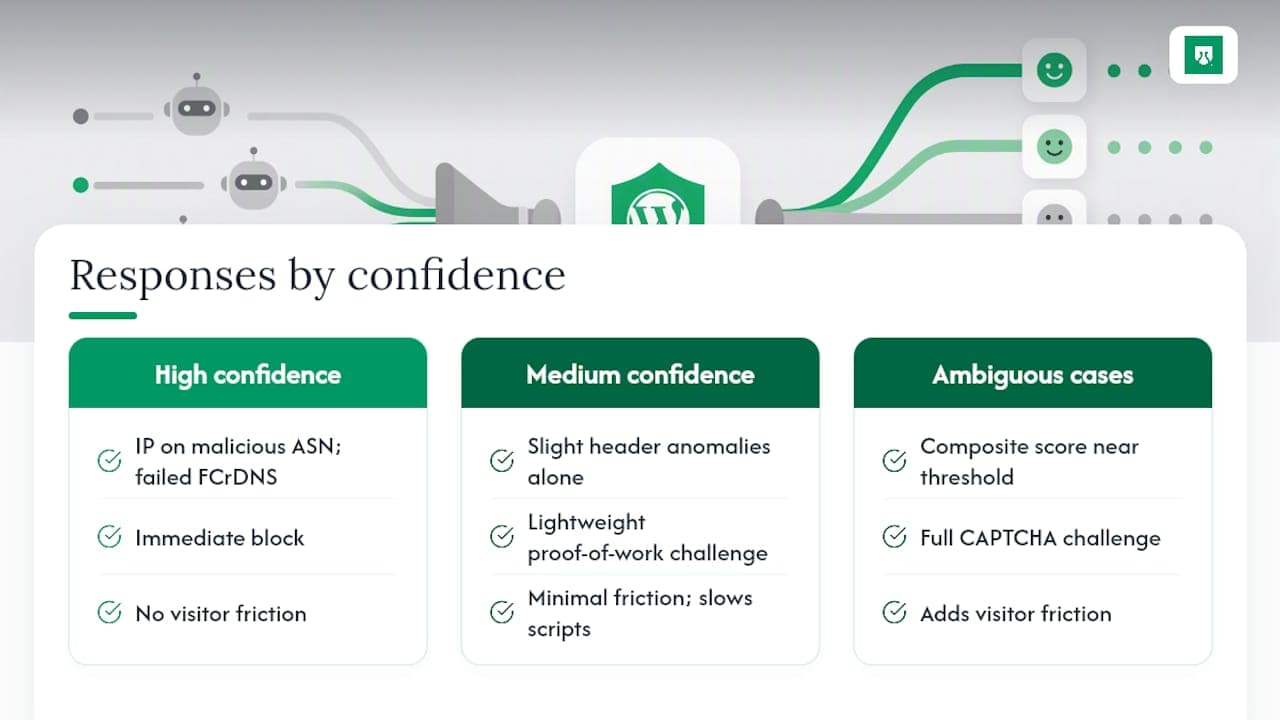
Deciding between a passive tag and an active challenge depends on confidence level. High-confidence signals, an IP on a known malicious ASN combined with a failed FCrDNS check, justify an immediate block. Medium-confidence signals, a slightly unusual header pattern with no other red flags, are better handled with a lightweight proof-of-work challenge that costs a real browser almost nothing but meaningfully slows down a scripted client. Reserve full CAPTCHA challenges for the ambiguous middle ground, since they add friction real visitors will notice.
Where Should Bot Detection Run in Your Stack?
Placement determines both how much protection you get and how much it costs you in server resources. Four options exist, and most sites end up running a combination rather than picking just one.
- Edge or CDN-level filtering catches the highest volume of obvious junk before it ever reaches your origin server. A CDN can reject requests from known bad ASNs or apply rate limits across millions of requests per second, at a scale no WordPress plugin can match. The trade-off is control: fine-grained, WordPress-specific rules (protecting a specific plugin's REST route, for instance) are harder to configure at the edge, and every edge vendor has its own rule syntax and pricing tier.
- Server-level early-init hooks run before WordPress loads its plugins, theme, and database connections. Rejecting a malicious request here means WordPress never spins up its full stack for that hit, and detection systems built to run at this stage save meaningful CPU and memory compared to filtering after the application has already loaded.
- In-WordPress plugins are the easiest to install and configure, since they live inside the admin dashboard you already use. The cost is that they run after WordPress has already done most of its initialization work, so a plugin can still tell you a request was malicious, but only after the server already paid the processing cost. Caching layers complicate this further: a cached page might serve before a plugin's detection logic even fires, which is why cache-bypass rules for sensitive routes like
/wp-login.phpmatter. - Hybrid deployment uses the edge for high-volume, low-nuance rejection (block known bad ASNs, enforce basic rate limits) and reserves server-level or plugin-based detection for enrichment and fine-grained decisions that need WordPress context, like checking whether a request is hitting a WooCommerce checkout endpoint specifically.
Pro Tip: If your host gives you access to mu-plugins or a server-level hook that runs before wp-settings.php loads, use it for your highest-confidence blocks. Save WordPress-native plugins for the signals that genuinely need application context, like logged-in user behavior.
The performance checklist worth running before and after any change: track server CPU usage during known bot spikes, measure average response time on /wp-login.php under load, and log how many requests get rejected at each stage of your pipeline. Early rejection at the server or edge level should visibly reduce database query counts, since a rejected request never touches wp_options or wp_users.
A Practical Checklist for Detecting and Filtering Bots
Before touching any detection tooling, close the obvious doors. Update WordPress core, every theme, and every plugin, since outdated software is the single most common entry point automated scanners look for. Enforce strong, unique credentials on every account with publishing or admin access, and add BasicAuth in front of /wp-admin on staging environments, a measure WordPress's own hardening guidance recommends as a baseline. Disable xmlrpc.php entirely if you don't use it for remote publishing or Jetpack, since it removes an entire amplification vector for brute-force attempts.
With the basics covered, choose detection tooling that matches your traffic volume and technical comfort:
- Local analysis plugins classify traffic and build a traffic-quality dashboard without sending visitor data off your server, a reasonable starting point if you want visibility before you commit to blocking anything.
- Honeypot and trap-URL plugins place a hidden link disallowed in
robots.txt; any client that follows it is either ignoring the standard or spoofing a crawler, and pairing the trap with FCrDNS verification keeps you from flagging a legitimate search bot by mistake. - Local, invisible proof-of-work challenges solve in the background for real browsers while adding real computational cost for scripted clients, an approach some plugins run entirely offline without any external service call.
- JS fingerprint collectors gather browser-side signals (WebDriver flags, canvas fingerprints) for sites that need to catch automation tools mimicking real browsers.
- External detection APIs make sense once traffic volume or fraud exposure outgrows what a local plugin can score in real time, particularly for login and checkout flows where the cost of a missed account takeover or a successful card-testing run is high.
Roll out any new rule in stages, never straight to a hard block. Run detection in log-only mode first, watching what would have been blocked without actually blocking it. Move to soft challenges (a lightweight proof-of-work or a low-friction CAPTCHA) for borderline scores next, and reserve targeted blocking for signals you've validated against real traffic over at least a week. Exempt REST API routes that WooCommerce, mobile apps, or third-party integrations rely on, since an overly aggressive rule can silently break checkout or an app connection days before anyone notices.
How to Tune Rules Without Blocking Real Visitors
Every detection rule needs an evidence trail, or you're guessing when something breaks. Log the requesting IP, ASN, PTR record, full User-Agent string, relevant headers (Accept-Language, Referer, Accept-Encoding), and the outcome of any challenge the request triggered. Retain these logs for at least 30 to 90 days, long enough to investigate a slow-building attack pattern or a customer complaint about a blocked login, since logs are the primary forensic evidence available after an incident.
A safe rollout follows a fixed sequence:
- Log-only mode for at least a week, capturing what your rules would flag without acting on any of it.
- A/B sample testing, applying soft challenges to a small percentage of flagged traffic and comparing challenge completion rates between suspected bots and your normal user base.
- Staged blocking by route or ASN, starting with the highest-confidence signals (known bad ASNs, failed FCrDNS on crawler UAs) before expanding to broader behavioral rules.
- Full deployment, once false-positive rates on the staged rollout stay low across a representative traffic sample.
For forensics after a suspected incident, access-log parsing tools (or a simple grep against your web server logs) can reconstruct a timeline of requests from a suspicious IP. File-integrity monitoring flags unexpected changes to core files or uploads directories, and host-level intrusion detection systems catch unusual process activity that a WordPress-level plugin can't see. The Department of Justice's coverage of botnet takedown operations is a useful reminder that the automated traffic hitting a single WordPress site is often one small piece of infrastructure spread across thousands of compromised devices.
Track a small set of KPIs on an ongoing basis: false-positive rate (legitimate users challenged or blocked), challenge pass rate (the percentage of challenged sessions that complete successfully), and server CPU saved by early rejection compared to your pre-detection baseline. If a blocking rule starts affecting legitimate traffic, roll it back immediately: revert to log-only for that specific rule, review the logs for the pattern that triggered it, and adjust the threshold before re-enabling.
How a Detection Layer Extends WordPress Defenses
WordPress-native tools handle a lot, but they see only what happens on your server. A dedicated detection layer sits earlier in the visitor's journey and adds signal depth that a plugin scanning server logs cannot generate on its own.
Shieldlabs works this way: a JavaScript snippet on the front end and server SDKs for Node.js, Python, Go, and PHP feed a decision API that returns a per-visit risk score, along with the specific signals behind it. That output typically includes:
- A composite risk score split into clean, low, medium, and high risk bands.
- VPN, proxy, and Tor detection, plus anti-detect browser detection, distinguishing anonymized traffic from ordinary privacy-conscious visitors.
- Automation and browser-fingerprint flags that identify scripted clients attempting to mimic real browser sessions.
- Persistent recognition of returning visitors with up to 99% accuracy, even across cleared cookies, incognito sessions, and IP rotation.
The value of a signal-based approach is that the score never arrives as an unexplained verdict. Every risk score comes with the underlying signals that produced it, so a login attempt flagged as high-risk shows exactly why, whether that's a datacenter IP, a failed fingerprint match, or a pattern tied to a known account-takeover attempt elsewhere on the network.
The integration pattern that makes the most sense operationally is calling the decision API at the moments that matter most: login attempts, checkout completion, and sensitive REST endpoints, rather than on every page load. That keeps overhead low while placing the richest signal set exactly where fraud risk concentrates. Per-source traffic-quality analytics also let a site owner see which acquisition channels, campaigns, or referrers are bringing in anonymized or high-risk visitors, turning a vague sense that "something feels off" with a traffic source into a number your team can act on. None of this replaces the decision logic in your own code. The score, and the signals behind it, are the input your team uses to decide what happens next, whether that means a hard block, a step-up challenge, or simply flagging the session for review.
What I'd Do First if I Were Triaging a Bot Problem Today
If your site is actively being hit right now, resist the urge to start blocking immediately. Set every new detection rule to log-only first. You need at least a few days of data before you can tell a real attack pattern from normal traffic noise, and a premature block on a misread signal creates a support headache that outlasts the original problem.
Run FCrDNS checks against any traffic claiming to be a search crawler before you touch it. This single check resolves most of the "is this Googlebot or a scraper pretending to be Googlebot" ambiguity in minutes, and it costs nothing to run. Push confirmed honeypot hits (any client that follows your hidden trap URL) straight to a blocklist, since nothing legitimate should ever touch that path. Whitelist your own admin IPs before you enable anything aggressive on /wp-admin, because locking yourself out during a triage exercise is a common and entirely avoidable mistake.
Short-term mitigations (rate limits, honeypots, log-only monitoring) cost almost nothing and can go live today. Longer-term investments, a dedicated detection API, dashboard-based traffic analytics, cross-account pattern detection, take more setup but pay off as your traffic and fraud exposure grow. Budget for both. The cheap fixes buy you time; the deeper tooling is what keeps working once the obvious attacks stop.
— Jeff
Get Started With Shieldlabs for WordPress Traffic
Shieldlabs provides WordPress site owners with detailed signal data typically found in enterprise fraud platforms, available self-serve and at published prices. Installation is one JavaScript snippet, roughly five minutes to your first signal, with server SDKs for Node.js, Python, Go, and PHP for anything you need to enforce outside the browser.
The dashboard shows per-visit risk scores split into clean, low, medium, and high risk bands, plus the specific signals behind every score, including VPN, proxy, and Tor detection and anonymity signal breakdowns your team can use to decide how to handle a given session. Pricing is published; please visit the Shieldlabs website for current details on plans and free tiers. Start with the identification product page to see integration options for your stack, or sign up directly and get your first signal reading before your next coffee break.
Sources
For technical verification beyond this guide, WordPress's own security overview and hardening documentation cover credential policy and server-side protections in more depth. Plugin pages for BotBlocker Security and EDH Bad Bots document early-init blocking and honeypot/FCrDNS techniques referenced throughout this article. For context on the scale of botnet infrastructure behind everyday web abuse, the Department of Justice's public record on botnet disruptions is a useful reference point.
- WordPress security — About WordPress
- Security hardening — WordPress Developer Resources
- EDH Bad Bots
FAQ
How Do You Detect Bot Traffic on a WordPress Site?
Combine network signals (IP reputation, ASN, FCrDNS verification), request header analysis, browser fingerprinting, and behavioral patterns like request timing and burst rate into one risk score rather than relying on any single check.
Can Bots Actually Be Detected Reliably?
Yes, though no method reaches absolute certainty. Layered detection combining passive signals with active challenges for borderline cases catches the large majority of automated traffic, and platforms like Shieldlabs recognize returning visitors with up to 99% accuracy even across cleared cookies and IP rotation.
How Do Bots Try to Avoid Detection?
Sophisticated bots spoof User-Agent strings, rotate IPs across residential proxy networks, use anti-detect browser configurations to mimic real fingerprints, and randomize request timing to avoid triggering rate-based rules. That's why combining multiple signal types matters more than trusting any one of them.
What's the Best Spam Blocker for WordPress?
There's no single universal answer since it depends on traffic volume and technical comfort, but an effective setup pairs a honeypot/trap-URL plugin with FCrDNS crawler verification and a hardened login flow, escalating to a dedicated detection API if fraud exposure grows beyond what a local plugin can score.
Where Should I Run Bot Detection for the Best Performance?
Early-init server hooks or edge-level filtering reject malicious requests before WordPress loads its full stack, saving CPU and memory compared to plugins that run after initialization, though most sites benefit from combining both edge-level and server-level detection.
Recommended
Related articles

Detect Free Trial Abuse with 100+ Signals for SaaS Teams
Detect free trial abuse without blocking real users. Use auditable signals, progressive friction, and metrics to protect conversion.

Four Stage Risk Funnel for Fake Signup Detection with Persistent ID
Practitioner guide to fake signup detection. Build a four stage signal first risk funnel and use persistent visitor ID plus auditable signals to cut fake...
Developer Playbook: Selenium Detection as a Five Signal Classification
Developer first playbook for selenium detection. Learn the five signal groups JavaScript flags, CDP artifacts, rendering, network, and behavior, plus an...