

5 Low Latency Checks to Detect Anti Detect Browsers for Fraud Teams

Last updated on September 23, 2026 · 14 min read
Yes, anti-detect browser sessions are detectable. The spoofing that makes these tools useful for evading bans also creates coherence mismatches between spoofed and real browser attributes, plus runtime API-patch tells that a handful of lightweight checks can catch. The immediate move for any fraud or security team: start logging WebGL renderer output, canvas test-retest variance, and navigator property consistency today, then route flagged sessions into a scored triage queue instead of a binary block/allow decision.
TL;DR:
- WebGL pixel output and renderer mismatch are highly reliable indicators of spoofed browser properties, especially when rendered pixels do not match the claimed GPU.
- Canvas test-retest variance and OffscreenCanvas comparisons detect injected noise that anti-detect tools use to defeat fingerprinting, making them effective lightweight checks.
- Combining navigator property anomalies, screen coherence issues, and API patch detection into a risk score improves accuracy and reduces false positives in identifying anti-detect sessions.
- Using a hybrid client-server approach for signal collection and scoring allows detection with minimal latency while maintaining auditability and detection effectiveness.
- Anti-detect browsers mainly rely on JavaScript API interception and property spoofing, but their inconsistencies across multiple signals make them detectable through coherence and hardware-based checks.
What Is an Anti-Detect Browser, and Which Signals Expose One?
Anti-detect browsers are purpose-built to override or fake the properties a website normally reads to fingerprint a visitor: renderer strings, canvas output, screen dimensions, audio processing, and dozens of navigator properties. The problem for anyone running one is that overriding a property rarely produces a value that's internally consistent with everything else the browser reports. That gap between the property you spoofed and the properties you forgot to touch is where anti-detect browser detection actually happens.
A few signal categories carry most of the weight:
- WebGL renderer and pixel mismatch. A patched renderer string ("Intel Iris" instead of the real GPU) is easy to fake, but the actual pixel output from a WebGL draw call depends on real hardware and drivers. Cross-checking the claimed renderer against rendered pixel output catches spoofing that string checks alone miss.
- Canvas noise and test-retest variance. Real hardware draws identical canvas commands the same way every time. Anti-detect tools that inject randomized noise to defeat canvas fingerprinting produce measurable variance across repeated draws on the same session, a tell that's cheap to check and hard to fully eliminate.
- Navigator anomalies. Mismatches between
deviceMemory,hardwareConcurrency, anduserAgentDatareveal spoofed device profiles, especially when the reported CPU core count doesn't match the claimed device class. - Screen and DPR coherence. Spoofed screen resolution,
availWidth, and device pixel ratio frequently disagree with each other in ways a real device configuration never would. - Audio fingerprint and font enumeration collapse. Overridden audio processing pipelines and font lists often flatten into suspiciously uniform outputs across sessions that claim to be different devices.
- Prototype and API-patch tells. When a tool wraps a native function like
getContextortoString, the property descriptor and function source often betray the patch. - Automation residue. Leftover artifacts from browser automation frameworks or DevTools protocol usage frequently ride alongside anti-detect configurations.
Academic evaluation of anti-fingerprinting tools confirms this pattern directly: API injection and small inconsistencies across navigator, WebGL, and canvas attributes let fingerprinting-based signatures reliably identify many anti-fingerprinting browsers, even when each individual property looks plausible in isolation. No single signal proves spoofing. The coherence between signals is what does.
Which Lightweight Checks Should You Deploy First?
You don't need a research lab to start catching anti-detect sessions. A handful of low-overhead checks, run at the point a session is created, cover most of the ground:
- Renderer substring plus pixel-scene cross-check. Compare the WebGL renderer string against a known list of plausible GPU strings, then render a small test scene and hash the pixel output. A mismatch between the claimed renderer and the rendered pixels is one of the more reliable signals available, since pixel output depends on actual hardware and drivers in a way string values do not.
- Canvas test-retest and OffscreenCanvas cross-context comparison. Draw the same canvas operation twice within a session and compare hashes; then draw the same operation through OffscreenCanvas and compare against the main-thread result. Divergence in either comparison flags injected noise.
- DeviceMemory and hardwareConcurrency threshold rules. Flag combinations that don't occur on real hardware, such as 1GB of device memory paired with 16 logical cores.
- Descriptor checks on commonly patched functions. Run
Object.getOwnPropertyDescriptorandtoStringcomparisons againstgetContext,toDataURL, and similar functions frequently wrapped by anti-detect tooling. Native functions have a specific, unmodified string signature; wrapped ones often don't. - Sampling and rate limits. Run the more expensive checks (pixel rendering, cross-context canvas) on a sampled percentage of sessions rather than every single one, to protect both page performance and your own compute budget.
That two-stage approach keeps latency low without giving up coverage.*
These patterns mirror what a broader technical guide to detecting anti-fingerprint browsers recommends as a baseline implementation, and they cost single-digit milliseconds per session when sequenced correctly.
How Do You Turn These Signals Into a Risk Score?
Treat each signal as a weak indicator on its own, then combine them into a weighted score rather than triggering a hard block on any single mismatch. A simple version: assign point values to each failed check (renderer/pixel mismatch, canvas variance, navigator anomaly, descriptor tampering), sum them per session, and bucket the total into risk bands. Teams running larger volumes can layer in coarse-grained clustering to group sessions with similar signal fingerprints without needing precise device-level identification, which keeps the approach privacy-preserving.
Three operational thresholds work well as a starting point:
- Monitor: Low point total, one weak signal. Log it, take no action.
- Challenge: Moderate score, two or more independent signals disagree. Trigger step-up verification or a lightweight friction point.
- Escalate to review: High score, coherence failures across multiple signal categories. Route to manual review or apply stricter transaction limits.
False positives cluster around a few known sources: virtual desktop infrastructure, corporate proxy configurations, and locked-down enterprise browser images can all produce unusual but legitimate navigator and hardware combinations. Build an allowlist for known corporate IP ranges and VDI signatures before tightening thresholds, or you'll spend review time chasing employees instead of fraud.
Timing matters too. A production deployment of a coarse-grained fingerprinting model across 205,000 sessions found that sessions flagged as highly risky were used in account takeover attempts at 5.83% within 72 hours, versus a 0.43% baseline ATO rate across all sessions. That gap is why holding a flagged session in a monitoring state for a short window, rather than clearing it instantly, meaningfully improves confirmation before you commit review resources.
How Should You Collect and Operationalize These Signals?
Collection point matters as much as the checks themselves. Client-side JavaScript can gather WebGL, canvas, and navigator signals cheaply but is visible to anyone inspecting page source, including the anti-detect tooling you're trying to catch. Server-side collection, paired with a lightweight client snippet, gives you a harder-to-tamper-with baseline for comparison. Most teams land on a hybrid: a small JS payload collects raw signals, a server SDK scores them alongside network and behavioral data.
A few implementation principles keep this sustainable:
- Favor coarse-grained features over hyper-precise fingerprints; Browser Polygraph's approach shows coarse-grained fingerprints scale to web-sized traffic without ballooning payload size or privacy exposure.
- Keep the JS payload small. Every signal you add is latency your checkout or signup flow absorbs.
- Surface the specific signals behind each risk score, not just a number, so a fraud analyst can see why a session was flagged.
- Build a deployment checklist covering the snippet, the scoring SDK, dashboard rule configuration, and a manual review queue before you go live.
Pro Tip: If your review team keeps overriding flagged sessions without a clear reason logged, that's usually a sign the score isn't showing enough of the underlying signal. An auditable score, one that shows its work, gets trusted; a black-box number gets ignored.
Where Did Anti-Detect Browsers Come From?
Anti-detect browsers emerged from a specific, narrow use case: agencies and individuals managing large numbers of social media, e-commerce, or ad accounts who needed each browser profile to look like a distinct, consistent device rather than the same machine logging in repeatedly. Standard browser profiles leak too much overlap across sessions, which is exactly what account-linking fraud systems look for.
The tooling evolved from simple proxy-plus-profile switching into full fingerprint management suites that override dozens of browser properties simultaneously, package each fake profile with its own cookie jar and storage, and let an operator run many isolated "identities" from one machine. Legitimate use cases exist alongside abusive ones. Agencies managing client social accounts, QA teams testing geo-specific rendering, and privacy researchers studying fingerprinting all use similar isolation techniques. But the dominant driver behind adoption at scale has consistently been evading the account limits and ban enforcement that platforms build specifically to stop one person from running many accounts.
That duality is why detection has to focus on behavior and coherence rather than simply penalizing the presence of profile-isolation technology itself. A business running detection needs to distinguish a QA engineer testing five browser profiles from a fraud ring running five hundred fake signups, and the signals covered earlier in this guide are what make that distinction possible.
How Do the Major Anti-Detect Tools Compare?
Anti-detect browsers on the market today generally fall into a few tiers rather than one uniform category. Entry-level tools focus on basic user-agent and proxy switching, offering a handful of spoofed properties and cheap per-profile pricing aimed at individuals managing a modest number of accounts. Mid-tier tools add canvas and WebGL noise injection, more granular navigator property control, and team collaboration features aimed at agencies running dozens to hundreds of profiles.
Enterprise-grade tools go further, offering fingerprint templates pulled from real device data, automated profile rotation, and API access for running detection avoidance at scale alongside browser automation frameworks. The sophistication gap between tiers matters for detection strategy: cheap tools tend to leave obvious coherence gaps (a spoofed renderer string with no matching pixel behavior), while premium tools invest specifically in closing those gaps, which is why relying on any single check is a losing strategy over time.
What all tiers share is the fundamental trade-off described earlier: spoofing a property to defeat one fingerprinting method almost always introduces a fresh inconsistency somewhere else. Detection systems that assume tools will keep improving, and score on coherence across many signals rather than any one static list of "known bad" values, hold up better as the tooling itself evolves.
What Technical Methods Do These Tools Use to Spoof Fingerprints?
The core technique across nearly all anti-detect browsers is JavaScript API interception: wrapping native browser functions so that calls to navigator.userAgent, canvas.getContext, WebGLRenderingContext.getParameter, and similar APIs return fabricated values instead of the real ones. This is typically done through prototype patching, where the tool overrides a function on Window.prototype or Navigator.prototype before any page script runs, so every subsequent read of that property returns the spoofed value.
Canvas fingerprint defense usually adds a randomization layer, injecting small amounts of noise into pixel data on each draw call so that the resulting hash differs from the browser's true rendering fingerprint. Audio fingerprint defense works similarly, perturbing the oscillator or analyzer output that audio-based fingerprinting techniques rely on.
Screen and hardware spoofing overrides screen.width, screen.height, navigator.deviceMemory, and navigator.hardwareConcurrency to present a fabricated device profile, often paired with a matching fake user-agent string to keep the reported device class internally consistent, at least on the surface.
The research evaluating these tools found that this multi-property spoofing rarely achieves full consistency: patched functions leave detectable descriptor and toString artifacts, and randomized outputs create test-retest variance that a legitimate, unmodified browser never produces.
Is Using or Detecting Anti-Detect Browsers Legal?
Anti-detect browser software itself is generally legal to build, sell, and use in most jurisdictions. It's general-purpose privacy and profile-management tooling, comparable in legal status to a VPN or a proxy service. What determines legal exposure is how it's used: operating one account per person under a platform's terms of service is different from running hundreds of fake accounts to collect referral bonuses or evade a ban, which typically violates the platform's terms of service and can cross into fraud depending on what the accounts are used for.
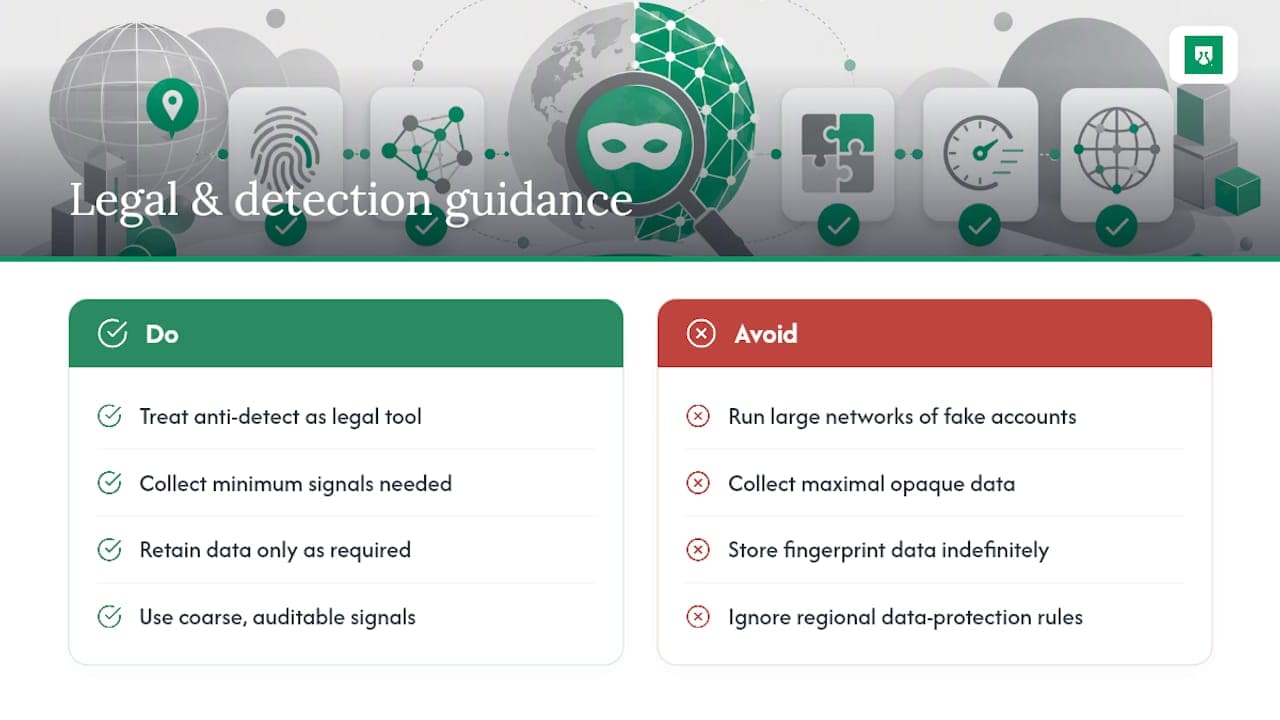
For businesses, the ethical and legal questions run the other direction: what can you collect and act on when detecting anti-detect browsers on your own traffic? Fingerprinting a visitor's device properties for fraud prevention purposes is a widely accepted practice, but data protection rules in various jurisdictions place limits on how fingerprinting data is collected, stored, and used, and those rules vary significantly by region and by whether the data is tied to an identifiable person. Teams building detection should collect the minimum signal set needed for the risk decision, retain it only as long as the fraud use case requires, and be prepared to explain what a flag was based on if a legitimate customer disputes an automated decision. Coarse-grained, auditable signals serve both the fraud goal and the transparency expectation better than opaque, maximal data collection.
What Do Anti-Detect Tools Try to Bypass, and What Actually Stops That?
Beyond fingerprint spoofing, anti-detect setups almost always pair with network-level evasion: residential proxies, VPN exit nodes, and mobile carrier IP pools designed to make each browser profile appear to originate from a distinct, plausible location. The goal is to defeat both device-level and network-level correlation at once, since a fraud system that only checks one layer misses the other.
Network detection has its own signal set: datacenter IP ranges, known VPN and proxy exit node lists, ASN reputation, and latency patterns inconsistent with the claimed geography all point toward masked network origin. Combining network signals with the browser coherence checks covered earlier catches setups that would slip past either layer alone, since defeating both simultaneously with full consistency is significantly harder than defeating just one.
Tor and consumer privacy relay traffic add another wrinkle: these are legitimate privacy tools used by real customers, not exclusively fraud indicators, which means network anonymity alone should raise a score rather than trigger an automatic block. The strongest detection posture treats anti-detect browser signals, proxy and VPN indicators, and behavioral patterns like account velocity as inputs to one combined score, rather than as separate systems each making an independent yes or no call.
When Should Detection Be a Priority for Your Business?
Prioritize anti-detect detection when it correlates with acquisition channels driving account takeover, multi-accounting, or promo abuse; referral programs, free trials, and bonus-heavy signups are the usual suspects. If your growth channels reward new accounts, anti-detect traffic will find them.
The ROI case is straightforward: reducing manual review volume and false-accept rates on your highest-value flows, new account creation, checkout, and bonus redemption, typically pays for the detection investment faster than a blanket rollout across every low-risk page on your site.
Yahor Papou, CMO at ShieldLabs
Try ShieldLabs for Auditable Anti-Detect Signals in Minutes
Most teams building this from scratch spend months tuning WebGL and canvas checks before trusting the output. The platform provides coverage including anti-detect browser detection, VPN, proxy, Tor, and Apple Private Relay signals, built into plans with the specific signals behind each score visible in the dashboard rather than buried in a black box.
Setup involves one JavaScript snippet and server SDKs for Node.js, Python, Go, and PHP, enabling scoring sessions on the backend. Start with the free tier covering 5,000 one-time identifications and no card required, then check the per-visitor risk scoring against the coherence checks covered in this guide to see how closely the signals line up.
Sources
Further reading: the Browser Polygraph deployment study, anti-fingerprinting tool analysis, and the ShieldLabs anti-detect browser archive.
- Browser Polygraph: Efficient Deployment of Coarse-Grained Browser Fingerprints for Web-Scale Detection of Fraud Browsers (IMC 2024)
- Taming the Shape Shifter: Detecting Anti-fingerprinting Browsers (PMC)
- Detecting virtualized and containerized browsers: GPU, screen, and timing artifacts (Crawlex blog)
Recommended
Frequently asked questions
- Can Anti-Detect Browsers Be Detected Reliably?
- Yes. Coherence checks across WebGL, canvas, navigator, and screen properties, combined with API-patch detection, catch the large majority of anti-detect sessions, though no single check should be treated as conclusive on its own.
- What Is the Single Most Reliable Detection Signal?
- No single signal is fully reliable, but pixel-based WebGL cross-checks paired with canvas test-retest variance are among the hardest for anti-detect tools to fully defeat, since they depend on real hardware behavior rather than a reportable string value.
- How Long Should a Flagged Session Stay in Monitoring Before Escalation?
- A 72-hour monitoring window is a reasonable starting point, since flagged sessions showed a meaningfully higher account takeover rate within that window compared with the overall baseline.
- Do VPNs and Proxies Count as Anti-Detect Signals?
- Network anonymity tools raise a session's risk score but shouldn't trigger an automatic block on their own, since legitimate customers use VPNs and privacy relays for reasons unrelated to fraud.
- Can ShieldLabs Detect Anti-Detect Browsers Without Slowing Down My Site?
- ShieldLabs collects signals through a lightweight snippet and surfaces anti-detect browser and other risk signals alongside a per-visitor risk score, designed to run without adding noticeable latency to checkout or signup flows.
Related articles
Device Spoofing Detection for Web Fraud Teams
How browser, device and TLS signals reveal spoofing on the web, plus where mobile attestation belongs in a separate defense layer.

Browser spoofing: what it is and how spoofed browsers give themselves away
What browser spoofing is, what attackers fake (user agent, OS, screen, timezone), and how a spoofed browser betrays itself through signals that disagree.
