

Remember This Device for MFA With a Persistent Device ID

Last updated on October 9, 2026 · 8 min read
Last updated: October 9, 2026
“Remember this device” for MFA is an application trust policy: after a successful multi-factor login, the product remembers an approved browser for a limited period. A persistent device ID can help recognize that browser later, but it cannot establish that the current user controls an authenticator. The 2025 NIST authentication guidance treats session continuity, reauthentication and authenticators as distinct parts of an authentication system.
Build remembered-device access around an independently issued, revocable trust record. Require a completed MFA ceremony before issuing it, check current context on later logins, and step up again when the record expires, is revoked or the action requires stronger assurance.
TL;DR: Device recognition supports a remembered-browser policy. Your authentication system issues the trust credential, enforces expiry and revocation, and requests MFA when required. A matching fingerprint never substitutes for a valid session or possession of an authenticator.
What should a remembered-device record contain?
A remembered-device record ties one account to an approved browser context and a revocable credential issued after MFA. Store the credential's hash, account key, creation time, expiry, last use and revocation status on the server. Add device evidence as context for later review.
| Field | Purpose |
|---|---|
| Account key | Scope trust to one authenticated account |
| Token hash | Look up an opaque credential without storing its plaintext value |
| Created and expires timestamps | Enforce a finite trust period |
| MFA confirmation reference | Record the successful ceremony that established trust |
| Device context | Compare returning observations within the identifier's scope |
| Revoked timestamp | Immediately invalidate the record |
Use a cryptographically random token. A device ID is observable identification evidence and should not become the secret in the trust credential. Keep the token separate from analytics identifiers, and expose only a useful device label and last-used date in the account's device-management screen.
How do you issue trust after a successful MFA login?
Offer the option after the account has passed its required authentication factors. If the user chooses it, create a server-side record and send the opaque credential in a secure first-party cookie. Do not allow a client flag such as remember_device=true to create trust before MFA completes.
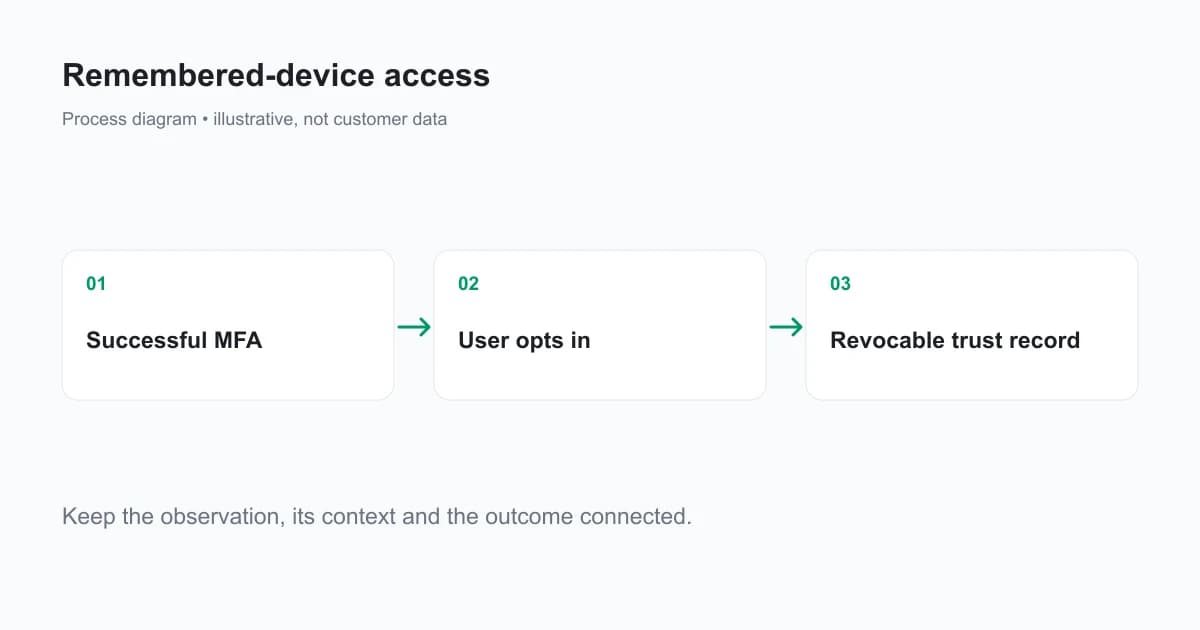
Use cookie settings appropriate to the authentication flow. Secure restricts transmission to HTTPS; HttpOnly keeps JavaScript from directly reading the cookie. Choose SameSite behavior deliberately, especially when your login involves another origin. The MDN Set-Cookie reference explains the attributes and the __Host- prefix requirements.
An illustrative cookie might use __Host-remember_device, Secure, HttpOnly, Path=/ and SameSite=Lax, without a Domain attribute. Its expiry must agree with the server record. Pick a trust duration from the product's authentication requirements; an arbitrary long lifetime increases the period during which a stolen credential could be useful.
How should a returning login use device recognition?
First establish the account and validate the remembered-device credential. Then compare a current, server-verified device observation with the trusted browser context and read available risk evidence. Apply the authentication policy to that combined state.
An application-owned decision table can look like this:
| Condition | Authentication path |
|---|---|
| No valid remembered credential | Run the normal MFA path |
| Valid credential, expired or revoked record | Require MFA and issue no implicit renewal |
| Account or context mismatch | Require MFA and investigate the mismatch |
| Valid record, current matching context, acceptable evidence | Apply the permitted remembered-browser policy |
| Sensitive action or authentication policy requires step-up | Require the appropriate factor regardless of the remembered record |
These are design choices for your authentication system, not ShieldLabs MFA settings. A device match adds context. It does not authenticate a password change, grant access to another account or satisfy a required security key ceremony.
OWASP recommends “Prefer phishing-resistant authenticators (FIDO2/WebAuthn)”. Device recognition supports the surrounding context, not the factor itself.
Avoid a “match equals bypass” branch. An existing account session, a copied cookie or a compromised browser can all present familiar context. Strong authenticators and session protections still need to work when recognition succeeds.
Which changes should trigger another MFA check?
Expiration, revocation, account recovery, a changed authentication factor and an unfamiliar context are useful reasons to require a new ceremony. A high-risk action such as changing recovery details may need step-up even during an otherwise valid remembered session.
Use a recovery path for ordinary changes too. A browser update or privacy setting can affect the evidence, and a new browser can legitimately receive a different identifier. Asking for MFA is often a more proportionate response than suspending the account solely because recognition changed.
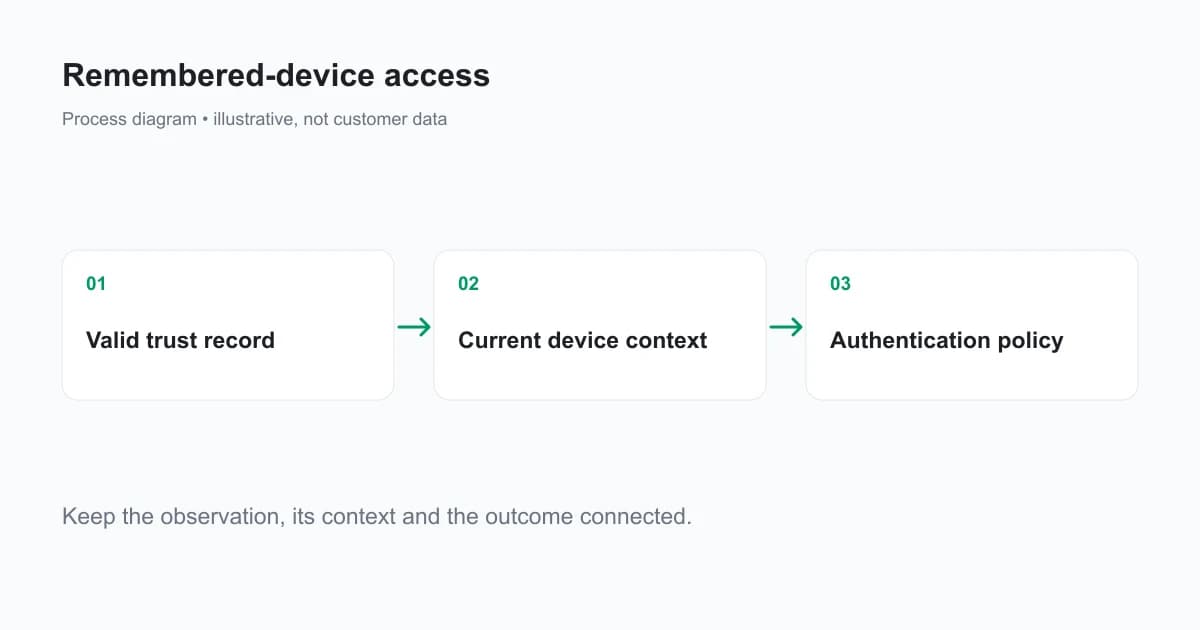
Keep the trust lifetime separate from the login-session lifetime. Remembering a browser does not justify keeping every application session alive for that same duration. Use the assurance requirements and reauthentication rules that apply to your system; the NIST reference supplies an authentication framework, not an endorsement of a particular fingerprint-based shortcut.
How does ShieldLabs support the device context?
ShieldLabs provides Device ID, Visitor ID and explainable risk evidence for web activity. Use the browser snippet to collect a current observation, then read its result on the server through API or a verified webhook. Bind the observation to the account and current session before using it in your authentication workflow.
Use Device ID for the documented browser/device context. Visitor ID also includes a cookie and changes when that cookie is cleared. Another browser on the same machine receives its own Device ID. Treating those IDs as interchangeable would create unnecessary prompts or misplaced trust.
Read the risk score, named risk signals and available account activity alongside the device association. ShieldLabs detects four High-Risk Events: Multi-accounting, Account sharing, Impossible travel and Account takeover. An event's Medium or High confidence is separate from a score band. Your MFA provider and authentication backend retain ownership of factors, sessions, trust credentials and revocation.
The Python integration guide shows result retrieval and signed webhook validation. It deliberately leaves authentication and account binding to the application's existing system, where those controls already belong.
How do you revoke remembered access safely?
Give users a screen that lists remembered browsers with a last-used date and a revoke action. A revocation should invalidate the server record immediately. Clearing a visible cookie is useful cleanup, but the server state determines whether a previously copied token remains valid.
Define broad revocation rules for account recovery and suspected compromise. You may revoke one record or all records for the account, then require fresh authentication. A changed password or factor should follow your documented policy rather than silently leaving long-lived trust records untouched.
Keep revocation and session termination distinct. A remembered-browser credential and an already active application session are different records. An account-wide security response may need to revoke both and notify the account holder through an authenticated channel.
What should you test before rollout?
Test token expiry, revocation, a copied token, another account using the same browser, another browser using the same account, and unavailable device evidence. Confirm that an incomplete check cannot create or renew a trust record.
Use a sensitive-action test even when the remembered device is valid. If recovery details or authenticator enrollment still skip required step-up, the convenience policy has spread beyond its intended boundary. Measure MFA completion and recovery success for legitimate users alongside suspicious remembered-access attempts.
Keep a clear audit record of the authentication event that established trust, later uses and revocation. Avoid logging plaintext remembered tokens. A record that says only “device matched” is insufficient to explain why a particular login received less friction.
Ready to add device context to your authentication flow?
ShieldLabs supplies persistent device recognition and explainable risk evidence for web login workflows. Start Free with 5,000 one-time identifications and test how the evidence fits your existing MFA system.
Sources
Recommended
Frequently asked questions
- What is the most secure way to MFA?
- Use phishing-resistant authentication appropriate to your required assurance level, such as supported security keys or passkey-based authentication, with secure enrollment and recovery. A remembered-browser credential can support a convenience policy, but it does not supply another authentication factor or replace the required authenticator.
- What happens to my 2FA device if I lose my phone?
- Use the recovery method established by your authentication service, such as previously issued recovery codes or another enrolled authenticator. Revoke the lost factor and affected sessions according to your account policy. A familiar device identifier alone should not authorize factor replacement or an account recovery.
- How does MFA work?
- Multi-factor authentication requires evidence from different factor categories, such as something a user knows and something they possess. A remembered-browser policy can reduce repeated prompts within an allowed trust period, but a device identifier alone is not an authenticator and does not establish possession of a factor.
Related articles
How to Detect AI Agents on a Website
Detect AI agents on a website by separating operator identity, automation evidence and authorization. Protect accounts while permitting useful public crawling.

Fraud Detection API for Web Apps: From Browser Signal to Backend Decision
Integrate a fraud detection API into web signup and login with browser collection, verified server results, signed webhooks and clear timeout handling.

Fraud Analytics: Reading Device and Risk Patterns in Web Traffic
Use fraud analytics to investigate risk signals, account events and traffic sources. Read dashboard units correctly and join evidence to real outcomes.