

4 Steps to Passive Authentication for Engineers (sub-100ms)


Last updated on September 23, 2026 · 11 min read
Passive authentication verifies a user by reading background signals, device fingerprints, network context, behavior patterns, instead of asking that user to do anything. The payoff is fewer login prompts and higher conversion, but passive signals alone rarely justify a green light on a high-risk transaction. In practice, they feed a risk engine that decides when a session can continue quietly and when it needs a step-up check.
TL;DR:
- Passive authentication's effectiveness depends on combining multiple signals like device, behavior, and network patterns, which reduce error rates below 1%.
- It is best suited for low-risk, high-volume scenarios such as returning user recognition and frictionless onboarding, not high-stakes transactions.
- Passive signals should feed into a risk engine that triggers step-up MFA only in medium or high-risk situations, never relying solely on them.
- Deployment requires careful latency management, staged rollouts, and ongoing calibration to prevent false positives or negatives from escalating.
- Passive signals do not replace active authentication for confirming identity, especially during sensitive or regulated actions.
What Is Passive Authentication and What Signals Feed It
Active authentication asks the user to prove identity: a password, an OTP, a fingerprint scan. Passive authentication skips the ask. It reads what is already there when a browser or app connects and scores that connection against what it has seen before from that same identity.
The signal set is broader than most teams initially assume. Device fingerprints capture screen resolution, installed fonts, GPU rendering quirks, and browser configuration. Behavioral biometrics track typing cadence, mouse movement, and touch pressure on mobile. Network signals flag the IP address, its ASN, and whether it routes through a VPN or proxy. HTTP headers and user-agent strings reveal inconsistencies that scripted traffic tends to produce. Geolocation and time-of-day patterns catch a login that claims to be from a user's home city at an hour that user has never been active. Session patterns, like the sequence of pages visited or the pace between actions, round out the picture.
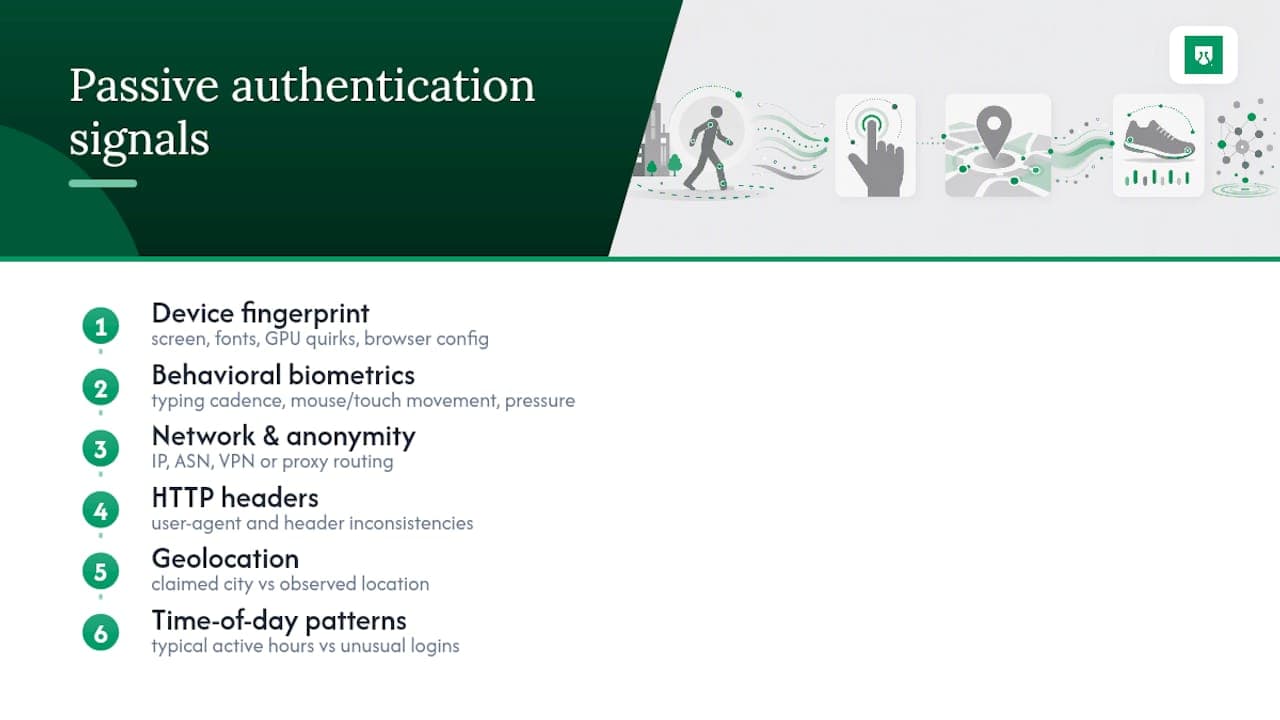
A returning shopper who logs in from the same laptop, the same time zone, and the same typing rhythm every week generates a very different signal profile than someone spoofing that same account from a data center.
Background recognition also needs a response to unfamiliar or suspicious access. The account takeover detection guide explains that investigation at login.
How Passive Authentication Works: From Signal to Decision
The technical flow runs through four stages, and each one has its own failure mode if skipped.
- Collection. Client-side JavaScript, mobile SDKs, and server logs gather raw signals on every visit or session event.
- Modeling. The system builds a baseline for each identity across multiple signal types. Behavioral biometrics in particular need several samples before the baseline is reliable, since a single visit rarely establishes what "normal" typing rhythm or mouse movement looks like for that user.
- Scoring. The engine compares the current session against the baseline and produces a risk score, weighted across signal types rather than relying on any single one.
- Decisioning. A policy layer maps that score to an action: continue the session silently, log it for monitoring, or trigger step-up verification.
Fusing multiple signal types measurably outperforms relying on one. Research on multimodal behavioral authentication found that combining signal types cuts error rates well below what any single modality achieves alone. Dynamic threshold models that adjust scoring weights in real time, rather than fixed rules, improve both detection and usability in production authentication flows.
Pro Tip: Budget your signal pipeline for sub-100ms processing wherever possible. If a passive check adds a visible delay, it stops being passive from the user's point of view, even if no prompt ever appears.
What Passive Authentication Actually Improves
The clearest win is fewer interruptions. Every login prompt, OTP text, or CAPTCHA is a point where a real user can abandon the flow. Cut those prompts for low-risk sessions and conversion tends to follow.
Three metric categories are worth tracking once passive checks go live:
- UX metrics: step-up rate (the share of sessions asked to do more), overall authentication success rate, and support tickets tied to login friction.
- Security metrics: shifts in account-takeover indicators and fraud flags once passive scoring feeds a risk-based authentication policy.
- Accessibility metrics: fewer forced interactions also reduce barriers for users who struggle with traditional MFA steps, a point W3C's accessibility guidance makes directly.
On accuracy, controlled studies combining multiple behavioral sensors have reported false acceptance rates as low as around half a percent and false rejection rates near one percent. Those numbers come from lab conditions with adaptive models tuned to context, so treat them as a ceiling to aim for, not a guarantee any given deployment will hit. Run a controlled rollout before trusting the numbers on your own traffic.
Where Passive Signals Stop Being Enough
Passive authentication is a monitoring layer, not a lock. It works by inference: this connection resembles past behavior from this identity, so risk is probably low. That inference breaks down in specific, predictable situations.
- High-risk or regulated transactions. Wire transfers, password resets, and account ownership changes usually need explicit authentication regardless of how clean the passive score looks.
- Evasion attempts. Device spoofing tools and scripted behavior simulation can mimic individual signals; combining several modalities makes that harder to fake consistently across all of them at once.
- Privacy and retention. Behavioral and device data are still personal data in most frameworks, so minimize what's collected, set clear retention limits, and get consent where the signal type requires it.
- Explainability. A risk score with no visible signal breakdown is hard to audit and harder to defend if a decision gets challenged later.
An IEEE analysis of risk-based authentication design makes the point directly: passive signals are rarely sufficient alone and function best as one input into a broader risk engine, not as the final word.
Building Passive Signals Into a Risk-Based Authentication Stack
The architecture that works in practice is a chain, not a single gate: passive signal collection feeds a risk engine, the risk engine applies policy, and policy triggers an action.
- Low risk. Signals match the baseline closely. Session continues with no interruption, and the event is logged for future model training.
- Medium risk. Some signals deviate, a new device, an unfamiliar network. The system can request a lightweight, still relatively passive check or flag the session for closer monitoring without stopping the user outright.
- High risk. Multiple signals conflict with the baseline, or the action itself is sensitive. This is where step-up MFA belongs, explicit verification tied to the specific risk that triggered it.
Decide upfront whether checks run continuously through a session or only at defined checkpoints (login, checkout, account changes). Continuous monitoring catches session hijacking after login; checkpoint-only checks are cheaper to run but miss mid-session takeovers. Either way, log every score and every triggered action, then revisit thresholds monthly against false positive and false negative rates.
Deployment Considerations Engineering Teams Should Plan For
Getting passive authentication into production is less about the model and more about the pipeline around it.
- Integration pattern. Most teams start with a client-side snippet for browser signals, add SDKs for mobile telemetry, and enrich with server-side logs for network and header data.
- Latency budget. Set a hard ceiling on how long signal collection and scoring can take before it becomes a visible delay, and define fallback behavior (usually a temporary step-up) for signals that arrive late.
- Testing. Run staged rollouts and A/B experiments before flipping a policy on for all traffic, tracking FAR, FRR, and equal error rate (EER) as your core accuracy metrics.
- Threshold drift. Behavior changes over time, new devices, new habits, so retrain baselines on fresh samples and recalibrate thresholds rather than treating an initial model as permanent.
- Data minimization. Collect only the signals your policy actually uses, and set retention windows that match your actual need, not an indefinite default.
Pro Tip: Keep a rollback path for every threshold change. A miscalibrated model that starts step-upping 20% of legitimate traffic overnight is a support-ticket disaster you want to catch in hours, not weeks.
Where Passive Authentication Shows Up in Production
The most common deployment is onboarding: reducing friction during KYC or account creation for flows classified as lower risk, so new users aren't hit with unnecessary verification steps before they've even seen the product.
Right behind it is returning-user recognition, letting someone skip re-authentication on a device and network the system already trusts, which is the single biggest churn-reduction lever passive signals offer.
- Continuous authentication during a session, watching for anomalies that suggest a hijacked session rather than the original user.
- Subscription and promo abuse detection, spotting the same identity cycling through free trials or referral bonuses under different surface identities.
- Low-friction transaction approval, letting routine, low-value actions proceed without interrupting the user.
Passive vs. Active Authentication: How They Split the Work
Passive authentication verifies quietly using existing signals; its strength is zero added friction, its weakness is that it can't prove intent or handle novel high-stakes actions alone. Active authentication (passwords, OTPs, biometric prompts) proves intent directly; its strength is certainty, its cost is friction that drives abandonment.
The trade-off is straightforward: passive is cheap on UX and continuous, but its security coverage narrows as risk rises. Active is expensive on UX but covers the cases passive can't.
- Route low-risk, high-volume traffic through passive checks only.
- Escalate medium-risk sessions to a lightweight active step.
- Reserve full MFA for high-risk or regulated actions, regardless of how clean the passive score looks.
Practical Notes on Implementing Passive Verification
ShieldLabs returns persistent identification, the risk signals behind it, and a risk score, all auditable down to the signals that produced them. You choose the action for each case, from continuing the session to a step-up check.
Integration typically starts with one JavaScript snippet, then extends through SDKs and server-side APIs as coverage grows. A few operational habits matter more than any single signal:
- Roll out in stages and watch false-positive rates before widening scope.
- Keep decision logs so any flagged session can be reviewed after the fact.
- Map risk scores into your existing policy engine rather than building a parallel one.
ShieldLabs recognizes returning visitors with 99.9% identification accuracy, even across cleared cookies and IP changes.
How Technical Leaders Should Prioritize This Work
Start with your highest-volume, lowest-risk touchpoints, that's where removing friction pays off fastest and where mistakes cost the least. Put budget into multimodal signal coverage and calibration before adding another intrusive prompt; a second signal type usually beats a second checkbox. Treat every passive score as an input, never a verdict, and pair it with an explicit escalation rule. Track UX metrics and security metrics side by side, since a system that only reports one is telling half the story.
Yahor Papou, CMO at ShieldLabs
Evaluating ShieldLabs for Your Authentication Stack
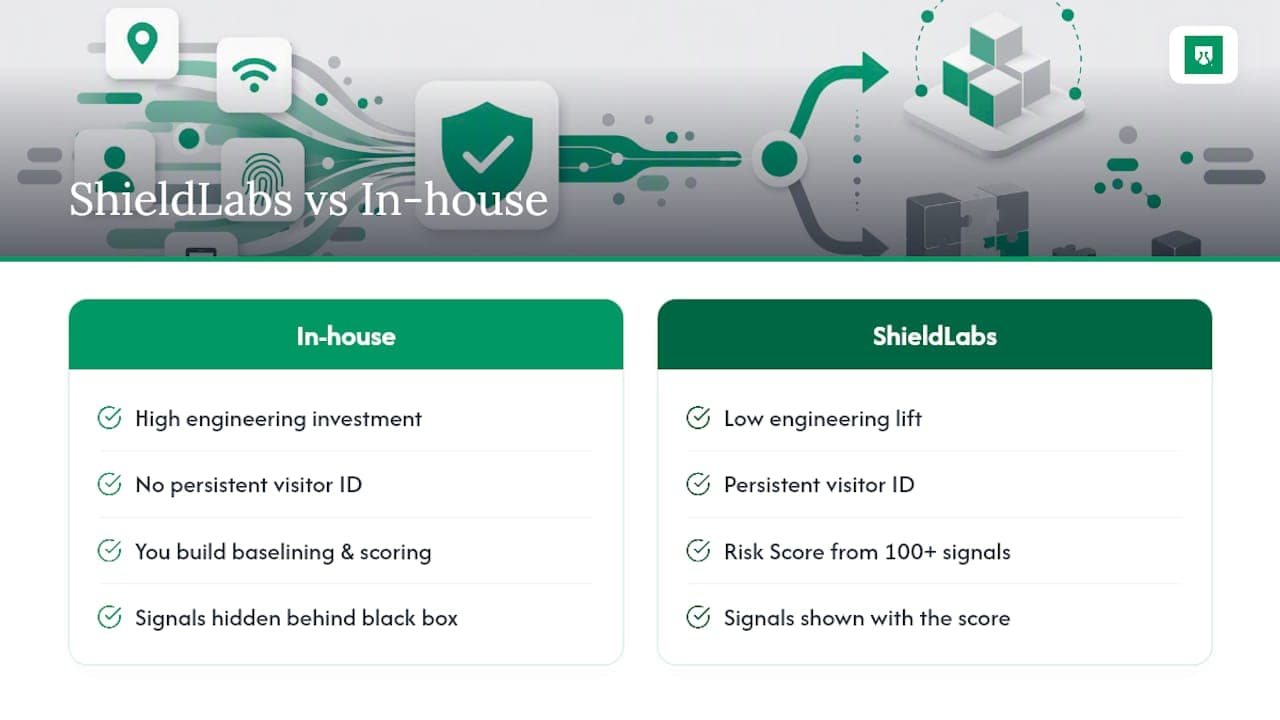
Building passive signal collection, baselining, and scoring from scratch takes a real engineering investment before it produces a usable score. ShieldLabs supplies that layer directly: persistent visitor identification and a risk score built from 300+ device and network signals, with the contributing signals shown alongside the score rather than hidden behind a black-box number. You choose the action for each case: step-up, monitoring, or session continuation. The platform includes a free tier suitable for testing signal quality against your own traffic before committing to a paid plan. If your current stack is still asking every returning user to prove who they are, start by checking how much of that traffic ShieldLabs would already recognize.
Sources
For deeper technical grounding, the multisensor behavioral authentication study covers accuracy benchmarks in detail, while IBM's overview of behavioral biometrics explains baselining requirements. Google Cloud's context-aware access documentation and this conditional access policy guide offer practical frameworks for combining passive signals with escalation rules.
- Multisensor behavioral authentication study (Springer, 2022)
- Multimodal behavioral biometrics for continuous authentication (IEEE TIFS, 2024)
- Secure apps and resources by using context-aware access (Google Cloud docs)
- What is behavioral biometrics? (IBM)
Recommended
Related articles

Web Device Binding: Coarse Fingerprints Link Visits for Fraud Teams
Learn how web device binding helps fraud teams recognize visitors with coarse fingerprints while managing privacy, latency, drift, and false positives.

Remember This Device for MFA With a Persistent Device ID
Design remember this device for MFA with a revocable trust credential, persistent device context, expiry and step-up authentication for sensitive actions.


Account recovery fraud: how attackers take over accounts through the reset flow
Account recovery fraud is how attackers bypass strong login by abusing the reset flow. How it works, why recovery is the weak point, and how to defend it.
