

iCloud Private Relay: what it is, and what it means for fraud detection

Last updated on September 23, 2026 · 9 min read
If you run fraud detection, you have already seen iCloud Private Relay in your traffic, whether or not your tooling named it. It is a privacy feature included with an iCloud+ subscription that encrypts a user's Safari browsing and hides their IP address, and it is on by default for a large and growing base of Apple customers. The reflex is to treat any masked IP as a VPN or proxy and score it up, but Private Relay behaves differently from an anonymizing tunnel, and one fact makes it precisely identifiable: Apple publishes the full list of its exit IP ranges. This guide explains what iCloud Private Relay is, how its two-hop routing works, how it differs from a VPN, and how a defender should read it without false-positiving real users.
Key takeaways
- iCloud Private Relay is an iCloud+ privacy feature that encrypts Safari browsing and hides the user's IP behind a temporary representative IP.
- It uses a two-hop relay, is Safari-only for the web, and preserves coarse geography, so the user stays in their real country rather than hopping to another one.
- Apple publishes the Private Relay egress IP ranges as a public CSV and pushes them to the major geo-IP databases, so the traffic is precisely identifiable, unlike a VPN or proxy that tries to stay hidden.
- Do not treat Private Relay like a high-risk VPN or proxy. Blocking or heavily penalizing it false-positives mainstream Apple users. Read it as its own distinct, lower-risk signal.
What is iCloud Private Relay?
iCloud Private Relay is a privacy feature that comes with an iCloud+ subscription. When a user turns it on, it encrypts the traffic leaving their device in Safari and hides their real IP address from the sites they visit and from network observers in between. In place of the real IP, the site sees a temporary representative IP assigned by Apple's relay infrastructure.
The important framing for a defender is what Private Relay is designed to do, and what it deliberately is not. It is consumer web privacy: it stops your Safari browsing from being tied to your IP address and your DNS lookups from being read by your network provider. It is not corporate security software, it does not route every app's traffic off the device, and it does not let the user pick a country to appear in. Apple states plainly that Private Relay "does not provide any methods to spoof location or circumvent regional content restrictions." That single sentence separates it from the entire category of tools people reach for when they want to look like they are somewhere they are not.
Because it ships inside iCloud+ and is easy to switch on, the population using Private Relay is not a population of evaders. It is ordinary, privacy-conscious Apple users going about normal browsing. That is the fact a risk model has to hold onto.
How iCloud Private Relay works
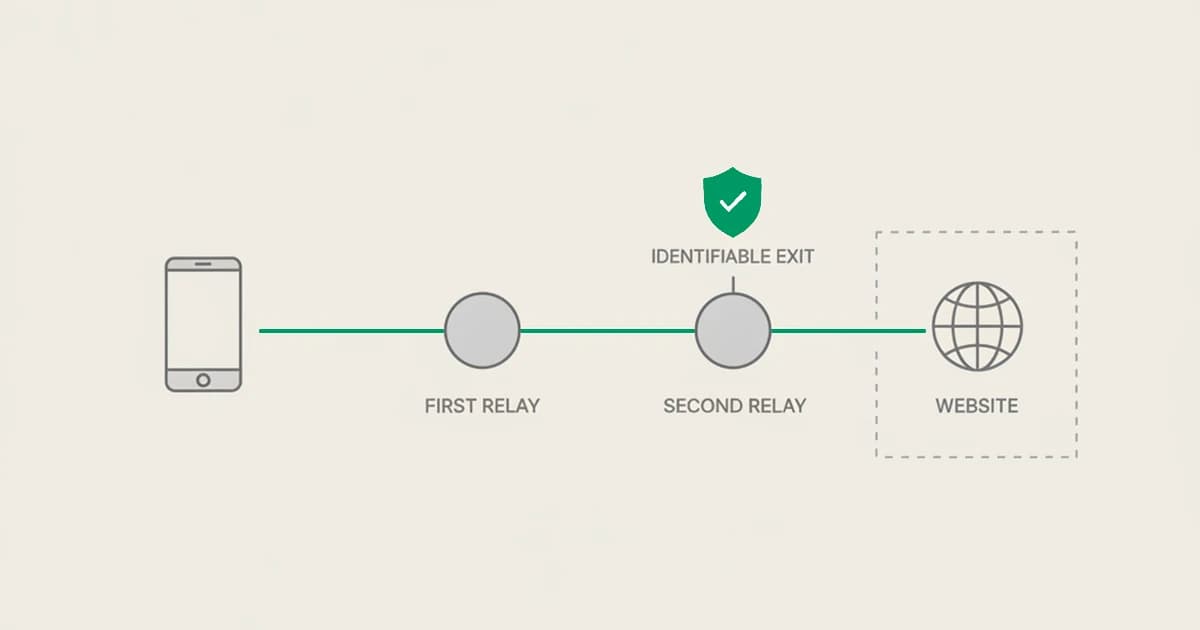
The mechanism is a two-hop relay, and the two hops are deliberately split so that no single party can see both who the user is and where they are going.
- First hop, run by Apple. The user's device makes an encrypted connection to a relay operated by Apple. This first relay can see the user's real IP address, because the connection comes straight from the device, but it cannot see which website the user is visiting. Apple knows who you are but not where you are going.
- Second hop, run by a third-party partner. From the Apple relay, the traffic passes to a second relay operated by a separate company. Apple's partners here have included Cloudflare, Fastly, and Akamai. This second relay can see the destination website but not the user's identity or real IP, and it is the relay that assigns the temporary representative IP the destination site actually sees.
Splitting the two hops between two operators is the core of the design. Neither relay alone holds the full picture, so neither Apple nor the partner can build a profile linking a person to their browsing.
Two properties of this routing matter more than anything else for detection. First, Private Relay is Safari-only for web browsing. Traffic from Chrome, Firefox, and other third-party browsers does not route through it, so a Private Relay IP is, by construction, a Safari session. Second, the representative IP preserves coarse geography. It maps to the user's real country and, depending on their setting, roughly their city or a broader region. Apple exposes two options: "Maintain general location," which keeps the representative IP close to the user at roughly city level, and "Use country and time zone," which broadens it to a wider region while staying inside the same country. Either way the user does not leave their real country. There is no country picker and no way to surface in a different market.
iCloud Private Relay vs a VPN
On paper both hide an IP, so it is tempting to file iCloud Private Relay under "VPN" and move on. In practice they are different tools solving different problems, and the differences are exactly the ones that change a risk decision.
A commercial VPN builds a full-device tunnel. It routes traffic from every app, not just one browser, and it typically lets the user choose an exit country from a long list, which is the whole selling point of pretending to be in another market. That country-hopping is what makes a VPN useful for bypassing geo-restrictions, and it is also what makes a VPN exit worth scrutinizing in fraud terms, because the location it presents may have nothing to do with where the person actually is.
Private Relay does none of that. It covers Safari web traffic only, it offers no country selection, and Apple explicitly states it will not spoof location or bypass regional restrictions. A Private Relay user stays in their real country by design. They are not choosing an exit; they are getting IP privacy for their browsing with their geography broadly intact. In other words, a VPN user might be evading, but a Private Relay user is almost certainly not. They are a mainstream Apple customer who left a default privacy setting turned on. If you want the deeper mechanics of tunnels and masked connections, our guides on detecting VPNs in 2026 and how browser and IP masking works go further, but the headline for Private Relay is simpler: it is IP privacy without the geography games.
What iCloud Private Relay means for fraud detection
Here is the fact that should reshape how you score it. Apple publishes the full list of Private Relay egress IP ranges as a public CSV at mask-api.icloud.com/egress-ip-ranges.csv, and pushes it to the major geo-IP databases. An anonymizing VPN or proxy spends real effort staying hidden and rotating through addresses so it cannot be pinned down. Private Relay does the opposite: Apple hands the exit ranges to the ecosystem so that sites can recognize the traffic and treat it correctly. That makes a Private Relay connection precisely identifiable in a way an evasion-focused proxy is not.
Put the two facts together, published exits and preserved geography, and Private Relay stops looking like a high-risk anonymizer. You can tell it apart from a generic proxy, and you know the user is still in their real country. The population behind those IPs is mainstream Apple users, not people assembling one device to look like many.
That leads to a concrete lesson. If your system treats Private Relay like a high-risk VPN or proxy and blocks or heavily penalizes it, you are false-positiving a large and growing base of legitimate customers, and on Apple-heavy traffic that can be a meaningful slice of good users landing in your review queue for no reason. The right move is to recognize Private Relay as its own distinct, lower-risk signal and let the risk decision reflect what it actually is, rather than collapsing every masked IP into one scary bucket. This is the same discipline that separates a residential proxy from a datacenter IP in solid proxy detection for fraud prevention: the category of the masked connection is information, and flattening it throws that information away.
The honest nuance is that Private Relay is still a masked connection. You cannot see the user's real IP behind it, and a determined fraudster on an iPhone could route through it too. So it is context, not a clean bill of health, and not a reason to wave a session straight through either. It is a signal that shifts the odds, read alongside everything else you know about the visit. It is a signal, not a verdict.
How ShieldLabs reads iCloud Private Relay
ShieldLabs detects iCloud Private Relay and treats it as what it is. It classifies the connection behind each visit and surfaces Privacy Relay as its own named risk signal, distinct from VPN, proxy, Tor, datacenter, and anti-detect browser use. Rather than folding a Private Relay session into a generic proxy flag, it labels the connection precisely, which is exactly the distinction Apple's published egress ranges make possible.
Because Private Relay is a mainstream privacy feature and not an evasion tool, ShieldLabs weighs it less heavily in the risk score than a high-risk anonymizer. A Tor exit or an anti-detect browser reflects real effort to look like someone else and carries more weight; a Private Relay connection, from a user who stayed in their real country with a default Apple setting on, carries less. That difference is baked into how the connection classification feeds the score, so a Private Relay visit does not read the same as a session trying hard to hide.
Each visit returns a risk score from 0 to 100 with the named risk signals underneath it, so you see both the number and the reasons behind it. Alongside the score, ShieldLabs provides persistent identification: it recognizes the returning device even on a relayed connection, because recognition is derived from stable device and browser characteristics read through a single JavaScript snippet rather than from the IP the relay masks. The masked IP does not stop the same device from resolving to the same identifier across visits, with 99.9% identification accuracy. The connection-level network intelligence that classifies Private Relay and the device-level identification work together: one tells you how the visitor connected, the other tells you whether you have seen this device before.
ShieldLabs surfaces the signal and the score through the API and webhooks, and you choose the action for each case: a Private Relay visit is usually fine, and only occasionally worth a closer look in the context of everything else about the session. This is the model behind our proxy and VPN detection: ShieldLabs names the connection, scores the risk, and helps block fraudulent and abusive traffic.
Reading Private Relay correctly means neither blocking real Apple users nor waving every masked session through. ShieldLabs reads the device and connection through one JavaScript snippet on web traffic and recognizes a returning device with 99.9% identification accuracy, and a genuinely new device on a new connection reads as new because there is nothing yet to recognize. The same snippet also covers bot and automation detection. It names the connection behind a visit, including Private Relay, and scores it for what it actually is.
Sources
- Apple Support: About iCloud Private Relay
- Apple: iCloud Private Relay Overview (egress IP ranges and geography behavior)
- Cloudflare: iCloud Private Relay information for Cloudflare customers
Recommended
Frequently asked questions
- Is iCloud Private Relay a VPN?
- No. It is easy to confuse because both hide an IP address, but they work differently. A VPN builds a full-device tunnel and usually lets the user choose an exit country, which is what makes country-hopping and geo-bypass possible. iCloud Private Relay covers Safari web browsing only, uses a two-hop relay, offers no country selection, and keeps the user in their real country. Apple states plainly that it does not spoof location or circumvent regional restrictions. So a Private Relay user is getting IP privacy for browsing, not pretending to be somewhere else.
- Can you detect iCloud Private Relay traffic?
- Yes, and more precisely than most anonymizers. Apple publishes the full list of Private Relay egress IP ranges as a public CSV at mask-api.icloud.com/egress-ip-ranges.csv and pushes it to the major geo-IP databases. Because the exit addresses are published rather than hidden, a Private Relay connection can be identified by IP with high confidence, unlike a VPN or proxy that actively tries to stay unidentifiable. ShieldLabs classifies the connection and labels it as a distinct Privacy Relay signal.
- Should I block iCloud Private Relay?
- Usually no. Private Relay is a mainstream privacy feature switched on by ordinary Apple customers, not an evasion tool, and it keeps the user in their real country. Blocking it or scoring it like a high-risk VPN false-positives a large and growing base of legitimate users. The better approach is to recognize it as its own distinct, lower-risk signal and weigh it in context, since it is still a masked connection and therefore context rather than proof either way.
- Does iCloud Private Relay hide the user's location?
- Only coarsely. Private Relay hides the exact IP address but preserves coarse geography: the representative IP maps to the user's real country and, depending on their setting, roughly their city or a broader region. The two settings are "Maintain general location," which stays close at roughly city level, and "Use country and time zone," which broadens to a wider region in the same country. There is no way to appear in a different country, because Apple explicitly does not offer location spoofing or regional bypass.
- How does ShieldLabs handle Private Relay?
- ShieldLabs surfaces Privacy Relay as its own named risk signal, distinct from VPN, proxy, Tor, datacenter, and anti-detect browser use, and weighs it less heavily in the risk score than a high-risk anonymizer such as a Tor exit or an anti-detect browser. Each visit returns a risk score from 0 to 100 with the named signals underneath it, plus persistent identification that recognizes the returning device even on a relayed connection. ShieldLabs surfaces the signal and the score through its API and webhooks, so you can act on the result in your backend; a Private Relay visit is usually fine, recognition runs at 99.9% identification accuracy, and the free tier covers the first 5,000 identifications.
Related articles
Stop False Positives: Apple Private Relay Detection for IT & Fraud Ops
Ops guide to detecting Apple Private Relay. Learn three detection techniques, when to return NXDOMAIN, and fraud safe rules for teams.

15 best VPN and proxy detection tools for fraud prevention in 2026
Compare the best VPN and proxy detection tools for fraud prevention in 2026: what each detects, residential-proxy coverage, pricing, and how to choose.
6 Step Datacenter Proxy Detection Workflow for Fraud Teams
Practical production guide for fraud teams: detect datacenter proxies by pairing ASN, rDNS, device/TLS telemetry and IP population signals.