

What is canvas fingerprinting? How it works and why it is so stable

Last updated on June 15, 2026 · 9 min read
Canvas fingerprinting is used to identify website users and is part of a broader set of browser fingerprinting techniques. A script asks the browser to render text and graphics to an off-screen HTML canvas, then reads the pixels back and hashes them. Because the result depends on the browser along with the GPU, graphics driver, operating system, and installed fonts, two browsers rarely produce the same hash, which makes it a stable way to recognize the same browser again.
Canvas is one of the most asked-about browser fingerprinting techniques, partly because it is easy to demonstrate and partly because it keeps working after cookies are cleared. This guide explains what canvas fingerprinting is, how it works step by step, what it reveals, how unique and stable it is, and where it fits in fraud detection.
Key takeaways
- Canvas fingerprinting reads how a browser renders a hidden image and turns the result into a hash. The same browser produces the same hash, a different browser usually does not.
- It is stable because it reflects the real browser, graphics hardware, and software underneath, which a user cannot easily change, and it survives cleared cookies and incognito mode.
- No single canvas hash is unique on its own. Its value comes from combining it with other browser fingerprinting techniques into one identifier.
- For fraud detection, canvas is one signal among many. It helps recognize a returning visitor, and randomized or noise-injected canvas readings are themselves a sign that something is hiding.
How canvas fingerprinting works
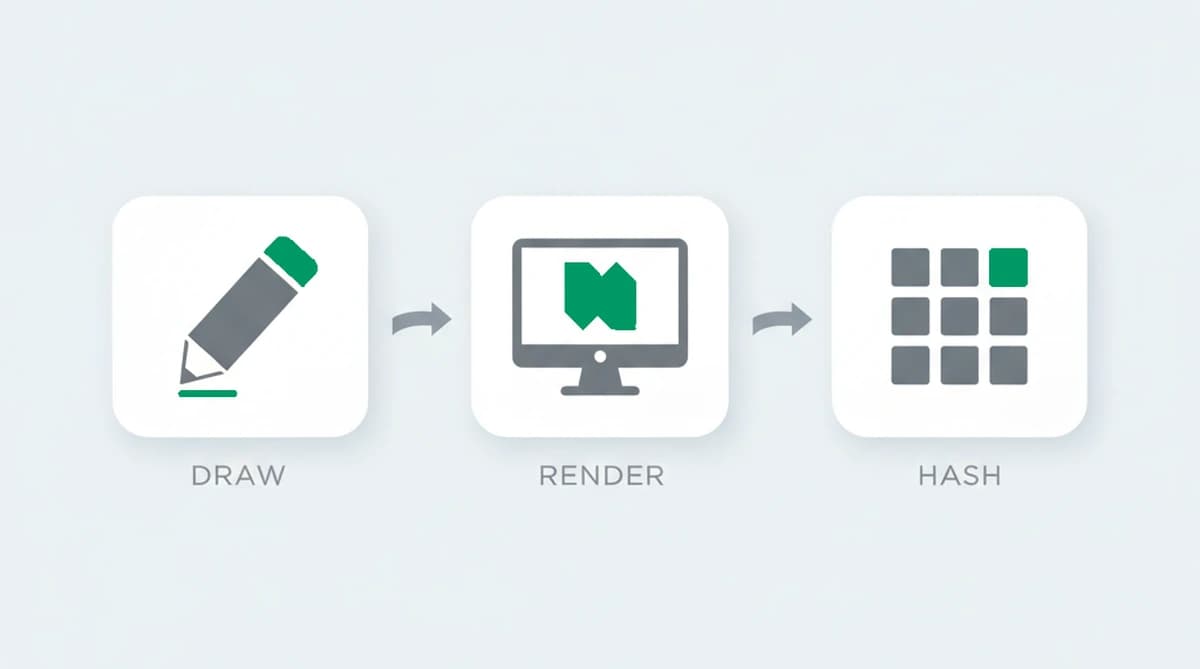
Canvas fingerprinting works in three steps, and the whole process runs in the background in milliseconds without any permission prompt. The user never sees the image, because it is drawn off-screen and never displayed.
- Draw. A script uses the HTML canvas API to draw text and shapes to a hidden canvas, often a line of text in a specific font over a colored or gradient background.
- Render. The browser renders that drawing. The GPU, the graphics driver, the operating system, and the font rasterizer all influence the exact pixels produced, down to the anti-aliasing at the edges of each letter.
- Hash. The script reads the pixel data back and runs it through a hash function. The output is a compact value, the canvas fingerprint, that stays the same in that browser and differs in browsers with a different rendering stack.
The detail that makes this work is that the drawing instructions are identical for everyone, so any difference in the output comes from the browser and the device it runs on, not the request. The same instructions sent to a thousand browsers return many different hashes.
We tested the same drawing instructions across a range of browsers and devices and got the result the technique predicts: many different hashes from one identical script, each stable for its own browser across repeat sessions. The output tracks the GPU, driver, and font stack underneath, not anything about the request. The method itself is not new; researchers first described canvas fingerprinting in HTML5 around 2012, two years before it was found running at scale on the open web.
What a canvas fingerprint reveals
A canvas fingerprint does not reveal personal information like a name or location. What it reflects is the combination of browser, hardware, and software that renders graphics:
- The GPU and graphics driver, which decide how shapes, gradients, and curves are turned into pixels.
- The operating system and its version, which affect font rendering and anti-aliasing.
- The installed fonts, since the chosen font, or its fallback when missing, changes the shape of the rendered text.
- The browser and its rendering settings, which influence how the canvas instructions are carried out.
None of these is identifying on its own. Many people run the same phone model with the same browser, so they share a similar canvas hash. The point is not that the hash names a person, but that it is consistent for one browser over time and different enough from most others to help tell browsers apart.
| Property | Canvas fingerprinting |
|---|---|
| What it reads | How a browser renders a hidden off-screen image, hashed into a value |
| Why it differs between browsers | The browser, GPU, graphics driver, operating system, and installed fonts shape the exact pixels |
| Does it survive clearing cookies? | Yes, it reflects the browser, hardware, and software underneath and survives cleared cookies and incognito mode |
| Main limitation | Not unique on its own, since browsers of the same model and version render alike, so it works only combined with other browser fingerprinting techniques |
How unique and stable is a canvas fingerprint?
A canvas fingerprint is moderately unique and quite stable, which is exactly the combination that makes it useful. On its own it does not single out one browser in a million, but it carries enough distinguishing detail to narrow the field of possible browsers, and it stays the same across sessions because the underlying browser and hardware do not change between visits.
Canvas fingerprinting is also widespread enough to be well studied. It was first documented at scale in 2014, in research published in the ACM Conference on Computer and Communications Security proceedings that found it running on thousands of popular websites, and a 2025 measurement published in the Internet Measurement Conference proceedings found that around 12.7 percent of the top 20,000 websites used it, with a slightly lower share on less popular sites. It is not a fringe technique; it is a common part of how the modern web recognizes returning browsers.
Stability has limits. A driver update, an operating system upgrade, or a new browser version can shift the hash, so a system that relies on canvas does not expect a permanent exact match. It treats the canvas value as one of several signals and tolerates small changes, which is also why canvas is rarely used alone.
Canvas fingerprinting in fraud detection
Canvas fingerprinting has two very different uses, and they are worth keeping separate. Advertisers and analytics networks use it to track people across sites for profiling, which is the privacy concern attached to the technique. Security and fraud detection use it for the opposite reason: to recognize that a returning browser is the same one, so a service can spot a single actor opening many accounts, which ShieldLabs detects as Multi-accounting, or coming back after a ban.
For fraud detection, canvas is one contributing signal, not a verdict. It helps link activity to a browser even when the cookies are cleared and the email is new, which is the exact reset that abuse relies on. Cookie-based defenses have kept advancing, and CookieGuard, a 2025 study at the Internet Measurement Conference of Safari's Intelligent Tracking Prevention and Firefox's Total Cookie Protection, is part of that push, yet a canvas fingerprint sits outside its reach because it stores nothing in the browser to clear. On its own a canvas hash proves little, but combined with the other techniques in a browser fingerprint and with network signals, it raises or lowers confidence that two visits came from the same place. A defender uses it to inform a risk score the customer acts on.
Can canvas fingerprinting be blocked?
Canvas fingerprinting can be resisted but not cleanly blocked, and the way it is resisted creates its own signal. Privacy browsers and extensions take one of two approaches: they refuse the canvas read, or they add random noise to the pixels so the hash changes on every read. Both reduce tracking, and for a privacy-minded user that is the goal.
For a fraud detection system, those countermeasures are informative rather than defeating. A canvas reading that changes on every single load is not what a normal browser does, so the randomization is itself a flag that something is being hidden. An anti-detect browser tries to present a clean, consistent fake canvas instead, but keeping that fake value consistent with the GPU, the fonts, and the rest of the fingerprint across every visit is hard, and the signals can contradict each other. This is the recurring theme in fingerprinting: covering a technique tends to leave a different trace.
Recognizing returning visitors with ShieldLabs
ShieldLabs combines device and browser signals through one JavaScript snippet, so no single signal is read in isolation. This is the foundation of a stable device identifier that recognizes a returning visitor after cleared cookies and a rotated IP, and the identifier is derived from the whole combination rather than any single signal.
Each visit returns a risk score from 0 to 100 with the named risk signals and the Details behind the score. That includes the risk signals and the contradictions that arise between what a visitor presents and the underlying signals. Because the read happens in the background from data the browser already exposes, it adds no friction for a real visitor, and you act on the risk score and named risk signals through the API and webhooks and choose the action for each case.
Sources
- Luo et al. (University of California San Diego): Characterizing Canvas Fingerprinting Use Across the Web (IMC, 2025)
- Acar et al.: The Web Never Forgets: Persistent Tracking Mechanisms in the Wild (ACM CCS, 2014)
- Nikkhah Bahrami, Fass, et al.: CookieGuard, a study of Safari ITP and Firefox Total Cookie Protection (IMC, 2025)
- Wikipedia: Canvas fingerprinting
- MDN Web Docs: Canvas API
Frequently asked questions
- How does canvas fingerprinting work?
- A script asks the browser to draw a hidden image, usually text over a background, to an off-screen HTML canvas. The browser renders it, and the GPU or software rasterizer, drivers, operating system, and fonts underneath all introduce tiny variations. The script then reads the pixels back and hashes them into a value that stays the same in that browser.
- What is a canvas fingerprint?
- A canvas fingerprint is the hash produced when a browser renders a hidden canvas image. It reflects the graphics hardware and software underneath rather than any personal data, and it is consistent for one browser over time. Combined with other browser fingerprinting techniques, it helps recognize the same browser on a later visit without a cookie.
- How accurate is canvas fingerprinting on its own?
- Canvas is moderately accurate but not unique by itself, because many browsers of the same model and version render alike. Its real value comes from combining it with other browser fingerprinting techniques. A single canvas hash narrows the field; the full combination is what reliably tells one browser from another.
- Can canvas fingerprinting be blocked?
- It can be resisted but not perfectly. Privacy browsers and extensions block the read or add noise so the hash changes each time. That helps against tracking, but for fraud detection a value that randomizes on every load is itself a sign that something is being hidden, so the countermeasure becomes a signal of its own.
- How does ShieldLabs use device and browser signals?
- ShieldLabs reads device and browser signals as one of many inputs, never on its own. It feeds persistent identification and a risk score from 0 to 100 with the named risk signals and the Details behind the score, including the contradictions between what a visitor presents and the underlying signals. You act on the result in your backend, and the free tier covers your first 5,000 identifications.
Related articles
Fingerprinting vs Cookies: Key Differences for Fraud Teams
How cookies differ from server-side fingerprinting, why many cookieless claims mislead, and practical steps for developers and fraud teams.

What was Google's Privacy Sandbox, and why did it end in 2025?
Google retired the Privacy Sandbox in October 2025 and third-party cookies are staying in Chrome. What it was, why it ended, and what it means for fraud.

How to detect anti-fingerprint browsers (2026)
Anti-fingerprint browsers spoof canvas, WebGL, fonts, and TLS to break recognition. How to detect them in 2026, and the tells they leave behind.