

What is audio fingerprinting? The browser technique, explained

Last updated on June 29, 2026 · 8 min read
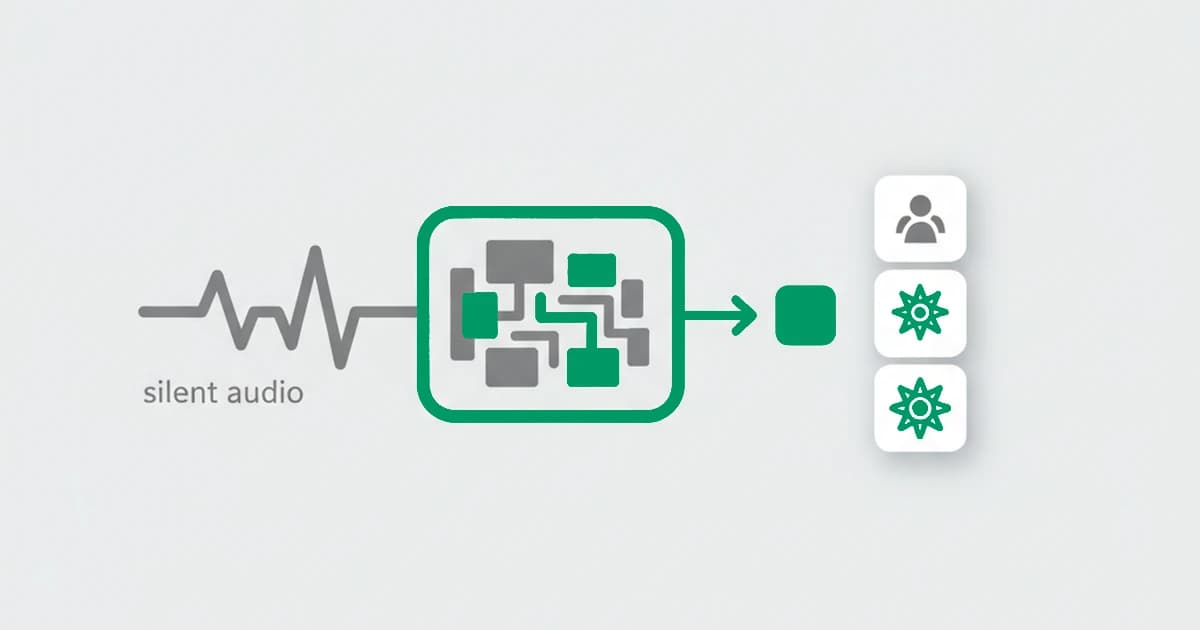
Audio fingerprinting, in the browser sense, is a technique that identifies a device by how it processes a sound signal. A script uses the Web Audio API to generate a tone, runs it through the device's audio stack, and measures the output. Tiny differences in the hardware and software produce a stable value that differs between devices, all without playing anything out loud or asking permission.
This is a different thing from the acoustic or music fingerprinting that powers song-recognition apps, which listens to real sound to match a recording against a library. Browser audio fingerprinting never listens to anything. It generates a signal internally and reads how the device renders it. This distinction is the first thing worth getting straight, because the two share a name and almost nothing else. This guide covers the browser technique: how it works, what it reveals, and where it fits in fraud detection. It is one of the browser fingerprinting techniques a site reads together.
Key takeaways
- Browser audio fingerprinting uses the Web Audio API to generate and process a signal internally, then reads the result. It does not record or listen to any real sound.
- It is stable because the output reflects the real audio hardware and software stack, which does not change between visits, and it works with no permission prompt.
- It is not the same as acoustic or music fingerprinting, which matches recorded sound against a database. The two only share a name.
- For fraud detection, audio is one signal among many in a device fingerprint, useful for recognizing a returning device rather than identifying a person.
Audio fingerprinting vs music recognition
The term audio fingerprinting covers two unrelated techniques, and search results mix them, so it is worth separating them first.
- Music or acoustic fingerprinting listens to real audio, a song playing nearby, and condenses it into a signature that is matched against a database. This is what apps like song-recognition tools use, and it is built to survive noise and compression.
- Browser audio fingerprinting never listens to anything. A script generates a signal inside the browser, processes it through the device's audio stack, and reads how that specific device rendered it. The goal is not to recognize a sound but to recognize a device.
The rest of this guide is about the second one, the browser technique used for device recognition and fraud detection.
How browser audio fingerprinting works
Browser audio fingerprinting works by asking the device to process a known signal and then measuring the exact result. It runs silently in the background and needs no permission, because it never accesses a microphone.
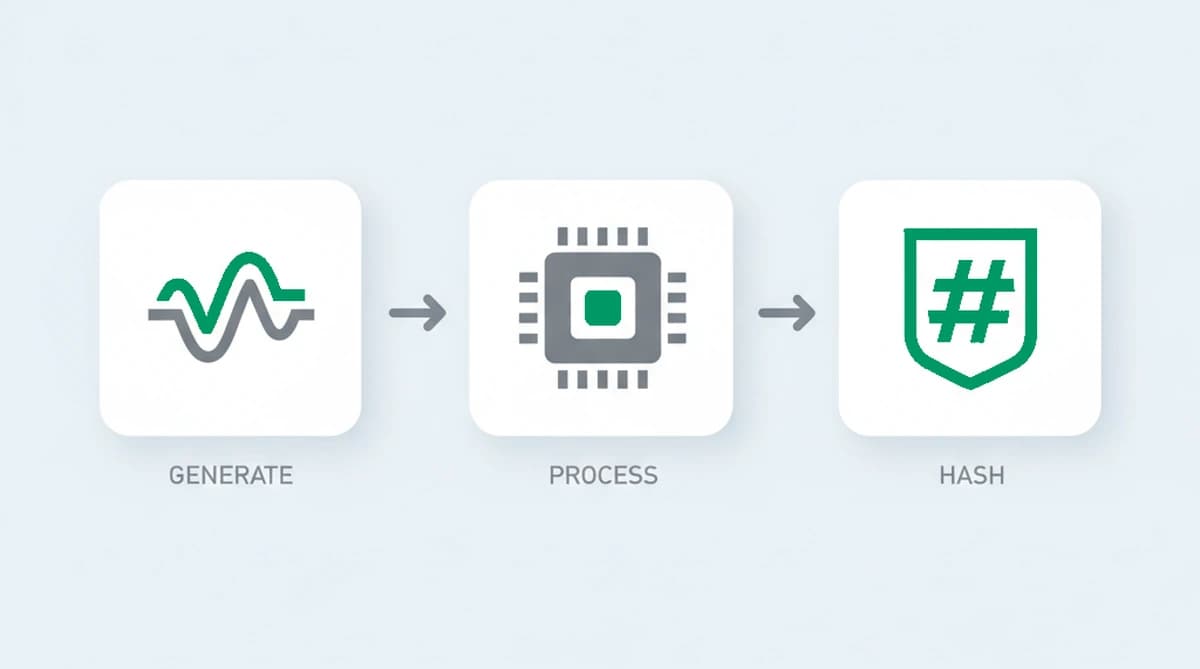
- Generate. A script uses the Web Audio API to create a sound signal, typically with an oscillator that produces a steady tone. The audio is never sent to the speakers.
- Process. The signal is passed through audio nodes, such as a compressor, that transform it. The exact math depends on the device's audio stack, its processor, and the browser's audio implementation.
- Read and hash. The script reads the processed waveform back as numbers and condenses them into a value. Because each device processes the signal slightly differently, the value is consistent on that device and differs on others.
The reason it works is the same as for the other rendering techniques: the instructions are identical for everyone, so any variation in the output comes from the device rather than the request.
What an audio fingerprint reveals
An audio fingerprint does not reveal sound, speech, or personal data. It reflects the parts of the device that shape how the signal is processed:
- The audio stack and processor, which perform the floating-point math on the waveform.
- The browser's audio implementation, since different browsers and versions process the signal in slightly different ways.
- The operating system and platform, which influence the audio pipeline underneath.
None of this names a person, and many devices of the same model and browser share a similar audio value. Its use is comparative: it adds distinguishing detail to a device fingerprint and stays consistent for one device over time.
| Property | Browser audio fingerprinting |
|---|---|
| What it reads | How a device processes a signal generated internally with the Web Audio API, read back and condensed into a value |
| Why it differs between devices | The audio stack and processor, the browser's audio implementation, and the operating system shape the processed waveform |
| Does it survive clearing cookies? | Yes, the audio stack does not change between sessions, so it survives cleared cookies and incognito mode |
| Main limitation | Only moderately distinctive, since values cluster heavily by device model and browser, so it adds distinguishing detail rather than standing alone |
How unique and stable is an audio fingerprint?
An audio fingerprint is fairly stable but only moderately distinctive, which is why it is used as a contributing signal rather than an identifier on its own. The output stays the same across visits because the audio stack does not change between sessions, and it survives cleared cookies and incognito mode the same way the other rendering techniques do.
Where it is weaker is uniqueness. Audio values cluster heavily by device model and browser, so on their own they separate far fewer devices than a full fingerprint can. Audio fingerprinting was first documented at scale in a 2016 measurement of the top million sites, published in the ACM Conference on Computer and Communications Security proceedings, when researchers found scripts using the Web Audio API to fingerprint visitors. It remains part of the live toolkit: a 2025 study at the same conference, Same Script, Different Behavior, traced scripts across the top 10,000 sites and found that 76 percent of the Web API calls that behaved differently across devices ran through known fingerprinting APIs, the Web Audio interface among them. Since then it has been a steady, if minor, member of the fingerprinting toolkit, valuable mostly for the distinguishing detail it adds rather than for any standalone power.
Audio fingerprinting in fraud detection
For fraud detection, an audio fingerprint is one of the signals that helps recognize a returning device. It cannot prove who someone is, but combined with the other techniques in a browser fingerprint, it raises or lowers confidence that two visits came from the same device, even after the cookies are cleared and the email is new.
Its role is small but real. Because it reflects the audio stack rather than anything the user can edit, it is hard to fake on its own, and a value that disagrees with the rest of the fingerprint, or that changes on every read, is a hint that something is being hidden. A defender treats it as one input to a risk score, not as a verdict.
Devices that inject noise to defeat this read gave themselves away in our own tests: we measured the oscillator output across sessions, and a genuine audio stack returned an identical value on each read within one session, while a noise injector returned a slightly different one, so the instability itself becomes the signal. Audio has been a measured fingerprinting surface since researchers profiled the top million sites in 2016, and the same stability that made it work then is exactly what exposes a randomized reading now.
Can audio fingerprinting be blocked?
Audio fingerprinting can be resisted but not cleanly blocked. Privacy browsers and extensions add small amounts of noise to the audio output, so the value changes on each read, or they block the scripts that perform the read. Firefox offers an anti-fingerprinting mode that covers audio among other surfaces.
For a fraud detection system, the countermeasure tends to leave a trace of its own. An audio value that is randomized on every single read is not what an ordinary device produces, so the randomization itself becomes a signal. As with the rest of fingerprinting, covering one technique cleanly while keeping the whole picture consistent is the hard part.
Recognizing returning visitors with ShieldLabs
ShieldLabs reads device and browser signals as one of many inputs in a single fingerprint, never on its own. It contributes a little distinguishing detail to a stable device identifier that recognizes a returning visitor after cleared cookies and a rotated IP, derived from the whole combination rather than any single value.
Each visit returns a risk score from 0 to 100 with the named signals behind it, including the risk signals and the contradictions that surface when what a visitor presents does not fit the underlying device signals. Because the read happens in the background from data the browser already exposes, it adds no friction for a real visitor, and you act on the score through the API and webhooks and choose the action for each case.
Sources
- Englehardt, Narayanan: Online Tracking: A 1-million-site Measurement and Analysis (ACM CCS, 2016)
- Zafar, Su, Datta, Kapravelos, Das: Same Script, Different Behavior: Characterizing Divergent JavaScript Execution Across Different Device Platforms (ACM CCS, 2025)
- MDN Web Docs: Web Audio API
- Wikipedia: Device fingerprint
Frequently asked questions
- How does browser audio fingerprinting work?
- A script uses the Web Audio API to generate a tone, usually with an oscillator, and passes it through processing nodes such as a compressor. The device's audio stack and processor shape the result in tiny ways. The script then reads the processed waveform back and hashes it into a value that stays the same on that device.
- Is audio fingerprinting the same as music recognition?
- No. Music or acoustic fingerprinting listens to real sound and matches it against a database of recordings. Browser audio fingerprinting never listens to anything. It generates a signal internally and measures how the device processes it, to recognize the device rather than to recognize a song. The two only share a name.
- Does audio fingerprinting need microphone permission?
- No. Browser audio fingerprinting does not use the microphone and asks for no permission. It generates and processes the signal entirely inside the browser using the Web Audio API, and nothing is recorded or played out loud, which is part of why the technique runs silently in the background.
- Can audio fingerprinting be blocked?
- It can be resisted but not perfectly. Privacy browsers and extensions add noise so the value changes on each read, or block the scripts entirely. For fraud detection, a value that randomizes on every read is itself a sign that something is being hidden, so the countermeasure becomes a signal of its own rather than a clean block.
- How does ShieldLabs use device and browser signals?
- ShieldLabs reads device and browser signals as one of many inputs, never alone. It adds distinguishing detail through persistent identification and feeds a risk score from 0 to 100 with the signals behind it, including contradictions between what a visitor presents and the underlying signals. You act on the result in your backend, and the free tier covers your first 5,000 identifications.
Related articles
Fingerprinting vs Cookies: Key Differences for Fraud Teams
How cookies differ from server-side fingerprinting, why many cookieless claims mislead, and practical steps for developers and fraud teams.

What was Google's Privacy Sandbox, and why did it end in 2025?
Google retired the Privacy Sandbox in October 2025 and third-party cookies are staying in Chrome. What it was, why it ended, and what it means for fraud.

How to detect anti-fingerprint browsers (2026)
Anti-fingerprint browsers spoof canvas, WebGL, fonts, and TLS to break recognition. How to detect them in 2026, and the tells they leave behind.